The Best Ecommerce Platforms, Judged by a Performance Marketer
A performance marketer's view of platform choice, scored on tracking, product feeds, page speed and customization instead of themes and pricing tiers. Shopify Plus, BigCommerce and…
The best ecommerce platform is the one that does not fight you when you are tracking a conversion, syncing a product feed or trying to load a product page in under two seconds. Themes and pricing tiers are the easy part of the decision. For a performance marketer, Shopify Plus, BigCommerce and headless setups each carry real trade-offs that only show up once there is ad spend behind the store.
Most platform comparisons are written by people who have never had to debug a dead pixel at 11pm during a Black Friday sale. I have spent eight years running paid media and SEO across Shopify, BigCommerce and a handful of headless builds, and the platform decision reaches my work in exactly four places: tracking, product feeds, page speed and how far I can customize before I need a developer. So those are the four things this article scores. If you want theme galleries and app-store counts, there are a thousand other posts for that.
Why “best ecommerce platform” means something different to a performance marketer
Standard platform roundups are written from the store owner’s chair. They compare monthly fees, drag-and-drop editors, checkout customization and how many themes you can pick from. Useful if you are launching your first store. Useless if you are about to put 40,000 euros a month of media spend through it, because none of it tells you whether a Conversions API event will fire with the right match keys, or whether your feed will get 40% of its variants disapproved in Google Merchant Center.
So, what is the best ecommerce platform for paid advertising and SEO? It depends on your scale and your tracking maturity, which is the honest answer. For most DTC brands between 1 and 20 million in annual revenue, Shopify or Shopify Plus with a proper server-side tracking layer is the highest-performing stack I see, mostly because the ecosystem removes friction everywhere else. BigCommerce and headless builds win on raw speed and on customization ceiling, and they charge for it in engineering hours. That is the filter I apply when a prospective client asks whether they should switch platforms, and more often than not the answer is that their platform is not the problem.
Criterion 1: tracking and server-side capability
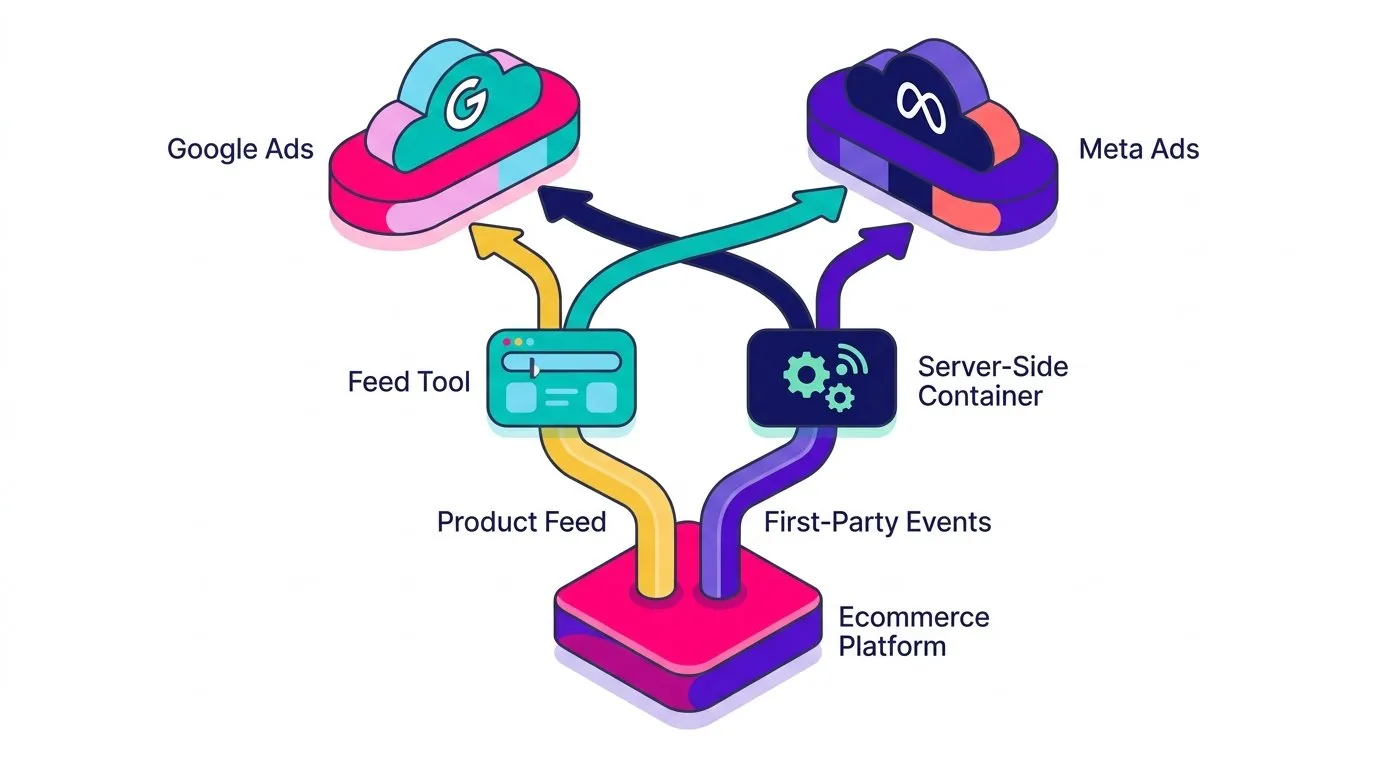
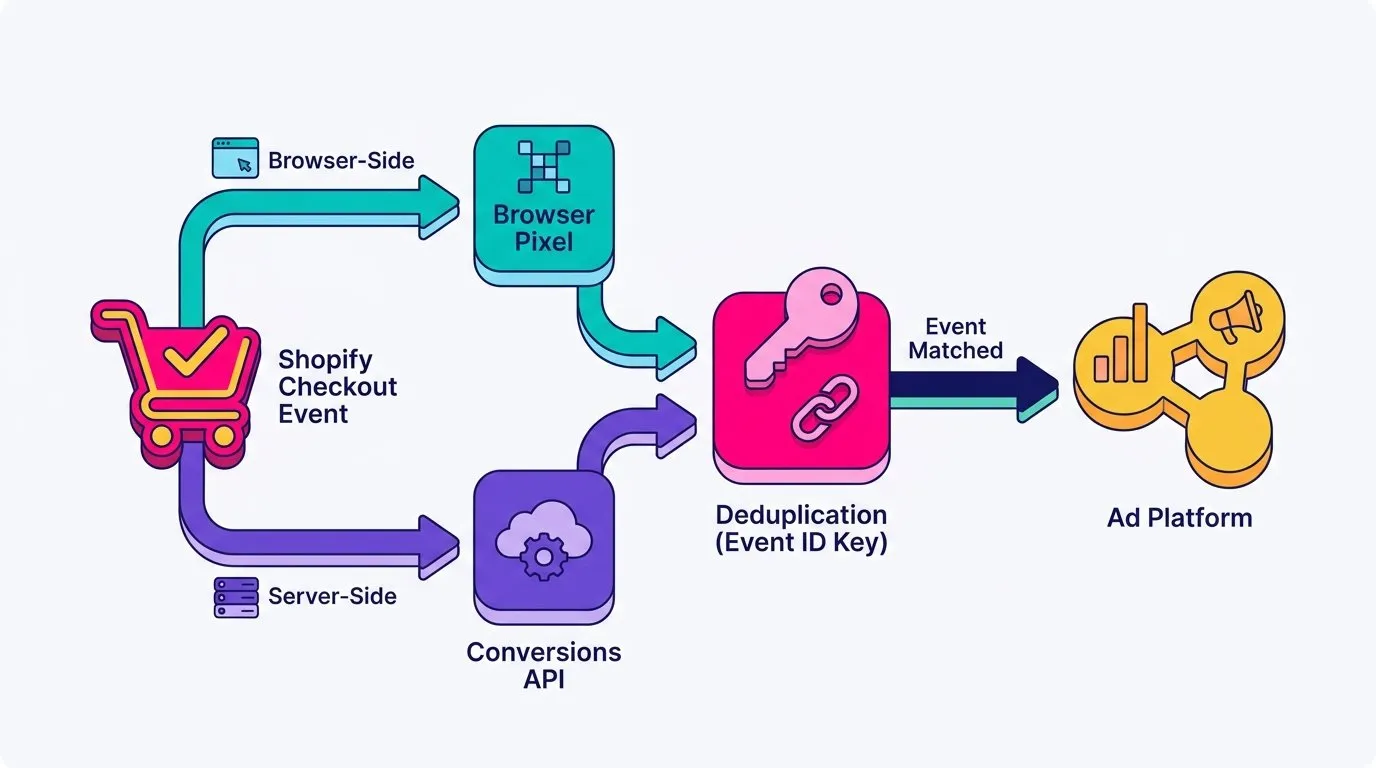
Browser-side tracking has been degrading for years. Apple’s App Tracking Transparency prompt in iOS 14.5 started it, ad blockers and Safari’s cookie restrictions continued it, and consent banners finished the job in Europe. Server-side tracking is the patch. Instead of relying on a script in the user’s browser to report the purchase, your server sends the event directly to the ad platform through an API, with hashed first-party identifiers attached. Meta calls it the Conversions API, Google handles the equivalent through Enhanced Conversions and the Data Manager API.
Native support varies a lot. Shopify ships first-party integrations for both Meta and Google that already push server-side events, which is genuinely a head start, and it supports Google Tag Manager server-side containers through tools like Stape without much drama. BigCommerce gets you there too, but the setup is more manual and you will be writing more of the plumbing yourself. Headless gives you total control and zero scaffolding: every event, every identifier, every deduplication rule is something your team decides and builds.
Here is where it gets less comfortable. Shopify’s native integrations are good, not complete. I regularly see duplicate purchases when a browser pixel and a server event both report without a shared event ID, delayed events on checkout extensibility setups, and thin customer match keys that drag Meta’s event match quality score down into the low 5s when it should sit above 7. Those are not cosmetic problems: match quality feeds attribution and bidding, so a weak signal quietly makes your ecommerce conversion tracking look worse than your actual performance. Patching it usually means middleware and a tighter grip on your first-party data strategy, not a new app.
Think of browser-side and server-side as rhythm and lead guitar. One of them alone is not a song. Run both, deduplicate properly, and the mix holds together.
Criterion 2: feed management for Google Merchant Center and Meta Catalog
A product feed exists on every platform. Whether it is a good feed is a different question, and Shopping campaigns live or die on it. Google’s product data specification wants GTINs, correct variant grouping, availability, pricing that matches the landing page to the cent, and category mapping. Miss those and you do not get a penalty notification, you get silence: items disapproved, campaigns underspending, and a Shopping account that looks fine at a glance.
Native tools are fine at small scale. Shopify’s Google & YouTube channel handles a few hundred SKUs in one market and one currency without complaint, and the same goes for the Meta integration. The ceiling appears when you add markets. Multi-currency pricing, localized titles, country-specific availability, custom labels for margin tiers or seasonal collections: that is the point where native apps start to feel like a form with too few fields. We usually move clients to a dedicated feed layer such as DataFeedWatch at that stage, because rules like “append material to the title for all apparel items where the title is under 60 characters” are not something you want to solve with manual product edits in the admin.
The recurring failure I see is not exotic. It is GTIN mismatches on apparel variants, missing size and color attributes so Google cannot group a product correctly, and a title structure copied straight from the storefront where it was written for a human browsing a collection page, not for a query match. Fixing feed structure is usually the cheapest performance win available in an account, which is why I treat it as a platform criterion rather than a campaign task. If you want the practical version of this, start with the Google Merchant Center and Shopify setup, then apply the same logic to your Meta catalog ads, because the catalog is the creative in Advantage+ shopping campaigns.
Criterion 3: page speed and Core Web Vitals out of the box
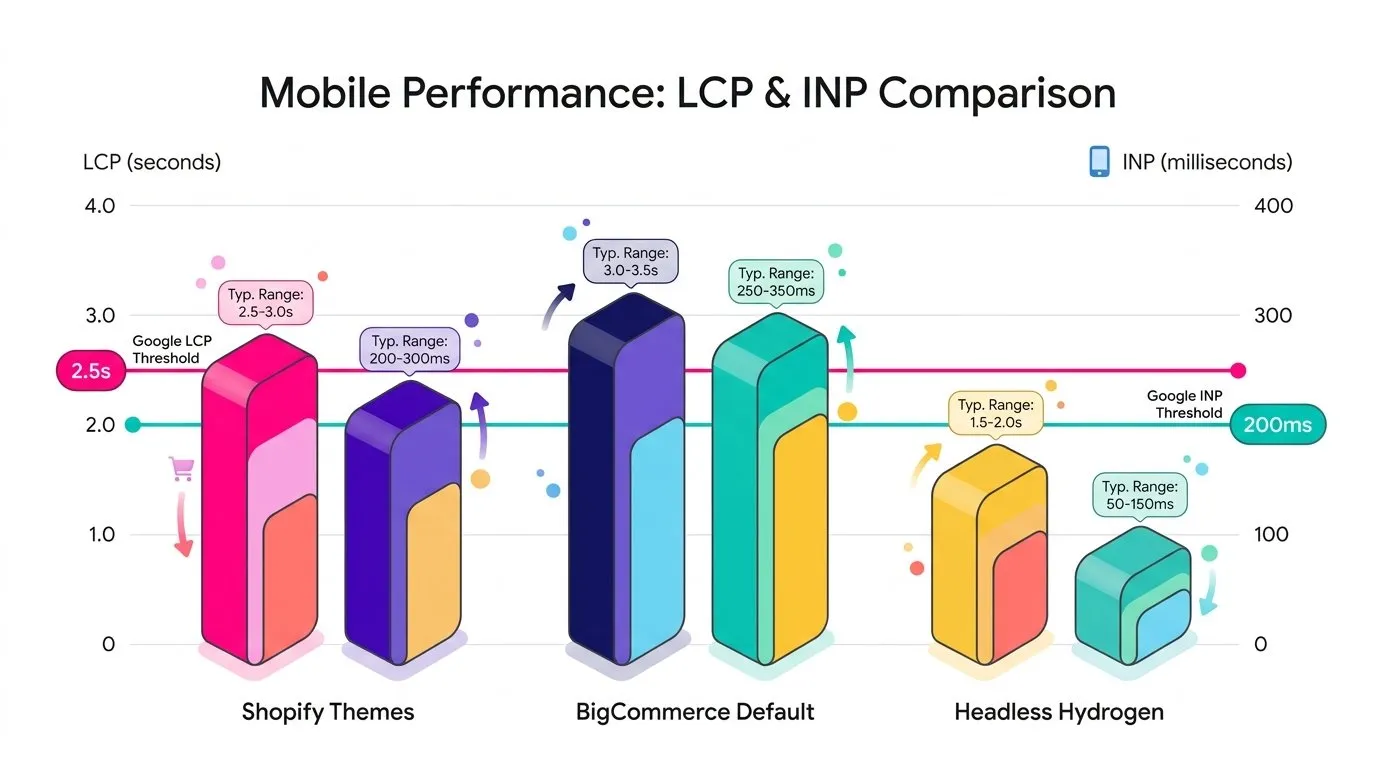
Speed is usually discussed as an SEO topic, and it is one. Google’s Core Web Vitals thresholds ask for Largest Contentful Paint (LCP) under 2.5 seconds and Interaction to Next Paint (INP) under 200 milliseconds at the 75th percentile. What gets forgotten is the paid side. Landing page experience is a component of Google Ads Quality Score, and Quality Score moves your effective cost per click. A slow product template does not announce itself in the Google Ads interface. It shows up as CPCs that are 20% higher than they should be, and you spend weeks blaming auction competition.
By platform type, the pattern is consistent in the audits I run. Shopify stores are rarely slow because of Shopify: they are slow because of the theme and the eight apps injecting scripts into every page, and mobile LCP tends to drift between 2.5 and 4.5 seconds in that state. BigCommerce defaults are leaner out of the box, with fewer third-party scripts by habit rather than by architecture. Headless storefronts on Hydrogen or Next.js have the best achievable ceiling, comfortably under 2 seconds on mobile when built well, and they get there only with real engineering attention. A badly built headless store is slower than a decent Shopify theme, which surprises people.
I have watched a single oversized hero image on a product template inflate CPCs across an entire Shopping campaign before anyone connected the two. Screaming Frog and PageSpeed Insights, the standard starting point for diagnosing why a page is losing visibility, found it in twenty minutes. If technical performance is on your list this quarter, the ecommerce SEO guide covers the organic half of the same work.
Criterion 4: the customization ceiling
Shopify’s model is app dependency. Something is missing, you install an app, it costs 29 dollars a month and it works on Monday. That speed is the reason the platform dominates the mid-market, and the invoice adds up: fifteen apps, fifteen scripts, fifteen vendors with access to your store. BigCommerce leans API-first, so more of the gaps get closed by your own code against documented endpoints. Headless hands you everything and holds you responsible for everything, including the parts Shopify was silently doing for you.
When native tools stop, we build. Ongoing PPC campaign management often means Google Ads scripts that pause campaigns when a feed’s disapproval rate crosses a threshold, scripts that flag products that have gone out of stock while still absorbing spend, feed middleware that reshapes variant data before it reaches Merchant Center, Google Data Studio dashboards that reconcile platform orders against ad platform conversions so nobody argues about which number is real. None of that is glamorous and all of it is cheaper than the media waste it prevents.
The trade-off is worth saying plainly: a higher customization ceiling means a deeper engineering dependency. On Shopify I can ship a tracking fix in an afternoon. On a custom headless build I file a ticket and wait for the next sprint. Neither is wrong, they are just different costs, and the right answer depends on whether you have a developer who answers Slack messages.
How we judge ecommerce platforms at Midsummer Agency
When a client asks us to weigh in on a platform decision, we do not start from a feature matrix. We run four checks: can we get clean server-side events with strong match keys, can we shape the feed without manual product editing, does the product template pass Core Web Vitals on mobile, and what breaks if we need something the platform does not offer natively. Four answers, one recommendation.
That audit uses the same tools we run day to day: GA4 and server-side GTM for the measurement layer, Microsoft Clarity for behavioral evidence on the templates, Screaming Frog for the technical crawl, Merchant Center diagnostics for the feed. The output is usually a list of fixes on the current platform rather than a migration plan, because a platform is rarely the bottleneck people assume it is.
Platform-by-platform scorecard for performance marketers
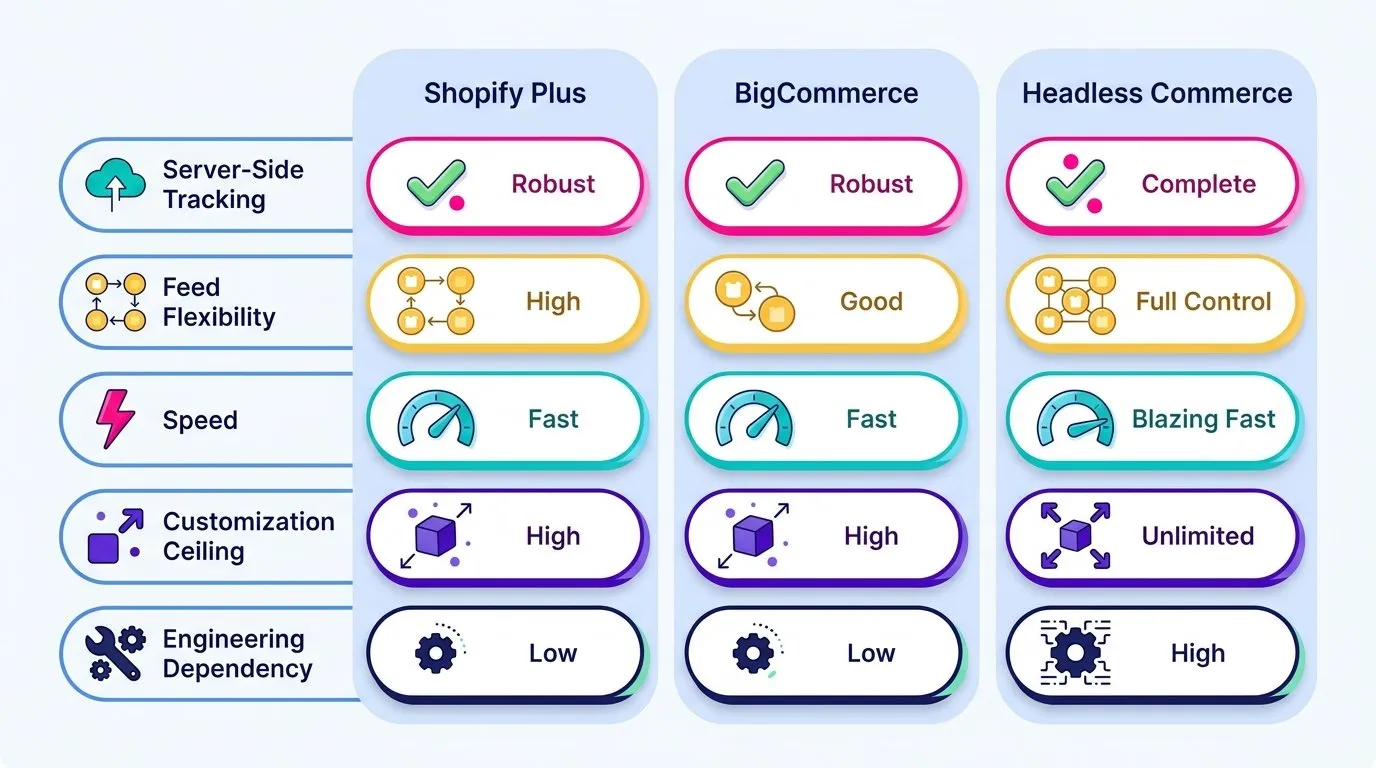
Shopify and Shopify Plus. Best ecosystem by a wide margin, with native Conversions API support that covers 80% of what you need and leaves the deduplication and match-key work to you. Feed tools are solid up to a few hundred SKUs in one market. Speed depends almost entirely on theme and app discipline. Customization is moderate, and Plus mainly buys you checkout control, higher API limits and Shopify Functions. The honest weak point is data granularity, which is why ecommerce attribution work on Shopify almost always needs a layer the platform does not provide.
BigCommerce. More open APIs, less app dependency, leaner default front end. The smaller ecosystem is the real cost: fewer plug-and-play tracking and feed integrations, so your agency or developer does more of the setup. If you have in-house technical capacity, that is a fair trade. If you do not, it is friction you will feel every time a platform releases a new tag format.
Headless (Shopify Hydrogen, commercetools and similar). The highest ceiling on speed and customization, and nothing is handed to you. Tracking, feeds, consent, structured data: all built, all maintained. Worth it when your catalog, markets or front-end requirements genuinely exceed what a templated storefront can do, and expensive when they do not.
Criterion
Shopify / Plus
BigCommerce
Headless
Server-side tracking
Good, gaps to patch
Workable, manual setup
Full control, nothing native
Feed flexibility
Fine to mid catalogs
Good via API
Built from scratch
Speed out of the box
Theme dependent
Lean default
Best ceiling, needs work
Customization ceiling
Moderate (higher on Plus)
High
Unlimited
Engineering dependency
Low
Medium
High
So which platform should you actually choose?
Between 1 and 5 million in revenue, Shopify with a properly configured tracking layer and a clean feed will do everything you need, and the money you would spend on a migration buys more growth inside the ad accounts. Between 5 and 20 million, the ceilings start to press: multi-market feeds, custom pricing logic, theme performance under a heavier app load. That is the band where a feed management tool and a server-side container stop being optional. Past 20 million, with multiple markets and a real in-house tech team, headless and BigCommerce Enterprise become reasonable conversations rather than vanity projects.
Migrating is a different question from choosing. A migration resets your tracking history, puts your URL structure and rankings at risk, and occupies your team for a quarter. It is justified by a specific bottleneck you can name, a feed limitation you cannot work around, a speed ceiling you have already tried to fix, a checkout requirement the platform refuses. It is not justified by a competitor’s tech stack or a conference talk. I have seen more revenue lost to unnecessary migrations than to staying one platform generation behind.
The platform is the stack, not the storefront
Platform choice looks like a design decision and behaves like a measurement decision. Whatever you pick, you inherit its tracking defaults, its feed structure, its front-end performance and its limits, and those four things sit underneath every campaign you run on top of it.
Before you commit to anything, run one check on your current setup: pull your Meta event match quality, your Merchant Center disapproval count and your mobile LCP on a product page. If all three look healthy, your platform is not what is capping your results. If they do not, you now know which of the four criteria to fix first, and most of the time you can fix it without changing platforms at all.
Want to know whether your platform is actually holding your performance back, or whether it is the setup on top of it? Take a look at our web analytics and tracking services, or ask us for a measurement audit.
We will check your server-side events, your feed health and your product template performance, then tell you plainly which fixes are worth your next sprint.