Building A First-party Data Strategy For Ecommerce After The Cookie
Third-party cookies are gone and platform signals keep shrinking. We show you what data to collect first, how to activate it, and where it outperforms.
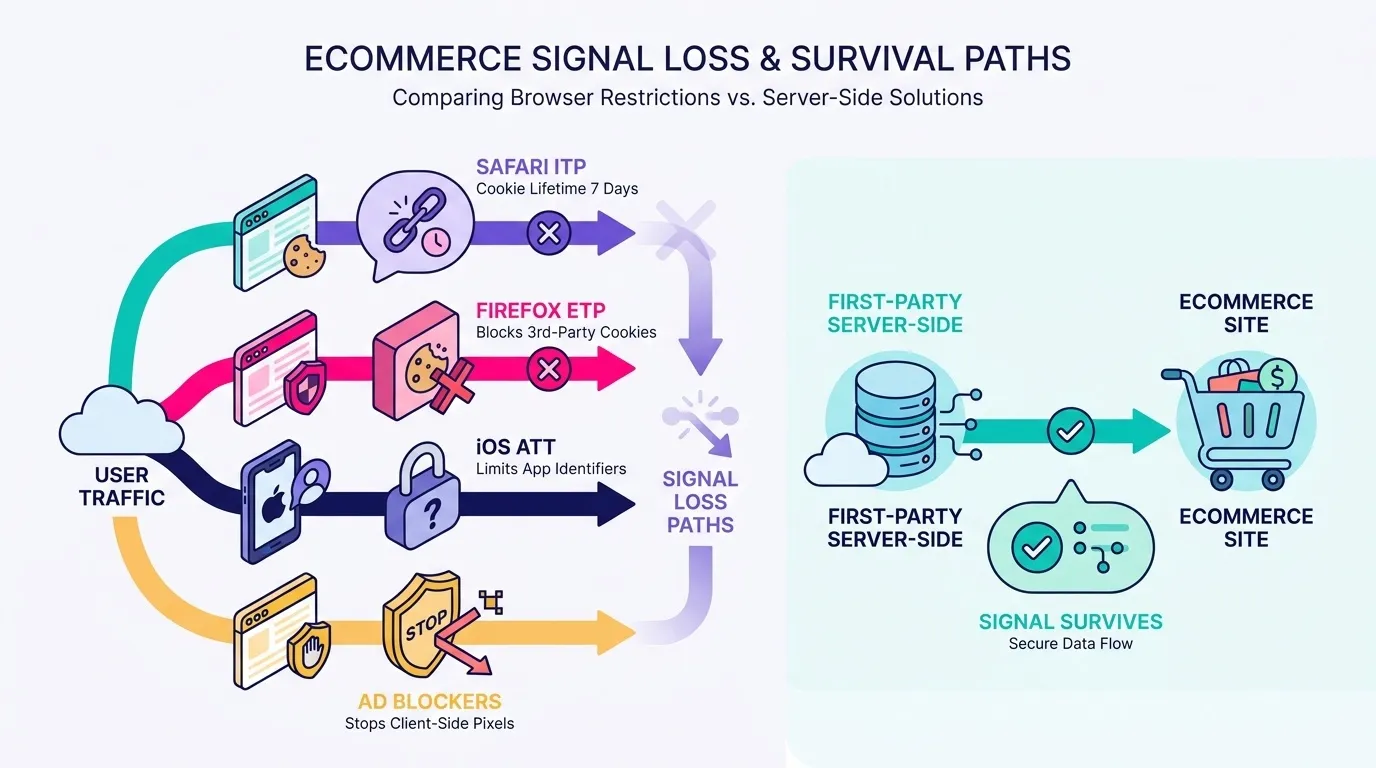
Third-party cookies never actually disappeared on schedule, because Google cancelled the Privacy Sandbox deprecation plan. Safari’s ITP, Firefox’s ETP and iOS privacy changes had already made those cookies unreliable years earlier. A first-party data strategy for ecommerce means owning three things: the collection (your CRM), the connection layer (a Data Manager), and the transport (server-side tracking), so your ad platforms receive clean, consented, durable signal no matter what any single browser or vendor decides next.
If you run paid media for a Shopify brand doing $1M to $20M, you have probably noticed your conversion numbers drifting away from your Shopify reports while nobody changed a single campaign. That gap is rarely a tracking bug. Most of the time it comes from signal that depends on a browser and a cookie instead of on infrastructure you control. Here is what actually happened to the cookie deprecation plan, what first-party data means on a Shopify stack, the three-layer architecture I would build to collect and move it, how to activate it inside Google and Meta, and a short audit you can run against your own setup.
The Privacy Sandbox Is Dead, But The Problem It Was Meant To Solve Isn’t
Let me start with the status update, because a lot of the content still circulating on this topic is built on a premise that no longer holds. Google dropped its plan to phase out third-party cookies in Chrome, kept them in place, and has since begun retiring several of the Privacy Sandbox APIs it spent years promoting as the replacement. You can read the sequence of reversals on Google’s own Privacy Sandbox announcements. So yes, in Chrome, third-party cookies are still there.
That changes almost nothing about your measurement problem. Safari has been limiting cookie lifetimes for years: under WebKit’s Intelligent Tracking Prevention (ITP), third-party cookies are blocked outright and client-side first-party cookies get capped at seven days, which quietly turns a returning customer into a new visitor. Firefox blocks third-party cookies by default under Enhanced Tracking Protection (ETP). iOS App Tracking Transparency cut the identifiers Meta relied on for post-click attribution. Ad blockers and privacy extensions kill client-side pixel requests before they ever leave the browser. None of that reversed when the cookie plan did.
The lesson I took from the whole episode is a practical one. For three years, a lot of brands treated “wait for the Privacy Sandbox” as a strategy, and the vendor changed its mind. Browser policies, app store rules and platform APIs are decided by companies whose incentives are not yours. The parts of the pipeline you own, your customer database and your own server, are the only parts nobody can deprecate on you.
What “First-party Data” Actually Means For A Shopify Brand (Beyond Email Lists)
First-party data is anything you collect directly from your own customers on your own properties: CRM records, order history, on-site behavior, account and loyalty data, support tickets. Zero-party data is the subset customers hand you deliberately, like a skin-type answer in a beauty quiz or a size preference at signup. Third-party data is bought or licensed from someone else, and it is the category that keeps shrinking.
A first-party data strategy for ecommerce is the plan for collecting customer data you own, storing it in one system of record, and sending it to your ad platforms and analytics tools through infrastructure you control. That is what cookieless tracking looks like in practice: browser-dependent tracking replaced by server-to-server connections built on consented, hashed customer identifiers. In practice it means three layers: a CRM, a connection layer, and server-side tracking.
Data type
Where it comes from
Ecommerce example
Zero-party
The customer tells you on purpose
Hair type from a diagnostic quiz, size and fit preferences, replenishment reminder opt-in
First-party
Your own properties and systems
Shopify order history, AOV, product categories bought, email and consented phone, subscription status
Third-party
Bought, licensed or scraped from elsewhere
Purchased prospect lists, off-site interest segments, cookie-based data broker audiences
Here is the part that surprises clients most often. When someone tells me they do not have enough first-party data, what I usually find is the opposite: they have plenty, scattered across five systems that never talk to each other. Shopify holds order history and customer tags. Klaviyo holds email engagement and consent status. The loyalty app holds points and tiers. The post-purchase survey app holds attribution answers and skin or fit data. Even the product feed you maintain for Shopping campaigns is first-party data about your own catalogue, and if you have not looked at how it connects to the rest, our guide on how Google Merchant Center works with Shopify is a good place to see what that feed already knows. Nothing is missing. The connections are.
The Three-layer Stack: CRM, Data Manager, And Server-side Tracking
The CRM layer: consistency before volume
The CRM layer is your system of record, and the job there is consistency rather than volume. Capture email at every entry point in the same format, capture phone only where you have consent for it, and make sure order value, product category and purchase count land on the customer record and not just inside an order object nobody queries. Whether that record lives in Klaviyo, HubSpot or Shopify’s own customer objects matters far less than whether every touchpoint writes to it the same way. I would rather have four fields that are always populated than twenty that are populated 60% of the time, because a matching process built on inconsistent fields fails silently and you will not notice for a quarter.
The Data Manager layer: the piece that gets skipped
The Data Manager layer is the one brands skip, and skipping it is where the mess comes from. This is the orchestration piece that sits between your CRM and your destinations: it normalizes formats, hashes identifiers, deduplicates events, decides which platform gets which fields, and applies consent status before anything leaves your side. Sometimes it is a proper customer data platform. More often, for a brand at this stage, it is a lighter setup: an automation layer in Make moving CRM segments and offline conversions on a schedule, plus a server-side container doing the real-time translation. Without that layer, you get the classic symptom of a purchase counted twice in Google Ads because both the client-side tag and the server-side one fired, and now nobody trusts the dashboard.
The server-side layer: transport you control
The server-side layer is the transport. A client-side pixel runs in the customer’s browser, which means it depends on that browser’s cookie policy, extensions and network conditions. A server-side Google Tag Manager (GTM) container moves the collection to a server you control, usually via a Stape endpoint on your own subdomain: the browser sends one request to your infrastructure, and your infrastructure distributes clean, consented events to GA4, Google Ads, Meta and anything else. Cookies written there last longer than seven days in Safari, requests are far less likely to be blocked, and you get to inspect and modify the payload before it leaves.
What you are comparing
Client-side pixels only
Server-side container
Data completeness
Events lost to blockers, extensions and slow page unloads
Events sent from your server, independent of browser conditions
Cookie durability
Capped at 7 days in Safari for JavaScript-set cookies
Set via HTTP on your own subdomain, much longer retention
Page performance
Every destination adds a script to the browser
One request out, distribution happens server-side
Consent handling
Managed per tag, easy to leave gaps
Enforced once, centrally, before data leaves
Control over payload
Whatever the vendor script decides to send
You choose which fields go where, and can hash or drop them
Activating First-party Data Where It Actually Moves ROAS
Enhanced Conversions and Advanced Matching
This is where the build starts paying for itself. Enhanced Conversions in Google Ads and Advanced Matching in Meta both do the same basic thing: they take hashed customer identifiers you already own, email first and phone where consented, and use them to attribute conversions the browser could not stitch together on its own. The hashing happens before anything leaves your infrastructure, so you are sending an irreversible fingerprint rather than a customer list. The requirement is consistency: a setup that passes identifiers on 90% of purchases recovers meaningfully more conversions than one that passes them on 40%, and that gap is almost always a data quality problem rather than a settings problem. If you are still wiring up the basics, start with our walkthrough on how to create Google Ads conversions for Shopify and layer matching on top of a clean base.
Building sharper audiences
Audiences are the second payoff. A pixel-built audience knows who viewed a product page. A CRM-built audience knows who bought three times in eight months, spends above your average order value (AOV), and has never used a discount code. Those are different animals, and the lookalike models Google and Meta build from them behave differently too. For a fashion brand, an audience of customers who bought two consecutive seasonal drops at full price is worth far more as a seed than “all purchasers, 180 days”. For beauty, replenishment timing sits in your order history and nowhere else, which makes a 45-day post-purchase segment something only you can build.
Sending value signals back
The third piece is value. Most accounts still optimise toward a single conversion value, which teaches the algorithm that every order is equal. They are not. Sending back the metrics that separate a one-time discount hunter from a customer who reorders quarterly, whether through offline conversion imports or value rules fed by your CRM, moves bidding toward profitable customers instead of cheap ones. That is the difference between a good ROAS screenshot and a MER (blended revenue over total ad spend) that actually improves.
Consent, Compliance, And Not Shooting Yourself In The Foot
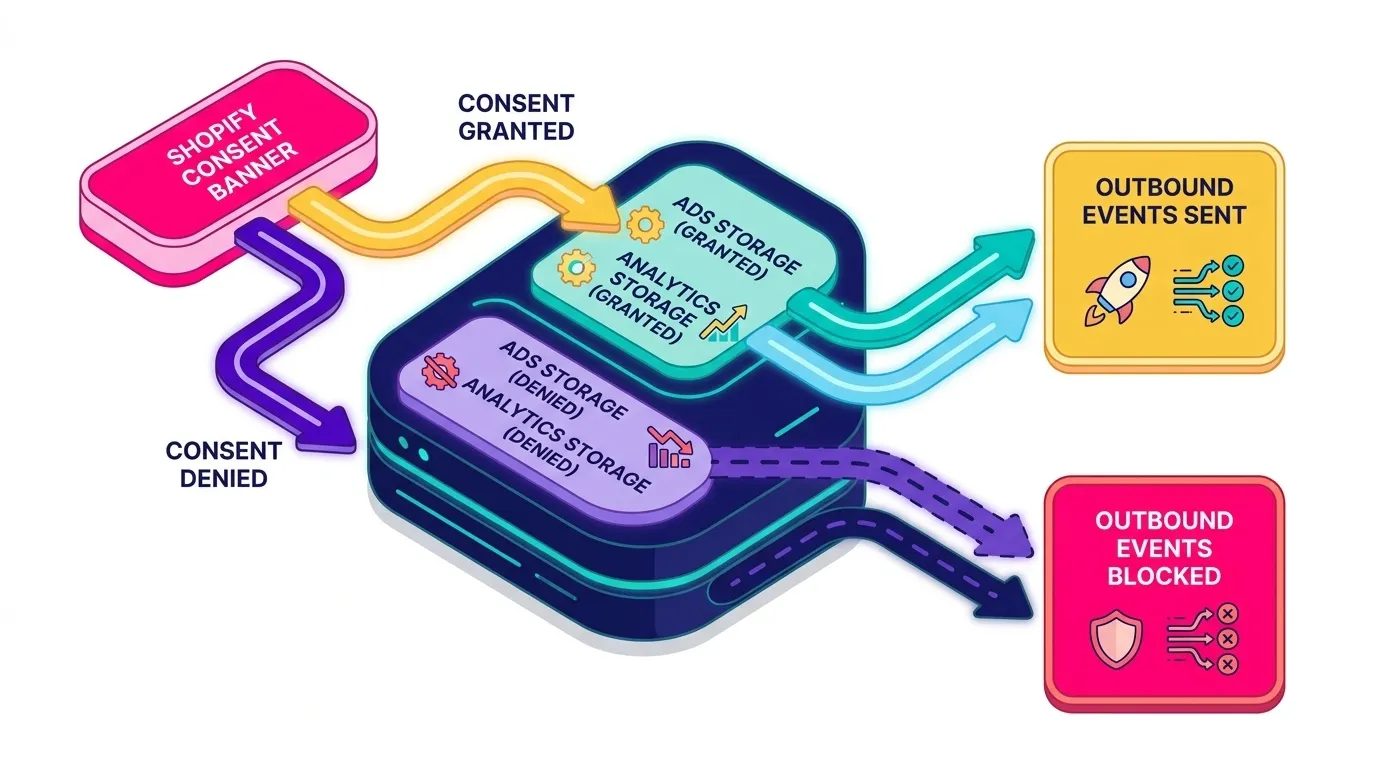
Consent handling sounds like a separate project bolted onto tracking, but it is one more input the same stack has to respect. Consent Mode v2 passes two signals, one for ads storage and one for analytics storage, and adjusts what Google tags collect based on the visitor’s choice. Denied consent means cookieless pings and modelled conversions rather than nothing at all. What matters technically is that those signals reach your server-side container, not just your client-side tags, so a single decision point governs everything downstream. On Shopify, Pandectes handles the consent banner and the signal mapping without fighting the checkout, and Cookiebot does the same job on non-Shopify builds.
Two practical rules for the Data Manager layer, and I am a web analytics manager rather than a lawyer, so treat these as engineering constraints rather than legal advice. First, purpose limitation: if a field was collected for order fulfilment, do not quietly start pushing it to an ad platform because it happened to be available. Second, retention: your CRM should have a defined lifespan for customer records and your container should not be building shadow copies of data you promised to delete. Both are easier to design in at the start than to retrofit, which is the same reason I like putting consent logic in one place.
A Practical Audit: Is Your Stack Ready?
This is the gut-check I run before a kickoff call, not a full technical review. It takes about twenty minutes with access to Shopify, GTM and your ad accounts, and each answer is a yes or a no.
Does every entry point (checkout, account creation, newsletter, post-purchase survey) write email to the same customer record in the same format?
Is there a server-side GTM container live on your own subdomain, and is it actually receiving purchase events?
Are Enhanced Conversions in Google Ads and Advanced Matching in Meta switched on and reporting a healthy match rate?
Do consent signals reach the server-side layer, or only the client-side tags?
Does any customer value signal, LTV (lifetime value), repeat purchase rate, margin tier, flow back into a bidding strategy?
Can you name the one system that is your source of truth for customer data, without hesitating?
Two or three “no” answers is normal and nothing to panic about. The order in which you fix them matters more than the count: consistency in the CRM comes first, then the connection layer, then activation. Turning on Enhanced Conversions while your email field is populated half the time just gives you a confident-looking bad number.
That is roughly the process we run with clients too. We start by mapping what already exists rather than proposing a new tool, and most of the time the fastest gain comes from fixing the three places where the customer record breaks, not from adding another platform. From there we build the server-side container, wire consent into it once, and only then start connecting destinations, checking each one against Shopify’s own order data before we trust it.
We keep a rule for ourselves: no new signal goes live until we can explain the number it produces. If a server-side purchase event lands within a few percent of the Shopify order count, we move on. If it does not, we find out why before adding the next platform. It is slower for about two weeks and considerably faster for the following year, because nobody has to re-litigate whether the dashboard is lying.
What Changes For MER And Reporting Once This Is Live
The first thing you notice is that the numbers get smaller and truer. Duplicated events disappear, phantom conversions from double-firing tags stop inflating campaign performance, and modelled conversions sit on top of a solid observed base rather than substituting for one. Some campaigns will look worse. Those are usually the ones that were being credited for other people’s work, which is a conversation worth having once rather than a quarterly mystery.
Once the input is trustworthy, MER stops being a moving target. You can compare blended revenue against total spend and act on the result, instead of arguing about whether the drop is real or a tracking artefact. That is the point where the build stops looking like an IT project to your leadership team and starts looking like a budgeting tool: reallocation decisions get made in days rather than after another month of “let’s wait and see”. If you want to pressure-test the maths, our MER Calculator does the arithmetic, and our piece on advanced attribution models for ecommerce growth covers how clean first-party signal changes what your attribution model can honestly tell you.
Final Thoughts: Playing The Long Game On Data
Platform decisions will keep coming. Another iOS update, another browser policy, another API quietly deprecated after two years of documentation. The brands that barely feel those changes are the ones that already own their collection, their connection layer and their transport, so a vendor reversal becomes a configuration change rather than a strategy rewrite. Privacy Sandbox cancelled was the cheapest possible reminder of that.
Building your data infrastructure now is like controlling the center of the board early in a chess game. It does not win anything by itself, and no one will applaud you for it, but it means you always have moves available regardless of what Google, Apple or Meta decides to play next.
Want a second pair of eyes on your tracking before you commit to a rebuild? Take a look at our web analytics services or ask us for a tracking audit. We will map what your stack collects today, show you where the signal is leaking, and build the server-side setup that gets clean, consented data back into your ad platforms.