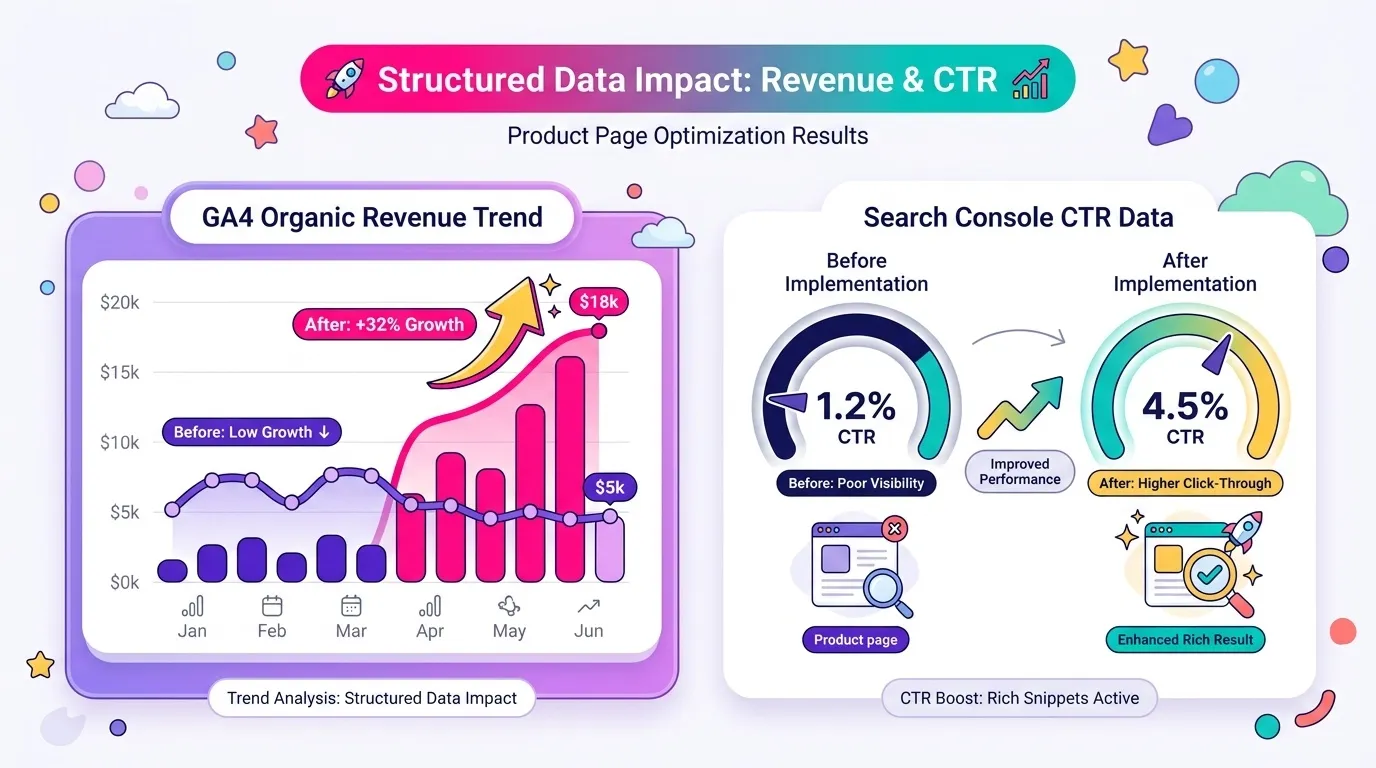
Structured data (schema markup) is code, usually written in JSON-LD, that you add to a webpage’s HTML to explicitly tell search engines what the content on that page means. It does not directly boost your rankings. What it does is make your page eligible for rich results, star ratings, prices, FAQs, breadcrumbs, which can meaningfully increase your click-through rate. For Shopify and DTC stores specifically, Product, Review, FAQ, and Breadcrumb schema are the four types worth prioritizing first.
Two Identical Rankings, Two Very Different Results
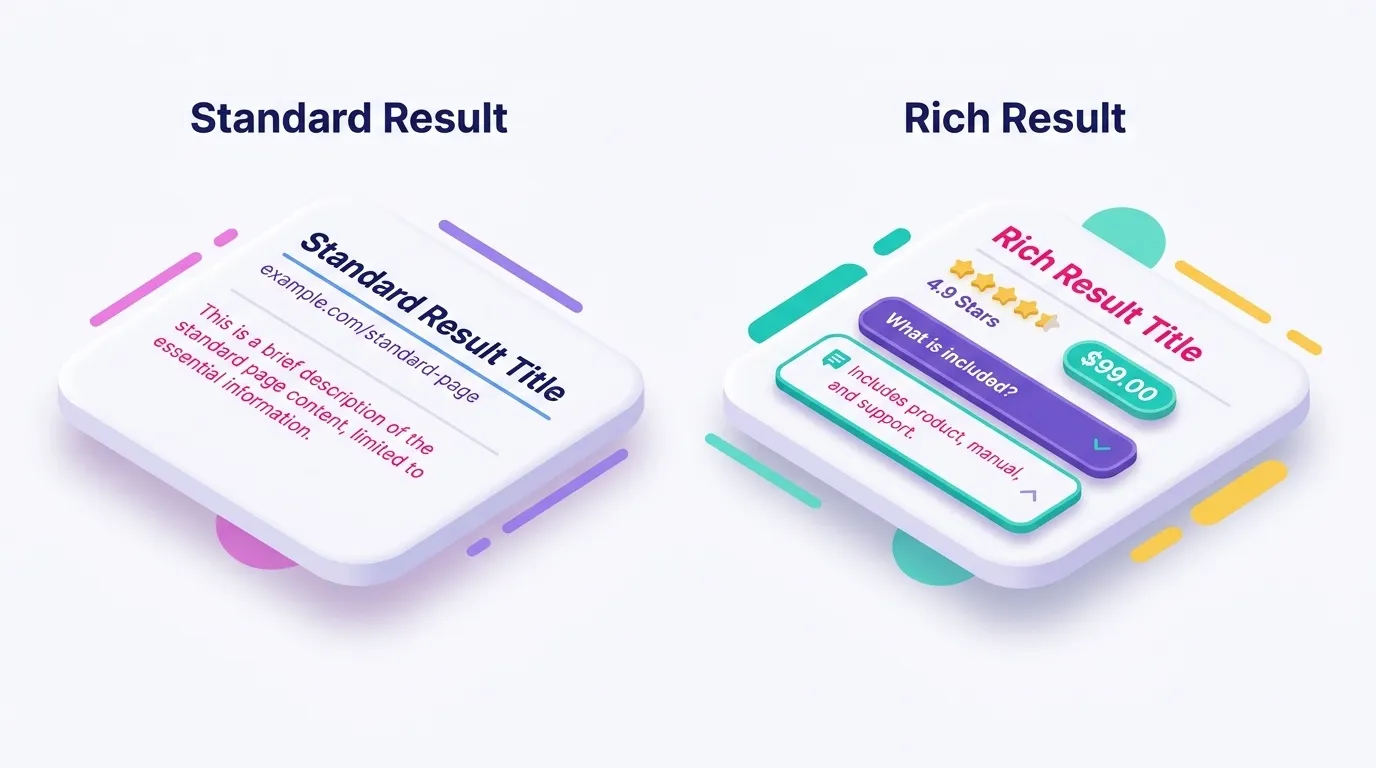
Picture two product pages ranking side by side on page one for the same keyword. Same position, same domain authority, roughly the same content quality. One shows a plain blue link with a meta description. The other shows a star rating, a price, and a “free shipping” badge sitting right under the title. Which one do you click?
That difference is not luck, and it is not a ranking boost either. It is structured data doing exactly what it was designed to do: translating your page’s content into a format search engines can read, interpret, and reward with extra visual real estate in the results.
Here is where most guides on this topic get muddy. They conflate “adding schema” with “ranking higher,” and that confusion sends ecommerce teams chasing the wrong outcome. Structured data and SEO are related, but not in the way most people assume, and I want to be precise about that from the first paragraph rather than let you find out three thousand words in.
What This Guide Covers
In this piece, I’ll walk you through a plain-English definition, an honest answer on whether structured data helps SEO, copy-paste JSON-LD examples built specifically for Shopify stores, and, just as importantly, how to actually measure the impact using GA4 and Search Console rather than taking it on faith. If you want the fuller picture of how structured data fits into a broader organic strategy, our Complete Guide to E-Commerce SEO is the pillar resource worth bookmarking alongside this one.
I’m writing this from the vantage point of someone who implements and audits this stuff on real Shopify accounts every week, not from a theoretical playbook. So let’s get into what structured data actually is, because that’s where the terminology confusion usually starts.
What Is Structured Data in SEO? (Direct Answer)
The Simple Definition (for Humans and Search Engines)
Structured data is a standardized code format, usually JSON-LD, added to a webpage’s HTML that explicitly labels what each piece of content means to search engines. That’s the definition. Everything else is detail.
Think of it like labeling moving boxes before a house move. If every box is labeled “kitchen” or “books,” the movers know exactly where things go without opening each one to guess. Leave the boxes unmarked, and the movers still figure it out eventually, they open, inspect, infer, but it takes longer and the guesses are occasionally wrong. Search engines work the same way with your webpages. Structured data is the label on the box.
The shared “labeling language” that makes this possible is schema.org, a vocabulary jointly maintained by Google, Bing, Yahoo, and Yandex specifically so that every search engine reads the same labels the same way. It defines the available “box labels”, Product, Review, FAQPage, Organization, Article, and dozens more, so you’re not inventing your own tagging system that only one search engine understands.
One thing worth clarifying immediately: structured data does not change what a human visitor sees on the page. It’s invisible markup that runs parallel to your visible content, a layer for machines, not for eyes. Your customer still sees your product photos, price, and description exactly as designed. The schema is just whispering the same information to Google in a format it can parse instantly.
Structured Data vs. Schema Markup vs. Rich Results, Clearing Up the Terminology
Here’s where I see even experienced marketers get tangled: they use “structured data,” “schema markup,” and “rich results” interchangeably, as if they’re the same thing wearing three different hats. They’re not. Each term describes a distinct layer of the same process.
Structured data is the general concept, the practice of organizing content in a machine-readable way. Schema markup is the specific vocabulary and code you actually write, the schema.org vocabulary expressed in JSON-LD. Rich results are the visual payoff in the SERP, the stars, the FAQ dropdown, the breadcrumb trail replacing a raw URL.
If it helps, think of it this way: structured data is the strategy, schema markup is the language you use to execute it, and rich results are what you get paid in. Confusing any of the three tends to produce either unrealistic expectations (“I added schema, why aren’t we ranking higher?”) or under-investment (“this is just a technical checkbox”).
Getting this distinction straight matters because it sets up the question every DTC manager eventually asks me directly: does any of this actually help SEO, or is it just cosmetic? Let’s answer that honestly, because the answer has real budget implications.
How Structured Data and SEO Actually Work Together
How Search Engines Read and Use Markup
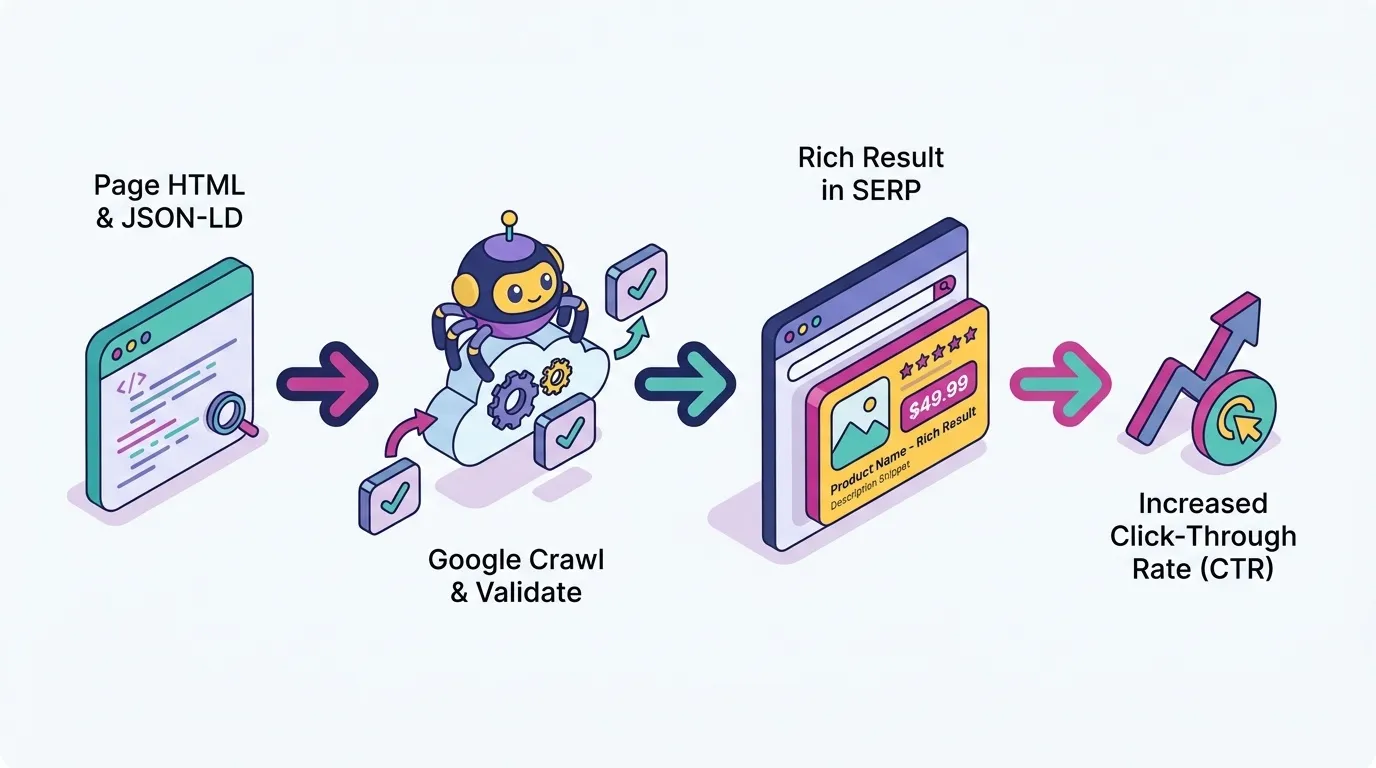
To understand the “why,” it helps to walk through the mechanical “how.” When Googlebot crawls a page, it fetches the raw HTML, parses it, and looks specifically for JSON-LD blocks (or Microdata/RDFa, though we’ll get to why JSON-LD wins later). Once found, it cross-references that code against the schema.org vocabulary and stores the resulting structured entities inside its index, and increasingly, its Knowledge Graph.
Without markup, Google still tries to understand your page, using natural language processing to infer what it’s about. That inference is genuinely impressive technology, but it’s still a guess. A product page without schema might get correctly identified as “a page about a jacket,” but Google has to work harder to confidently extract the exact price, availability, and rating without ambiguity.
Structured data removes that ambiguity by stating things explicitly rather than letting Google infer them. This matters beyond individual pages too: consistent, accurate markup across your site feeds Google’s broader entity understanding of your brand, which ties into topical authority and, more broadly, the E-E-A-T signals search engines use to gauge trustworthiness.
Eligibility for rich results is essentially Google’s reward mechanism for correctly adopting this vocabulary. According to Google’s own Search Central documentation on structured data, implementing markup correctly doesn’t guarantee a rich result will appear, competition, quality guidelines, and Google’s own discretion all play a role, but it is the gate you have to pass through to even be considered. No markup, no chance.
Structured Data’s Role in Generative Engines (AI Overviews, ChatGPT, Gemini)
Now, shift the lens from classic blue-link search to the world we’re actually operating in: AI Overviews, Gemini responses, ChatGPT browsing answers. Generative engines lean on clearly labeled, structured content even more heavily than traditional search, because they’re extracting discrete facts to synthesize into a conversational answer, not just ranking a list of links.
FAQ schema and clean entity labeling (Product, Organization) make it dramatically easier for these LLM-powered systems to lift accurate information without hallucinating details or misattributing a price to the wrong product. When your content is ambiguous, the model fills gaps with probability. When it’s structured, there’s less gap to fill.
There’s a strategic layer here too. As more search volume shifts toward AI-generated answers rather than ten blue links, structured data starts functioning as a trust signal, evidence that your content is verifiable and machine-readable rather than a wall of unstructured prose the model has to interpret from scratch.
This is exactly the intersection where SEO and GEO stop being separate disciplines and start looking like the same job with a slightly different scoreboard. If you want the fuller framework on how these two approaches relate, we’ve mapped it out in SEO vs GEO: Understanding the Future of Search Optimization, and if you’re curious specifically about how AI Overviews are reshaping organic visibility, How Google AI Overview Is Affecting SEO goes deeper on that shift.
Does Structured Data Help SEO? (Direct Answer / Myth-Busting)
What Google Officially Says About Ranking Impact
Let’s not dance around it: no, structured data is not a direct Google ranking factor. Google’s own documentation confirms this explicitly, stating that adding structured data doesn’t guarantee or directly improve rankings. It enables eligibility for enhanced search features. That’s a meaningfully different claim.
I want to sit with that for a second, because it’s the single most misunderstood point in this entire topic. Structured data doesn’t push your page from position 8 to position 3. What it does is change how position 8 (or 3) looks to a human scrolling the results.
Why does the myth persist despite Google saying otherwise? Mostly correlation dressed up as causation. Sites with meticulous schema implementation also tend to have strong technical SEO overall, clean site architecture, fast load times, solid content. When those sites rank well, it’s tempting to credit the schema. In reality, the schema is a symptom of a well-run technical program, not the cause of the ranking.
So if structured data isn’t moving the ranking needle, why does the entire industry obsess over it? Because of what happens after Google decides your page is eligible for a rich result. That’s where the real, measurable value lives.
The Real Benefit: CTR, Not Rankings
Here’s the actual mechanism, spelled out plainly: structured data leads to rich result eligibility, rich results increase your visual prominence in the SERP, and that increased prominence drives a higher click-through rate at the same ranking position. Not a higher ranking. A higher click rate at whatever ranking you already have.
Picture it concretely. A product result showing a 4.8-star rating and a visible price at position 5 will frequently out-click a plain, text-only result sitting at position 3. The star rating alone acts like a visual magnet, it signals social proof before the user even reads the headline.
There’s a secondary, more subtle effect worth flagging honestly: a sustained CTR increase is itself a soft engagement signal that some of Google’s ranking systems may factor in over time. So while structured data isn’t a direct lever, an indirect compounding effect is plausible, higher clicks, more engagement data, potentially better standing over the medium term. I say “plausible” deliberately; Google hasn’t confirmed this as a formal mechanism, and I’d rather be precise than promise you a growth loop that isn’t guaranteed.
The honest takeaway for a DTC manager reading this: don’t implement schema expecting a rankings jump. Implement it expecting a CTR and revenue lift, then actually measure it, which is exactly what we’ll walk through later in this article. If you’ve ever wondered why a “schema fix” didn’t move your rankings, this misconception is probably worth adding to our list of The Top 7 eCommerce SEO Mistakes, because expecting the wrong outcome from the right tactic is its own kind of mistake.
The Main Types of Structured Data Markup in SEO
JSON-LD vs. Microdata vs. RDFa, Which Format to Use
Three formats can technically express schema.org vocabulary: JSON-LD, Microdata, and RDFa. All three are valid. But Google explicitly recommends JSON-LD, and for Shopify stores specifically, the practical case is even stronger.
JSON-LD lives as a single, self-contained script block you can drop anywhere in the page’s <head> or body, entirely separate from your visible HTML. It doesn’t require touching individual HTML tags, which makes it far easier to maintain, audit, and update without risking a layout break.
Microdata and RDFa, by contrast, require embedding attributes directly inside your existing HTML elements (think itemprop, itemscope). That’s fragile territory on Shopify, where theme updates, app installs, and Liquid template changes happen constantly. One theme update can silently strip or duplicate those inline attributes without anyone noticing until a rich result disappears from the SERP three weeks later.
My practical recommendation, and the one I apply on every Shopify account I touch: use JSON-LD unless you have a specific legacy reason not to. There rarely is one.
Schema Types Every eCommerce Brand Should Know
Not every schema type carries equal weight for a DTC store. Six types consistently matter: Product, Review/AggregateRating, FAQPage, BreadcrumbList, Organization, and Article.
Product schema is the workhorse. It carries price, availability, SKU, and brand, information that also overlaps meaningfully with your Google Merchant Center feed. Get this one wrong and you’re leaving the highest-value rich result type on the table.
Review and AggregateRating schema is arguably the single highest-CTR-impact type for ecommerce, because it’s the direct source of that star rating sitting under your product title. Few things build instant trust in a scroll-happy SERP faster than five gold stars and a review count.
Rounding out the priority list: FAQPage captures pre-purchase questions directly in the results (shipping, returns, sizing), BreadcrumbList replaces a messy URL string with a clean navigational path, and Organization schema feeds your brand’s eligibility for a Knowledge Panel, useful once your brand starts generating meaningful branded search volume. Article schema matters more for your blog content than your commerce pages, but it’s worth including consistently across your content hub.
Here’s how I’d map these across a typical Shopify site’s page types:
Ecommerce Page Type
Recommended Schema Type(s)
Product page
Product + Offer + AggregateRating (the highest-priority combination for most Shopify stores)
Category / Collection page
ItemList + BreadcrumbList
Blog post
Article (with Author and Organization nested)
FAQ / Shipping & Returns page
FAQPage
Homepage
Organization (+ SiteNavigationElement where relevant)
This table alone should settle most “where do I even start” debates. If your money pages are product and category templates, that’s exactly where your schema budget should go first. For the content strategy sitting underneath those pages, our guides on Product Page Optimization and 11 Ecommerce Category Page Best Practices pair naturally with the schema priorities above.
SEO Structured Data Schema Examples (Copy-Paste Ready)
Product Schema Example for a Shopify Store
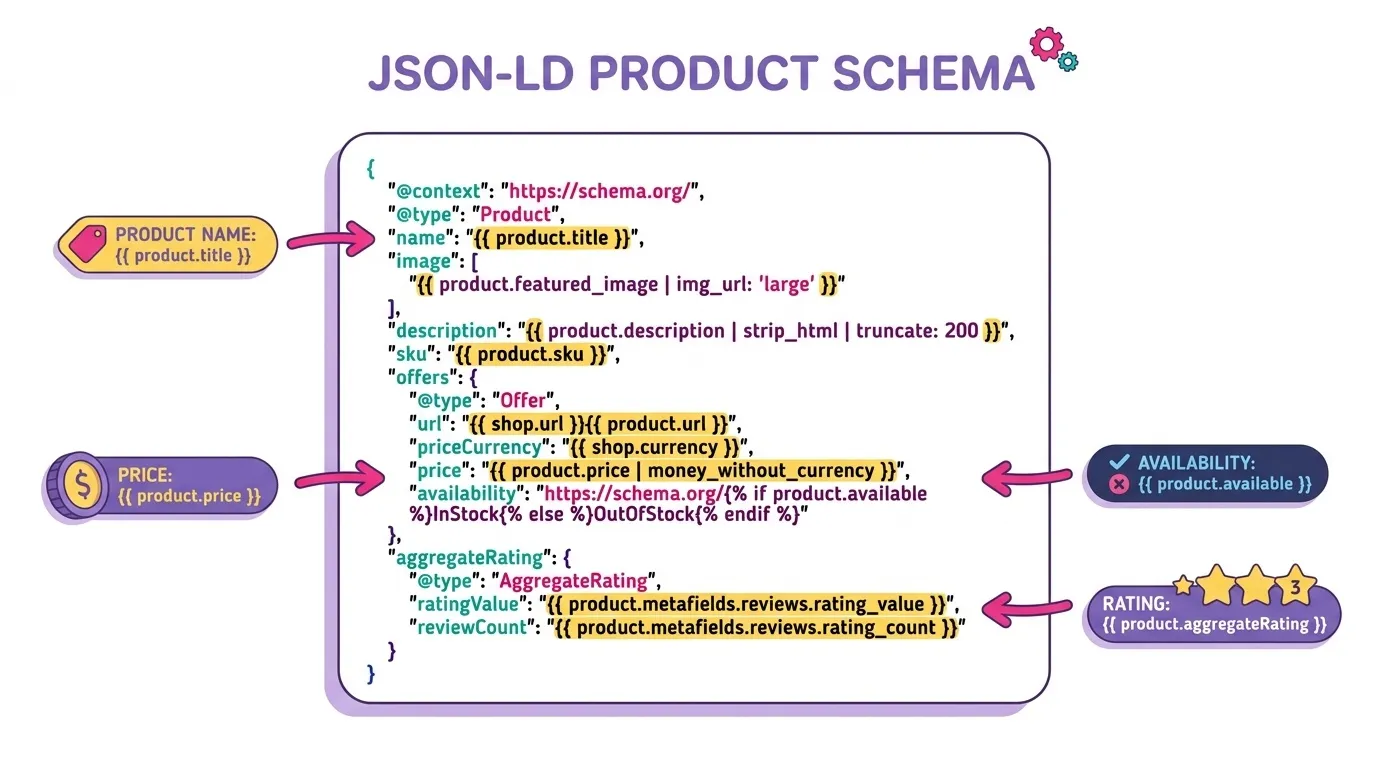
Rather than hand you a generic HTML sample that doesn’t reflect how Shopify actually structures product data, here’s a JSON-LD block written with real Shopify Liquid variables, the kind you’d drop into your product-template.liquid or a dedicated schema snippet file.
A few fields need attention. The sku, price, and availability fields should pull dynamically from Liquid variables, never hardcoded, since inventory changes constantly. The aggregateRating block should be populated from your actual review app’s data (Judge.me, Loox, Yotpo all expose this), not filled in manually with numbers you hope are accurate.
One Shopify-specific gotcha worth flagging: check whether your theme’s theme.liquid or a review app is already injecting Product schema before you add your own. Duplicate schema blocks on the same page are a surprisingly common, entirely avoidable error, and we’ll cover exactly why that hurts you in the mistakes section below.
FAQ Schema Example
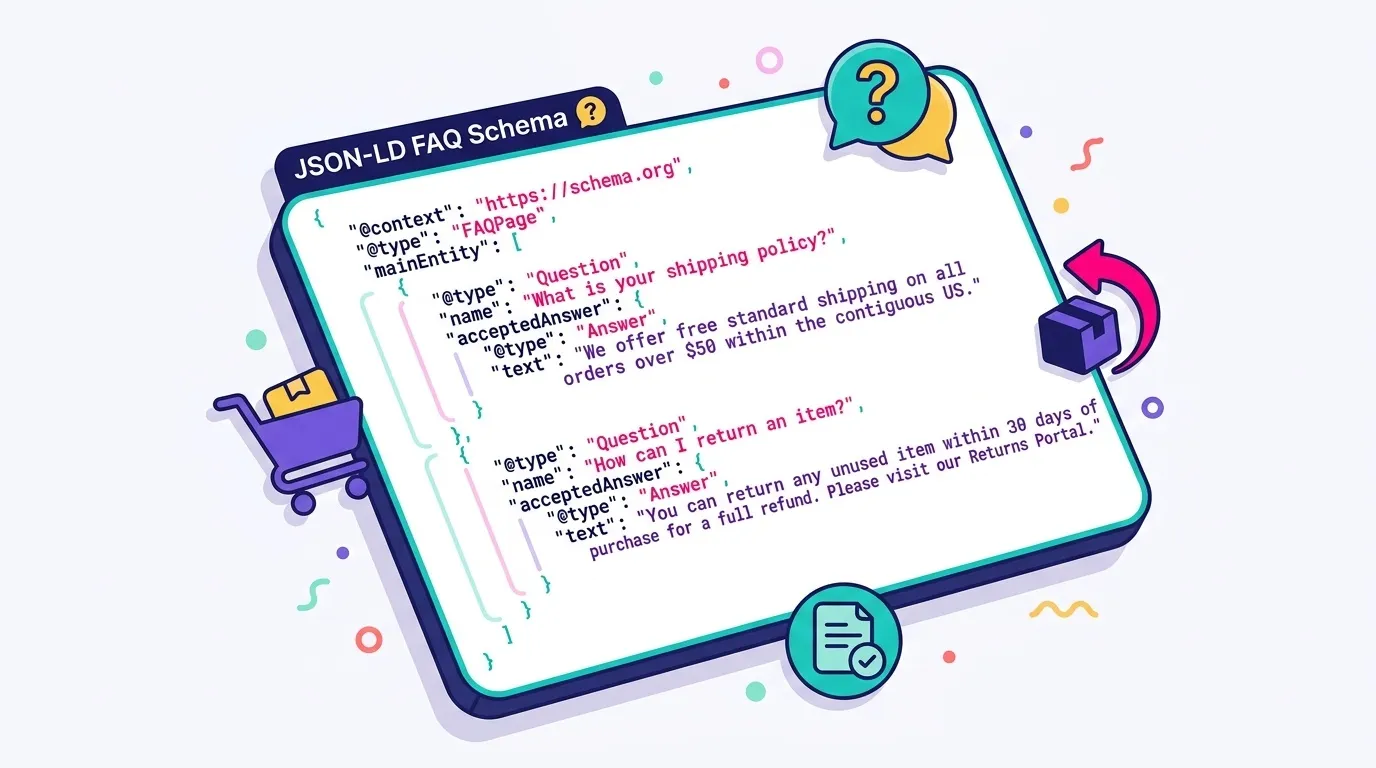
FAQ schema shines on product FAQ sections, shipping and returns pages, and collection pages that answer recurring pre-purchase questions (“Does this run true to size?”, “Is this vegan?”). It’s a genuinely low-effort, high-clarity addition for content you likely already have written.
{ "@context": "https://schema.org/", "@type": "FAQPage", "mainEntity": [ { "@type": "Question", "name": "What is your return policy?", "acceptedAnswer": { "@type": "Answer", "text": "We offer a 30-day return window on all unworn items with original tags attached." } }, { "@type": "Question", "name": "How long does shipping take?", "acceptedAnswer": { "@type": "Answer", "text": "Standard shipping takes 3-5 business days within the continental US." } } ]}
One non-negotiable requirement: the questions and answers in your markup must actually be visible on the page, not hidden-only content stuffed in for search engines. Google’s guidelines are explicit on this point, and hidden FAQ content is a fast way to lose eligibility entirely.
Worth setting realistic expectations here too: Google has, over time, restricted FAQ rich result eligibility more tightly, favoring authoritative and government-style sites in certain verticals. For ecommerce brands, that means FAQ schema is still worth implementing for the machine-readability and GEO benefits we discussed earlier, but don’t bank your entire CTR strategy on the FAQ dropdown appearing every time.
Breadcrumb Schema Example
Breadcrumb schema does something deceptively valuable: it can replace the raw URL string under your title in the SERP with a clean, readable navigation path, “Home > Women’s Jackets > Aurora Wool Coat” instead of a messy slug string. It’s a small visual upgrade that meaningfully improves perceived site structure.
Shopify’s native collection-to-product hierarchy maps onto breadcrumb schema almost perfectly, since your URL structure already reflects that navigational path. The main recommendation here is simply consistency: make sure the schema mirrors your actual site navigation rather than an outdated or aspirational structure.
Quick tip before moving on: breadcrumb errors are among the most common structured data issues I see in audits, mismatched URLs, missing positions, orphaned items. Validate this one immediately after implementation, which conveniently sets up our next section.
How to Implement Structured Data on Shopify (Step-by-Step)
Native Shopify Schema vs. Apps vs. Manual JSON-LD
Before adding anything, check what’s already there. Most modern Shopify themes, Dawn and its many derivatives included, ship with baseline Product and Organization schema out of the box. Adding more on top without checking first is how duplicate schema happens.
If you don’t have development resources, the app route makes sense: several structured data apps in the Shopify App Store handle FAQ, Review, and Breadcrumb schema through a simple interface. The tradeoff is real, though: apps add theme bloat, occasionally conflict with each other, and offer less granular control over exactly what gets output.
The manual JSON-LD route, editing theme.liquid or dedicated section files directly, gives you full control and zero app dependency. It’s the route I’d recommend for any brand with in-house dev capacity or an agency partner, since precision matters here, one missing comma in a JSON-LD block and the whole schema type fails validation.
My rough recommendation matrix: solo founder without dev support, lean on a reputable app. In-house dev team or agency relationship, go manual for the control and long-term maintainability.
Common Implementation Mistakes to Avoid
Four mistakes account for most of the structured data problems I find in audits. First, duplicate schema, multiple apps or theme code both injecting Product schema on the same page, which confuses Google about which version to trust and can dilute rich result eligibility entirely.
Second, incomplete required fields. Missing price, currency, or availability on Product schema disqualifies the entire markup from rich result eligibility, no partial credit given.
Third, hardcoded placeholder values that never update, a static “in stock” status sitting in the code even when the product has been sold out for two weeks. Beyond the SEO risk, this is a trust issue with real customers who click through expecting availability.
Fourth, simply forgetting to re-test after theme updates. Shopify theme changes, app updates, and even Liquid section edits can silently break previously working schema without any visible warning on the storefront itself. If you want a broader technical audit checklist beyond schema specifically, How to Improve Your Web Page Visibility for Better Search Rankings covers adjacent technical SEO ground worth checking regularly.
How to Validate and Test Your Structured Data
Google Rich Results Test & Schema Markup Validator
Google’s Rich Results Test is the tool to start with, because it checks eligibility for specific rich result types, not just whether your syntax is technically valid. Paste a URL or raw code snippet, and it tells you exactly which schema types were detected and whether they qualify for enhanced display.
Schema.org’s own Markup Validator is worth running as a secondary check, particularly for schema types Google’s tool doesn’t directly test, Organization being a common example. It confirms syntactic correctness even when Google’s tool stays silent on eligibility.
The process itself is simple: paste your URL or code, review the detected schema types, and fix any flagged errors or warnings before that markup goes live. Warnings aren’t always fatal, some are recommendations rather than requirements, but errors typically mean the entire schema type will fail to register.
If your Shopify site carries meaningful active traffic, test on a staging URL first. Pushing untested schema straight to a live product page risks a validation failure that Google catches before you do, potentially suppressing an existing rich result you already had.
Monitoring Rich Result Performance in Search Console
Once live, validation becomes an ongoing habit, not a one-time task. Google Search Console’s Enhancements reports (Products, FAQs, Breadcrumbs) show valid, invalid, and warning counts over time, and they’re genuinely one of the most underused reports in most accounts I audit.
I’d recommend a recurring monthly check, folded into your existing SEO reporting cadence, specifically to catch schema errors early, especially right after a theme update or new app install. Catching a broken schema block within a month is far less painful than discovering it six months later when someone finally asks why the star ratings disappeared.
For a sharper read on actual performance, filter the Search Console Performance report by “Search Appearance” to isolate pages eligible for rich results, then compare their CTR against non-rich pages targeting similar queries. That comparison is where the real proof of value lives, and we’ll build on exactly this method in the measurement section below.
Structured Data Mistakes That Can Hurt You
Markup That Doesn’t Match Visible Content
Google’s core structured data guideline is unambiguous: markup must reflect content actually visible and available to users on the page, not aspirational data, and not hidden content invisible to human visitors.
The ecommerce violation I see most often: a product marked “in stock” in the schema while the visible page displays “sold out.” It’s an easy trap, usually caused by static values that never sync with actual inventory, but it’s a direct policy violation regardless of intent.
The consequence isn’t limited to that one page either. Google can revoke rich result eligibility for that specific markup type sitewide, not just the offending product, which is a disproportionately expensive penalty for what’s often a small technical oversight.
The fix is straightforward: generate schema dynamically through Liquid variables tied to your actual inventory and pricing data, never through static, hardcoded values that drift out of sync the moment stock changes.
Spammy or Irrelevant Schema Use (Manual Action Risk)
There’s a more severe risk sitting one step further down this same path: deliberately misleading markup, fabricated reviews, keyword-stuffed FAQ content irrelevant to the page, can trigger a manual action from Google’s Search Quality team, not just an automatic eligibility loss.
Review and AggregateRating schema receives particular scrutiny here, precisely because it directly shapes consumer trust signals inside the SERP. Inflating a rating or fabricating a review count isn’t a gray area; it’s the kind of violation Google actively audits for.
A manual action tied to structured data spam suppresses all rich results sitewide until the issue is fixed and a reconsideration request is filed and approved, a significant, entirely avoidable setback for a brand trying to scale organic traffic. If your site has recently changed domains, platforms, or URL structures, schema often breaks quietly during that process too, worth a look at our Complete SEO Migration Guide if a move is on your roadmap.
My rule of thumb, the one I apply without exception: if the schema wouldn’t accurately describe what a human sees on the page, don’t add it. It’s a simple filter, but it catches nearly every mistake in this section.
Measuring the Real Impact: Structured Data + GA4/Search Console
Tracking CTR Lift After Adding Rich Results
Implementation without measurement is just faith-based SEO, and I’d rather give you a method than a hope. Start with a baseline: pull average CTR and average position for your target pages in Search Console over a four-to-eight week window, before any schema changes go live.
After deployment and validation, monitor those same pages’ CTR at that same average position over an equivalent window. The goal is isolating the rich-result effect from any unrelated ranking movement, if position shifted too, your CTR comparison needs to account for that.
I’d also recommend segmenting by device. Mobile rich results frequently render more prominently, larger star icons, more visible pricing, than their desktop counterparts, so a device-blended average can understate or overstate the actual effect depending on your traffic mix.
Microsoft Clarity, while it doesn’t track SERP-level CTR directly, earns its place here as a complementary layer: session recordings from rich-result traffic can reveal whether visitors arriving via a star-rating click behave differently on-page (scroll depth, add-to-cart rate) than your average organic visitor. It’s a nice qualitative check on a quantitative trend.
Connecting Structured Data Wins to Organic Revenue
CTR is a good leading indicator, but it’s not the number that actually matters to a founder reviewing a P&L. The final step is connecting CTR lift to sessions, and sessions to GA4 ecommerce revenue attributed to the organic search channel specifically.
The cleanest method: build a simple before/after cohort comparison in GA4, organic sessions, conversion rate, and revenue, for the specific pages where schema was added, against a control group of comparable pages where it wasn’t. That comparison isolates the variable you’re actually testing.
Worth an honest caveat here, in the same spirit as the ranking myth we busted earlier: structured data alone rarely moves revenue dramatically on its own. It’s a compounding tactic, one that performs best layered on top of solid on-page content, sound technical SEO, and a coherent content strategy rather than deployed as a standalone fix. If you’re building or refreshing that broader content foundation, How to Create an Effective SEO Content Strategy is a useful companion piece.
This measurement discipline, honestly, is the line between “doing SEO tactics” and “running SEO as a growth function.” One treats schema as a checkbox; the other treats it as a variable in a system you can actually prove is working. For a parallel measurement approach applied to AI Overview visibility, How to Set Up AI Overview Tracking for Your Website follows a very similar before/after logic.
Final Thoughts: Making Structured Data Work for Your Store
Let’s close on the point I opened with, because it’s the one worth remembering after you’ve forgotten the JSON-LD syntax: structured data won’t move your rankings directly. What it does is unlock one of the highest-leverage, lowest-cost SEO investments available for click-through rate and visibility, and that leverage only grows as search itself becomes more AI-driven.
If you’re a Shopify DTC brand deciding where to start, don’t spread yourself thin across every schema type at once. Start with Product and Review schema on your money pages, the templates driving the bulk of your organic revenue, then expand outward to FAQ, Breadcrumb, and Article schema once the foundation is solid.
As generative engines increasingly lean on clearly structured, entity-rich content to build their answers, the brands that get this right now aren’t just optimizing for today’s SERP. They’re building a durable technical foundation that serves both classic SEO and the GEO landscape simultaneously, which, if I’m honest, is a far better use of a dev sprint than most quarterly roadmap items.
At Midsummer, we treat structured data as part of a measured, data-backed SEO program, tracked through GA4 and Search Console like everything else we touch, rather than a “set it and forget it” checkbox that nobody revisits until something breaks. If your team wants hands-on execution and ongoing monitoring rather than a one-time implementation, our AI SEO Agency approach folds structured data into a broader technical and content strategy built for exactly this kind of scaling brand.
Ready to make sure your product pages are actually earning the clicks their rankings deserve? Check out our SEO Agency services or request a personalized technical audit.
We’ll review your current schema implementation, fix what’s silently broken, and make sure your Shopify store is structured to win both today’s SERP and tomorrow’s AI-generated answers.
Let’s turn your search visibility into revenue, side by side.