Imagine showing the perfect product to the right person at the exact moment they are ready to buy, without having to manually set up a single ad creative for it. This isn’t a futuristic dream; it’s the reality of modern paid social advertising. For eCommerce founders and CMOs, the days of guessing which red sneaker will sell best on a Tuesday are over. The ability to automate relevancy at scale is the primary driver behind the shift towards machine-learning-led advertising.
We are talking about leveraging Meta Advantage+ Catalog Ads. Formerly known as Dynamic Ads, this powerful format has evolved under Meta’s “Advantage+” suite to become an indispensable tool for scaling revenue. It takes the heavy lifting out of creative testing by automatically matching items from your inventory to the people most likely to purchase them. It’s not just about saving time; it’s about maximizing specific inventory liquidity and driving efficency.
For a DTC brand scaling from $1M to $20M, manual ad creation is a bottleneck. You simply cannot manually design meaningful creative variations for hundreds of SKUs. Advantage+ Catalog Ads remove this friction, allowing your ad spend to flow fluidly towards the products that are actually moving. This shift allows your team to focus on strategy and offer creation rather than pixel-pushing in Canva.
In this guide, we will walk you through exactly how to build a robust Advantage+ Catalog Ad strategy. We will cover everything from the technical setup of your product feed in Shopify to advanced optimization techniques that lower your CPA. Whether you are looking to fix a leaking funnel with retargeting or aggressively acquire new customers with broad audiences, this framework is your roadmap to success.
What Are Meta Advantage+ Catalog Ads?
Meta Advantage+ Catalog Ads are an automated ad solution that uses machine learning to promote your entire product catalog across Facebook, Instagram, and the Audience Network. Instead of you creating an individual ad for each product, you create a template that automatically pulls images, videos, and details from your data feed. The “Advantage+” designation signals Meta’s latest AI capabilities, which dynamically optimize not just who sees the ad, but how the creative is rendered for each user to maximize the probability of a conversion.
The core difference between a standard Carousel Ad and a Catalog Ad is intelligence. A standard carousel is static; every user sees the same cards in the same order (unless you manually optimize them). A Catalog Ad is fluid. If User A has been browsing leather jackets on your site, the ad will dynamically prioritize leather jackets in their feed. If User B prefers video content and has shown interest in accessories, the algorithm might lead with a video card of your best-selling belt. This personalized relevance is why Catalog Ads consistently drive higher Click-Through Rates (CTR) and Conversion Rates (CVR) compared to static creatives.
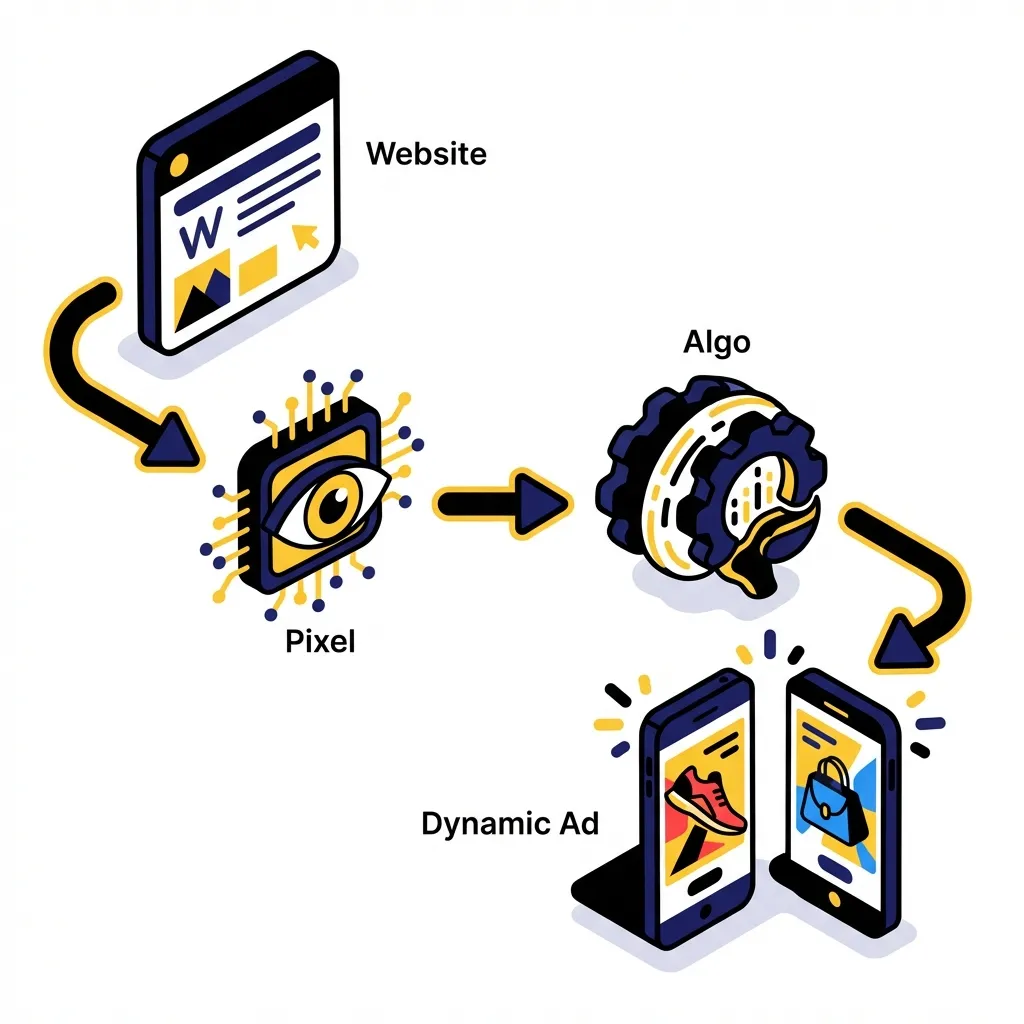
The engine behind this is the matching of user intent signals with your inventory data. When a user interacts with your website (tracked via the Meta Pixel and Conversions API), that signal is instant. Meta knows that “User 123 viewed Product ID XYZ.” The algorithm then creates a personalized ad for User 123 featuring Product ID XYZ and related items. This closes the loop between browsing behavior and ad delivery, creating a frictionless path to purchase.
These ads are highly versatile and support multiple formats. You can run them as: Collection Ads (a cover image/video with product tiles underneath), Carousel Ads (swipable cards), or even single interactions. They also power Collaborative Ads for brands selling through retailers. The flexibility means you can deploy catalog-based creative at every stage of the funnel, from cold prospecting to deep-funnel retention.
The Pillars of Success: Feed, Pixel, and Creative
The most critical concept to understand about Catalog Ads is “Garbage In, Garbage Out.” Your ad is only as good as the data feeding it. If your product feed contains low-resolution images, truncated titles, or incorrect pricing, your ads will look unprofessional and perform poorly. The Product Feed is the foundation. It is a live structured file (CSV, XML, or API sync) containing attributes for every SKU: ID, Title, Description, Image Link, Price, Availability, and more. This is the “content” of your ads.
The second pillar is the Meta Pixel and Conversions API (CAPI). This is the “intelligence” of the system. The feed provides the what, and the Pixel provides the who and when. You need a pristine match rate between the Product IDs in your feed and the Product IDs fired by your Pixel events (ViewContent, AddToCart, Purchase). If your feed uses ID: 123 but your Pixel fires ID: sku_123, the system breaks. It cannot match the user’s behavior to the product, rendering the dynamic engine useless.
The third pillar is the Catalog Manager (now part of Commerce Manager). This is where your feed lives and where you build “Product Sets.” The Catalog is the heart of your campaign structure. It allows you to segment your inventory. For example, you wouldn’t want to spend your entire prospecting budget promoting low-margin socks. By creating a Product Set for “Best Sellers” or “High AOV Items,” you guide the algorithm to focus its power where it matters most for your bottom line.
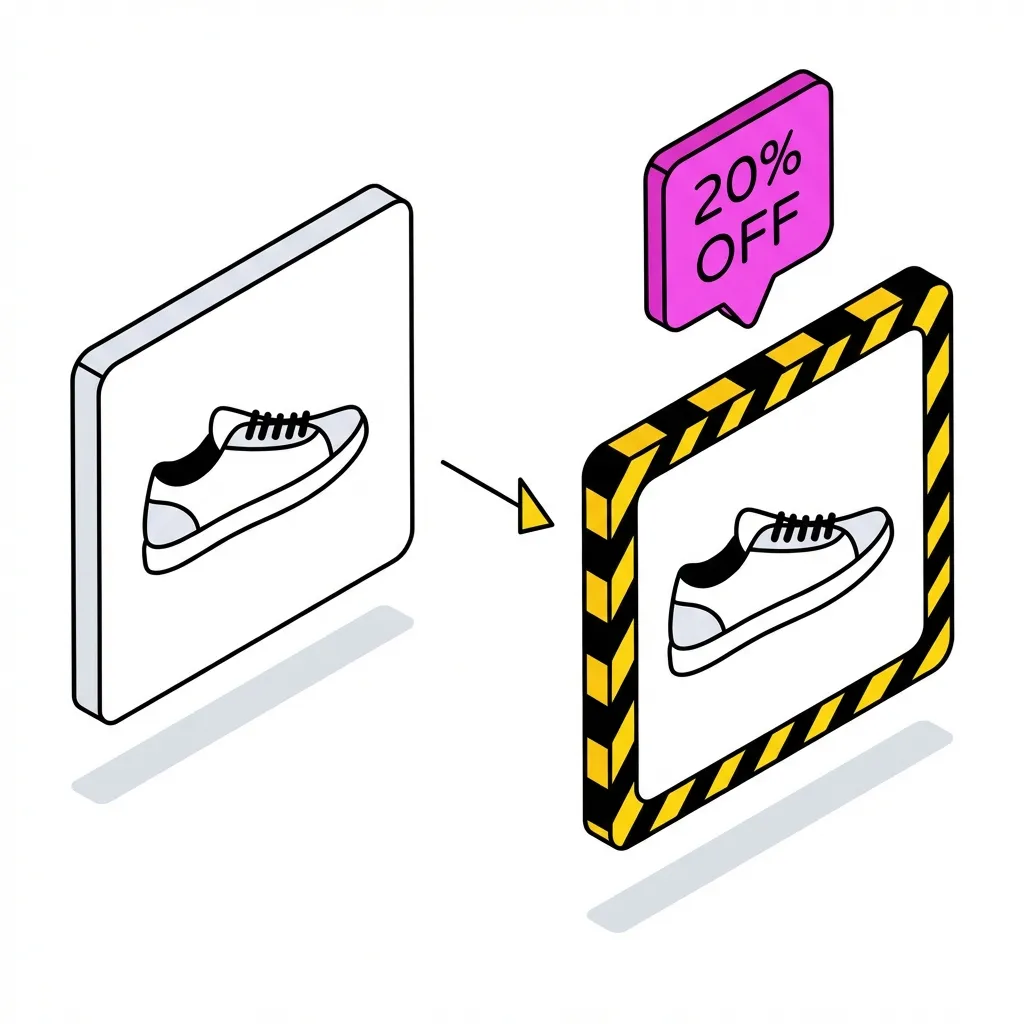
Finally, there is the Creative element. Many brands make the mistake of thinking Catalog Ads mean “ugly white background images.” This is a fast track to banner blindness. While the product image is pulled from the feed, you have control over the frame, the overlay, and the intro card. Successful brands invest in enhancing their feed images or using dynamic overlays (price, “bestseller” badges) to make their catalog ads visually distinct and on-brand.
Component
Function
Key Metric
Product Feed
The source of truth for inventory content
Data Quality Score
Meta Pixel/CAPI
Tracks user behavior and intent
Event Match Quality
Catalog Manager
Organizes products into strategic sets
Product Fill Rate
Step-by-Step: Setting Up Your Catalog for Success
For most Shopify merchants, the setup process is streamlined but requires vigilance. The default “Facebook & Instagram” Sales Channel in Shopify facilitates a seamless API sync. This is the easiest method and ensures that price changes or out-of-stock statuses on your site are instantly reflected in your ads. However, reliance on the default sync can sometimes limit your ability to customize data attributes. For advanced control, many scaling brands opt for third-party feed management tools to create a supplementary, optimized feed. Think of Channable, or DataFeedWatch, for example.
Once your catalog is synced, your immediate priority is Product Sets. Never simply run “All Products” unless you have a tiny SKU count. You need to segment. Go to Commerce Manager > Catalog > Sets and create groupings based on strategy. Common high-performance sets include: “New Arrivals (Last 30 Days),” “High Margin (>70%),” “Winter Collection,” or “Bundle Compatible.” This segmentation allows you to align your Facebook Ads budget with your business goals, rather than letting the algorithm spend on $5 accessories.
Troubleshooting is an inevitable part of the process. You will encounter errors. The most common is “Microdata Mismatch,” where the price on the landing page doesn’t match the price in the feed (often due to currency conversion or variant pre-selection). Another killer is “Image Too Small.” Meta requires high-resolution images (at least 600×600, but ideally 1080×1080). Routinely check the “Issues” tab in Commerce Manager. A healthy catalog interface should show green checkmarks; yellow warnings need to be your Monday morning priority.
Enhancing your feed data goes beyond just fixing errors. It means adding optional attributes that help the algorithm. Adding Google Product Categories, Gender, Age Group, and Material helps Meta’s AI understand exactly what you are selling. The more context you give the system, the better it can match your product to a user with relevant interests. For example, explicitly tagging “Leather” helps match with users who have an affinity for leather goods.
Finally, familiarize yourself with the Commerce Manager interface. It’s not just a settings menu; it’s an analytics tool. You can see which products are being viewed most often via your ads and which ones are driving purchases. This “Catalog Insights” data can inform your broader merchandising strategy. If a product has high views but low purchases in simpler ads, maybe the price point is wrong, or the landing page is broken.
How Advantage+ Catalog Ads Work in the Funnel
The classic use case for Catalog Ads is Dynamic Retargeting. This is the lower-funnel “closer.” A user visits your site, looks at a pair of running shoes, adds them to the cart, but leaves. An hour later, they open Instagram and see those exact shoes, perhaps with a 10% off code overlay. This remains one of the highest ROAS activities in eCommerce. It capitalizes on high intent. However, in a post-iOS14 world, the retargeting pool is smaller, and relying solely on this is a mistake.
The real growth unlocked by Advantage+ lies in DABA (Dynamic Ads for Broad Audiences). This is a prospecting strategy. You tell Meta, “Here is my catalog of best-sellers, find me new customers who look like they would buy these.” You don’t target “Running interests”; you target Broad (no interest targeting) and let the algorithm do the work. Meta uses its massive data set to identify users who are in the market for running shoes, even if they have never heard of your brand, and serves them your most relevant product.
Cross-selling is another powerful lever for increasing Customer Lifetime Value (LTV). If a customer buys a camera from you, you shouldn’t show them the camera again. You should show them lenses, tripods, and memory cards. By setting up detailed product sets and exclusion rules (e.g., “Upsell Set: Lenses” targeting “Purchased: Camera”), you can automate the post-purchase journey. This is crucial for brands looking to increase AOV and maximize profit per customer.
Upselling works similarly but focuses on upgrading the cart value. If a user views the “Basic” version of your software or product, you can retarget them with the “Pro” version, highlighting the additional benefits. This requires careful copywriting in the “Primary Text” of the ad to explain why the upgrade is worth it, while the dynamic image does the visual heavy lifting.
We strongly recommend integrating these strategies into a consolidated Advantage+ Shopping Campaign (ASC). ASC is designed to fluidly move budget between prospecting and retargeting based on where the cheapest conversion is available. While you lose some control over the exact split, the efficiency gains in machine learning generally outweigh the loss of manual granular targeting.
Designing High-Performing Catalog Creatives
“Banner Blindness” is real. If your catalog ads look like generic white-background e-commerce grids, users will scroll past them. To win in 2026, you need to treat your dynamic ads with the same creative rigor as your hero videos. This starts with the image itself. If possible, use lifestyle images in your feed rather than flat lays. A model wearing the jacket converts better than the jacket floating in white space.
Use Advantage+ Creative tools built into Ads Manager. These allow you to automatically add “Info Labels” (like “Free Shipping” or “In Stock”) and “Catalog Info” (like strikethrough prices). Meta can also automatically crop images or create slideshows from multiple images of the same product. These native tools are improving rapidly and are the easiest way to add dynamic movement to static assets.
For brands serious about aesthetics, third-party creative automation tools like Socioh, Marpipe, or Converteo are game changers. These platforms allow you to build “Brandified” templates. You can design a beautiful, on-brand frame with your fonts and colors in Figma, and then programmatically apply it to your entire 500-product catalog. You can create rules like: “If price is < $50, use the ‘Essentials’ green frame. If price is > $100, use the ‘Premium’ black frame.” This consistency builds brand equity even in performance placements.
Pricing Overlays are particularly effective for driving CTR. A dynamic overlay that clearly shows the price (and the discount, if applicable) qualifies the click. Users who click know the price and are okay with it, leading to higher intent on the landing page. It filters out window shoppers who might be deterred by the cost, saving you CPC budget.
Don’t forget to test formats. While the Carousel is the bread and butter of catalog ads, Collection Ads offer an “Instant Experience” (a full-screen mini-landing page that loads instantly). These are fantastic for mobile engagement. Test a “Best Sellers” Collection Ad against a “New Arrivals” Carousel to see which format drives better engagement for your specific audience.
Optimization Strategies for Lower CPA
Efficiency comes from exclusion. The easiest way to lower your CPA is to stop paying to advertise products that don’t convert or have low margins. Exclude low-margin SKUs from your primary prospecting catalog. If you sell a $5 keychain and a $100 bag, and it costs $20 to acquire a customer, selling the keychain loses you money. Create a “High Value” product set that excludes anything under a certain price point or profit margin.
Segment your catalog by Profitability. Groups your “Heroes” (high volume, decent margin) separately from your “Zombies” (low volume, low engagement). You might bid aggressively (Cost Cap or Bid Cap) on your Heroes set to scale volume, while running a low-budget automated campaign for the Zombies just to see if the algorithm can find pockets of demand.
Manage Frequency Caps, especially for retargeting. Seeing the same pair of shoes 50 times in 2 days is annoying, not persuasive. While Advantage+ manages frequency better than manual campaigns, keep an eye on it. If your Retargeting frequency creeps above 5-7 over a 7-day period, your audience is too small for your budget. Pull back spend or expand the retention window (e.g., from 30 days to 90 days).
Routine Match Rate checks are mandatory. Go to Events Manager and check the fidelity of your ViewContent and Purchase events. You want a match quality of 8.0/10 or higher. If it drops, it means you are losing data signal. Often this is due to a disconnect between the SKU ID in Shopify and the Content ID in the Pixel. A web analytics or a specialized Shopify app can usually resolve these discrepancies – and well, we at Midsummer Agency always manage to fix these issues 😀
Plan for Seasonality. Your “Best Sellers” in July are different from your “Best Sellers” in December. Don’t let a static “Best Sellers” product set run forever. Update the logic or manually refresh the items in that set to reflect the current season. During Black Friday, your feed should be optimized to highlight “Giftable” items and deep discounts.
Common Mistakes to Avoid
The cardinal sin of Catalog Ads is showing out-of-stock products. Nothing kills conversion rates faster than clicking an ad for a specific size/color only to see “Sold Out” on the site. Ensure your feed updates at least hourly. If you are using a manual CSV upload, you represent a massive risk. Stick to API syncs or scheduled hourly fetches.
Another frequent error is neglecting the Intro Card on carousels. The first card of a carousel doesn’t have to be a dynamic product. It can be a static image or video that introduces the collection or the brand. Use this real estate to sell the concept (e.g., “The Most Comfortable Summer Linen”) before the user swipes to see the specific products. It sets the context and improves engagement.
Over-segmenting audiences is a relic of the 2018 era. Don’t create separate ad sets for “Men 25-34 Buying Shoes” and “Men 25-34 Buying Socks.” Consolidation is key. The algorithm works best with large pools of data. Group your products into logical business categories ( Mens vs. Womens, or Apparel vs. Accessories), but don’t slice up your audience so small that the machine can’t learn.
Respect the Learning Phase. Every time you make a significant change to a campaign (budget, bid, creative), the algorithm resets. If your Catalog campaign is stuck in “Learning Limited,” it means you aren’t getting enough conversion events (usually 50 per week) for the system to optimize. Solution: Consolidate ad sets to aggregate budget and data, or move your conversion event up the funnel (e.g., optimize for “AddToCart” instead of “Purchase” temporarily).
Finally, check your Landing Pages. For Catalog ads, the link is dynamic: it goes to the specific product page (PDP). Ensure your PDPs are high-converting. If users click the ad but bounce, the issue is often the page, not the ad. Check your load times, mobile responsiveness, and ensuring the price on the page matches the price in the ad.
Scaling with Advantage+ Shopping Campaigns (ASC)
Advantage+ Shopping Campaigns (ASC) represent the future of Meta advertising. They are essentially a “black box” where you input your creative, your catalog, and your budget, and Meta handles the rest. ASC heavily favors catalog creatives because they are data-rich. To scale, you should move a significant portion of your budget (we often see 70-80% success rates) into ASC.
When scaling with ASC, use the 70/30 Rule. Allocate 70% of your budget to proven creatives (including your best-performing Catalog sets) and 30% to testing new concepts. ASC automates this testing to a degree, but you must constantly feed it new static and video assets alongside your catalog to prevent creative fatigue.
Signal Resilience is the hidden key to scaling. As you spend more, you need more data to maintain efficiency. Implementing Conversions API (CAPI) is non-negotiable for scaling beyond $1k/day in spend. It helps recover lost data from browser blockers and iOS restrictions, giving the ASC algorithm the “truth” it needs to find profitable pockets of users at higher volume.
Analyze performance by comparing ASC vs. Manual controls. While ASC usually wins on efficiency, it offers less reporting transparency. Don’t turn off your manual BAU (Business as Usual) campaigns entirely until ASC proves it can hold the ROAS at higher spend levels for at least 2 weeks.
How We Manage Catalog Ads at Midsummer Agency
At Midsummer Agency, we reject the “set it and forget it” mentality often associated with dynamic ads. We believe that automation requires more strategic oversight, not less. Our strategy is data-first, creative-second. (Though if you ask our creative members, they’ll dispute the ranking :D). We start by auditing your product feed line-by-line using specialized tools to ensure every attribute is maximizing its potential.
We understand that a generic product grid doesn’t build a brand. That’s why we deploy custom, proprietary Creative Overlays that align with your campaign cycles. Whether it’s a “Black Friday” border or a “Spring Drop” badge, we ensure your dynamic ads feel as premium and curated as your Instagram Main Grid. We treat your catalog as a canvas, not just a spreadsheet.
Furthermore, we look beyond the platform ROAS. We measure Incremental Lift. It’s easy for dynamic retargeting to claim credit for sales that would have happened anyway. We use lift studies to determine the true value of your catalog spend, ensuring we are acquiring new customers and not just cannibalizing your organic traffic.
Ready to stop wasting budget on the wrong products?
We offer a comprehensive Product Feed & Ad Account Audit to identify exactly where your detailed implementation is leaking revenue. Let us help you turn your inventory into your biggest growth asset – contact us for an audit!
Conclusion
Meta Advantage+ Catalog Ads are no longer just a “nice to have” for eCommerce brands; they are the engine room of modern growth. By automating the matchmaking process between your inventory and your audience, you unlock a level of efficiency and scale that manual targeting simply cannot match. But remember, the machine is only as smart as the data and strategy you feed it.
From ensuring your pixel match rates are impeccable to designing custom overlays that pop in the feed, success requires a blend of technical rigor and creative flair. Don’t settle for default settings. optimize your sets, test your formats, and watch your revenue optimization metrics climb.
The tools are there. The scale is waiting. Open your Commerce Manager today and start building a smarter funnel.