Running a Google Ads account without a regular PPC audit is like driving without a dashboard!
You have no idea what’s going on under the hood, and you could be missing important indicators about an account’s performance.
A PPC audit allows you to see what’s working and what’s not, helping you make data-driven decisions to optimize your campaigns.
Without it, you’re essentially flying blind, potentially wasting valuable ad spend and missing opportunities for growth.
Think of an audit like regular maintenance for your car: if you don’t check the engine, the tires, and the fuel efficiency, your car won’t run as smoothly or as safely.
The same goes for PPC campaigns; by performing an audit, you’re ensuring everything is running at peak performance and making adjustments where needed to avoid costly mistakes.
In this guide, we’ll break down exactly how to perform a comprehensive PPC audit, step-by-step.
What’s a PPC Audit?
A PPC audit is a deep review of your paid advertising account, like Google Ads, to see what’s working, what’s wasting your budget, and where you can improve.
Think of it as a check-up for your campaigns. Just like a car needs regular maintenance, your pay-per-click campaigns need a routine review to make sure they’re running efficiently.
Or, let’s suppose you are acquiring a new client who asks to review his/her Google Ads account.
How Is This Helpful?
As per my experience with clients, especially at the beginning of a collaboration, running a PPC audit is useful for several reasons, such as:
Identify wasted ad spend
Spot underperforming campaigns
Uncover hidden opportunities for growth
Ensure tracking and measurement are working properly
So, now that you know more about what a PPC audit is and why it is fundamental, here’s how to perform a complete PPC account audit, step by step.
First of all, what’s the account’s objective? Is it a lead-gen client or an e-commerce one? Based on these objectives, you’ll need to look into the following important steps.
1. Campaign & Account Structure
Let’s start with the basics: is the account organized logically? What are the main things to check?
Campaigns Structured by Objective
When setting up campaigns, it’s crucial to organize them around specific goals.
For example, separate campaigns for brand terms (keywords directly related to your brand) and non-brand terms (keywords related to the industry or product categories) will give you more control over how your budget is allocated.
Remarketing campaigns can be another standalone campaign focused on bringing back past visitors.
In my opinion, having campaigns organized by objective makes it easier to track performance and optimize each one based on its individual goals.
For instance, you might want to bid more aggressively on brand terms to defend your name from competitors, while using more conservative bids for non-brand keywords to expand your reach.
Ad Groups Grouped by Tightly Themed Keywords
When it comes to ad groups, keyword grouping is your go-to. Each ad group should target a small set of closely related keywords.
For example, if you’re advertising a product, you wouldn’t want one ad group to include broad terms like “buy shoes”, “best shoes”, and “discount shoes.”
Instead, you should have separate groups for “buy running shoes”, “best running shoes”, and “discount running shoes,” with ads and landing pages tailored specifically for each.
In my opinion, this structure makes your ads more relevant to users, which improves Quality Score.
Google rewards advertisers with a high Quality Score because it means the user experience is aligned across the keyword, ad, and landing page.
Use of Naming Conventions for Easy Reporting
Naming conventions are the system of rules you set for naming campaigns, ad groups, ads, and keywords.
A good convention might include details like the campaign goal, target audience, product line, and geographic focus, all in the name of the campaign.
In my opinion, using clear naming conventions makes reporting much easier and more efficient. You don’t have to waste time figuring out what each campaign or ad group is targeting when you pull up reports.
It also helps when collaborating with team members or agencies, as everyone will understand the account structure at a glance. This improves communication and decision-making.
Poor Structure Leads to Messy Data, Poor Quality Scores, and Harder Optimizations Down the Line
If your campaigns aren’t set up properly from the start, it’s like trying to work in a messy office; everything’s harder to find, and you end up wasting time.
Poor campaign structure can result in data confusion (making it hard to track performance accurately), low Quality Scores (which drives up costs and reduces ad visibility), and poor optimization opportunities.
In my opinion, a disorganized account structure is a recipe for poor results. If your ads and keywords aren’t aligned properly, you end up wasting your budget on irrelevant clicks and audiences that don’t convert.
This makes future optimizations more challenging because you’ll be sifting through disorganized data to identify what’s working and what’s not.
2. Conversion Tracking Accuracy
Before you even look at performance, verify that conversion tracking is correctly set up.
Conversion tracking is the cornerstone of any PPC audit. Without proper tracking, you’re essentially flying blind.
You can’t accurately measure whether your ads are delivering the results you want if you’re not tracking the right actions, like form submissions, phone calls, or product purchases.
In my opinion, starting with conversion tracking ensures that every decision you make during the audit is based on accurate, reliable data. Without this, any optimization suggestions or conclusions you draw might be fundamentally flawed.
Checking Google Ads Conversion Actions: Are They Duplicated? Overcounted?
One of the first things to check is whether you have duplicated conversion actions. Sometimes, you might accidentally set up multiple conversion actions for the same event.
For example, if you have separate actions for “form submission” and “thank you page visit” that essentially track the same thing, you could be counting conversions twice.
In my opinion, this is a common mistake and can drastically inflate your conversion metrics, making you think your campaigns are performing better than they actually are.
A clean and accurate conversion setup helps to ensure that you’re measuring actual, unique conversions, not double-counting or misreporting.
Verifying That the Tags Are Firing Using Google Tag Assistant or GTM
After confirming that the right conversion actions are set up, it’s time to verify that the tracking tags are firing correctly when the desired action occurs.
If your conversion tags (via Google Tag Manager or directly on the site) aren’t firing, conversions won’t be tracked at all, meaning you’ll miss out on important data.
In my opinion, using tools like Google Tag Assistant or Google Tag Manager’s preview mode can save you a lot of frustration.
They allow you to test if the tags are being triggered correctly on your site, especially on key pages like the “thank you” or confirmation page. Without confirming this, you can’t trust the data coming from your campaigns.
Matching Conversions with What Your Business Actually Values (Form Submissions, Purchases, Calls)
Sometimes, accounts are set up with conversion actions that don’t truly represent your business goals.
For instance, tracking page visits or clicks on a button as conversions might seem like progress, but they’re not really reflective of your business’s true success metrics.
In a PPC audit, it’s important to make sure that the conversions you’re tracking match what you actually care about.
In my opinion, your conversion actions should be aligned with your bottom-line goals. If you’re running e-commerce, track purchases. If you’re running lead gen campaigns, focus on form submissions or calls.
This way, you ensure that your efforts are aligned with your business’s core objectives, and you’re optimizing for what truly matters.
A PPC Audit is Meaningless if Your Conversions Are Inaccurate
If your conversion tracking isn’t set up correctly, your PPC audit will be based on faulty data. This means any decisions you make, like adjusting bids, reallocating budget, or pausing underperforming ads, might be entirely wrong.
For example, if you’re seeing a high number of conversions but haven’t set up the tracking correctly, you could be overestimating the effectiveness of your ads.
In my opinion, accurate conversion tracking is the foundation of a successful audit. Without it, your PPC optimization efforts will be based on incomplete or inaccurate data, leading to wasted spend and missed opportunities.
3. Campaign Settings
Incorrect settings can significantly impact campaign performance.
Here’s a checklist to help ensure you’re on the right track:
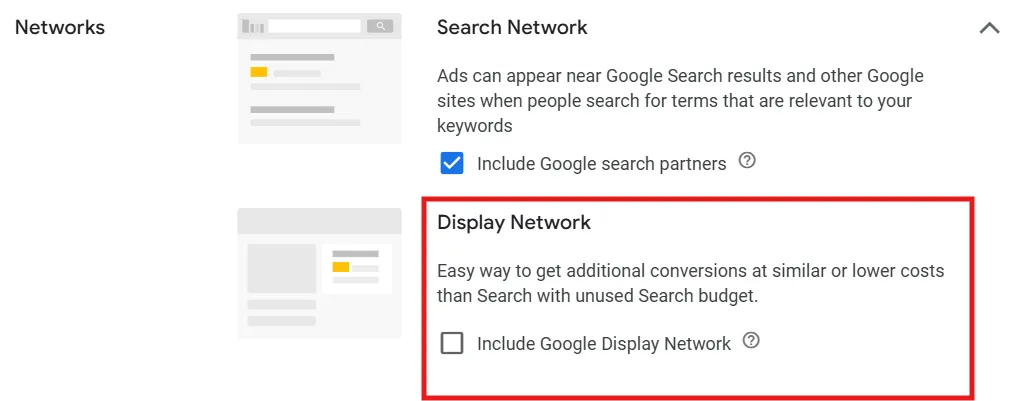
Networks
Make sure that your Search campaigns don’t include the Display Network, unless you specifically intend to use Search Partners or Display Select. Combining Search and Display can dilute the focus and lead to less targeted results.
Make sure the Display Network box stays unchecked, unless you really want to use it for a specific reason.
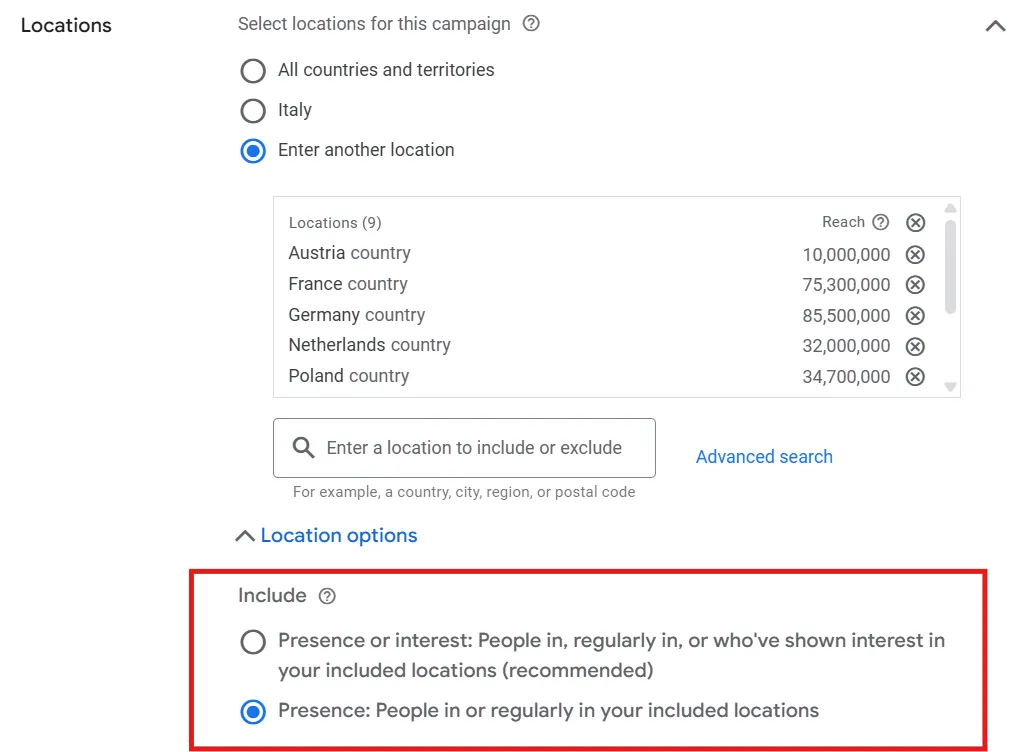
Location Targeting
Always choose the “Presence” option rather than “Presence or Interest” unless you’re running campaigns focused on tourism or targeting international audiences.
The “Presence” option ensures you’re reaching users who are physically located in the area you want to target, while the “Presence or Interest” option can broaden the audience unnecessarily.
For a more specific Location Targeting, choose Presence.
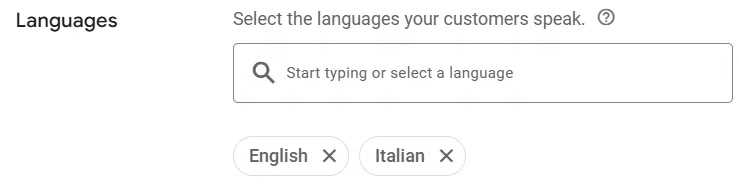
Language Targeting
Align your language targeting with the languages your customers speak, not just the default “All languages.” If your customers speak specific languages, targeting those will help you reach the right audience and improve engagement.
Target each and every language spoken by your audience.
Conversion Goal
In Google Ads, determining what actions you want users to take on your website or app after clicking your ad is essential for aligning your campaigns with your business goals.
These actions could include purchases, sign-ups, or form submissions, and setting conversion goals helps track and optimize those outcomes.
Google Ads uses these goals to optimize your campaigns by automatically adjusting bidding and targeting to focus on users who are most likely to complete the desired action.
You can set these goals at two levels:
Account Level: These goals are applied to all campaigns within your account, providing a consistent approach across your entire account.
Campaign Level: Setting goals at the campaign level allows for more specific optimization, catering to the unique objectives of each campaign.
Campaign-specific goals enable you to fine-tune your strategy and tailor the optimization for different types of campaigns, whether it’s driving sales, generating leads, or increasing website engagement.
Age Exclusion
Age exclusion in Google Ads refers to the ability to prevent your ads from being shown to certain age groups.
This setting allows you to target specific age ranges or exclude others, helping you optimize your ad spend and ensure you’re reaching the most relevant audience.
For example, if you’re running a campaign for a product or service that is primarily suited for adults between 25 and 40, you can exclude age groups outside of this range, such as those under 18 or over 60.
This can help improve your campaign’s effectiveness by focusing your budget on users who are more likely to convert based on their age.
I’ve tested this feature myself, and it really helped improve the quality of leads in one of my clients’ accounts, which was primarily lead-gen.
For a more specific targeting, enable age exclusion and check all boxes that apply to your needs.
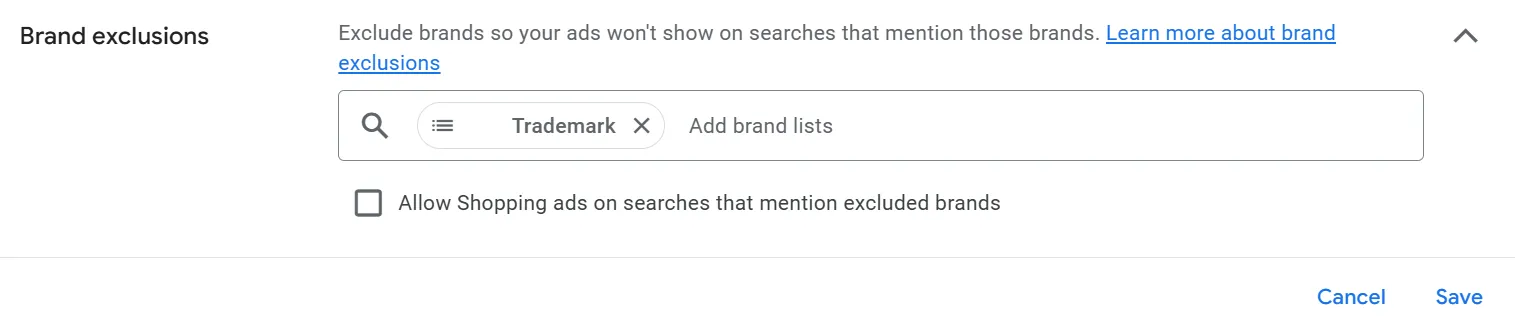
Brand Exclusion
Brand exclusion in Google Ads allows you to prevent your ads from appearing in search results that include specific brand names. This feature is available for both Search Network (AI MAX) and Performance Max campaigns.
By using brand exclusions, advertisers can better control where their ads are shown, ensuring they only appear for relevant searches.
When a brand exclusion is applied, your ads won’t show up in results that include the excluded brand name, helping to refine your targeting and improve ad relevance.
Exclude all brands you do not want your ads to appear for.
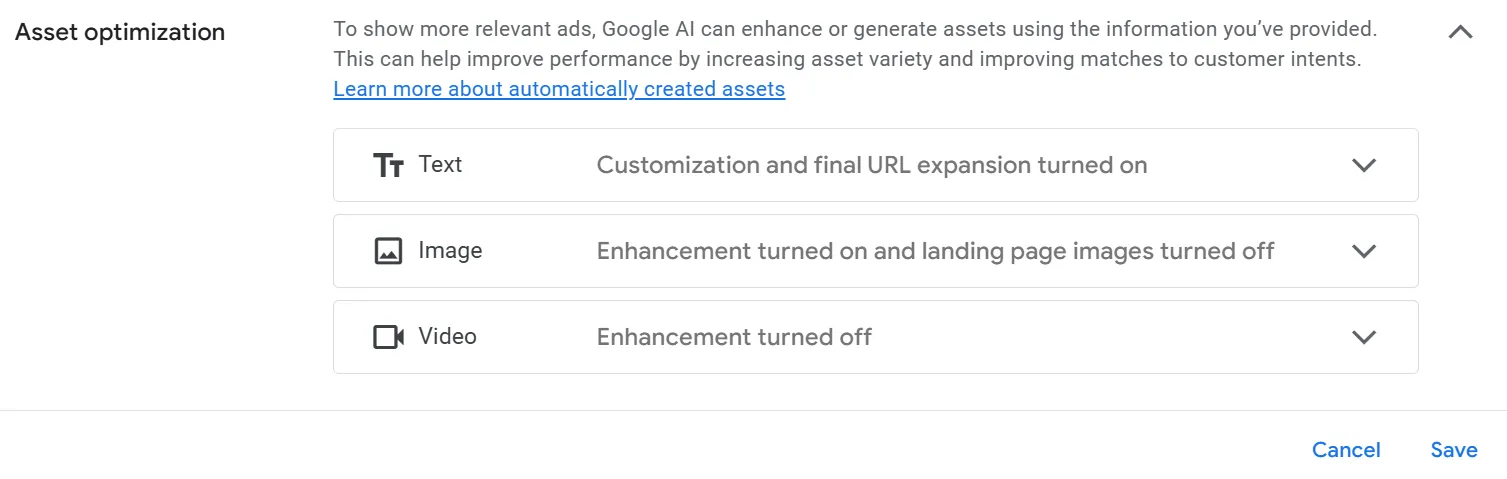
Asset Optimization
Please watch out for this feature; in fact, this is a new AI tool added from Google that generates assets using the information you provide. This is available on Search, Performance Max, and AI Search Max campaigns.
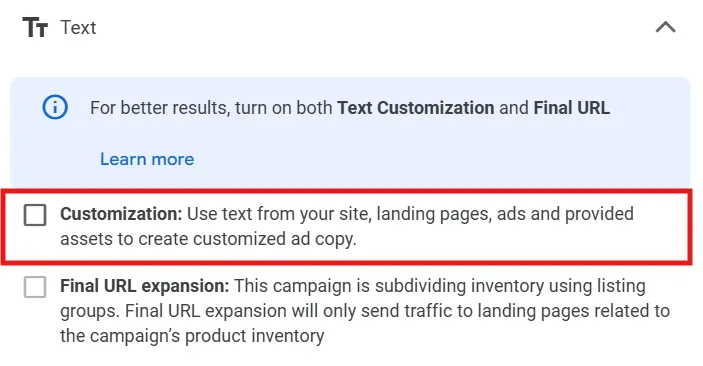
Text Customization
Text customization, formerly known as automatically created assets, is another feature to be careful of.
This lets you automatically update your ad text based on factors like user searches, business data, or the time of day, making your ads ‘’more relevant and engaging’’ (according to Google).
It’s now mainly used in Performance Max campaigns, though. By enabling it in your campaign settings, Google can generate headlines and descriptions directly from the content on your landing pages, optimizing ad copy for better performance.
Final URL Expansion
Final URL expansion is a feature that allows Google Ads to dynamically adjust the landing page users are sent to after clicking your ad, based on their search query.
It might be good to test, as it may improve CTR and reach; in fact, you may reach a wider audience and potentially capture traffic that might have been missed with a static final URL.
On the flip side, you have less direct control over where users land, as Google chooses the most relevant page. Also, there’s a possibility that Google might direct users to pages that are not ideal, potentially leading to a lower conversion rate or a negative user experience.
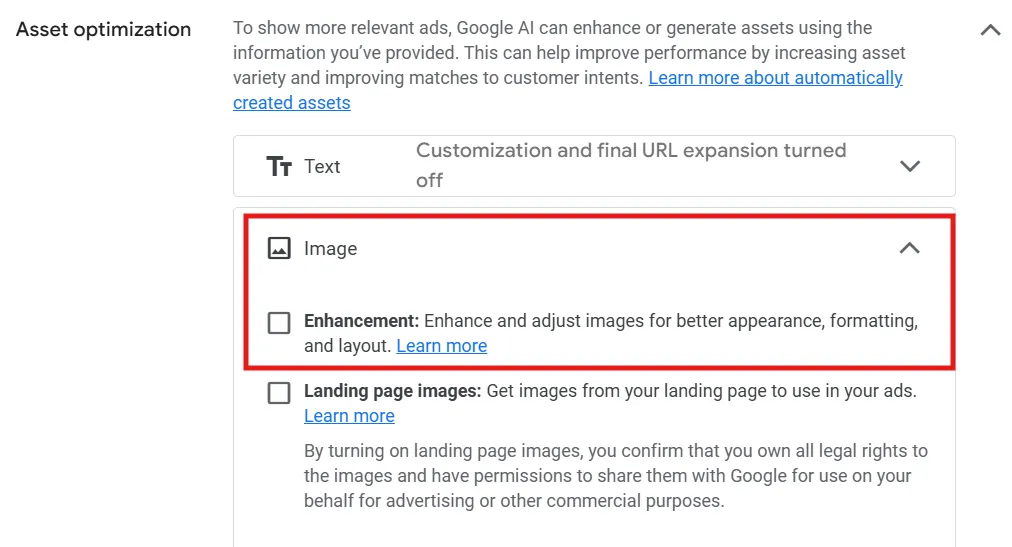
Image Enhancements
In particular, the Image Enhancements automatically optimize images for different formats and placements within the campaign. I’d recommend turning off, especially the ‘Landing page images’ feature.
If this is enabled, Google can automatically pull images from your landing page and use them as ad assets in your Performance Max campaigns.
This is not good, especially if you work with clients who might see creatives they never approved. In fact, you’re gonna lose control over brand identity, and moreover, Google might select poor-quality, incoherent or wrong-size images.
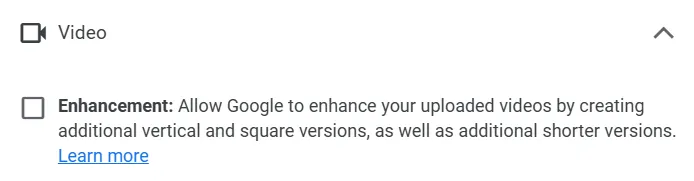
Video Enhancement
With this feature, you can get videos in different orientations from your original videos to better fit the screen on which they appear.
Here, again, the Google AI intelligently flips or extends your video in new aspect ratios while preserving the video’s original content. Additional versions of your video run automatically if they pass a quality review.
I would recommend testing this functionality as for some clients this worked pretty well. Remember, the secret is always testing.
4. Keyword & Match Type Audit
To improve your Google Ads performance, here’s a structured approach to reviewing and optimizing your keywords:
Identify Underperforming Keywords with High Spend and Low Conversions
Go through your active keywords and filter for those that have high spend but low conversions. These are likely draining your budget without yielding results. Consider pausing them.
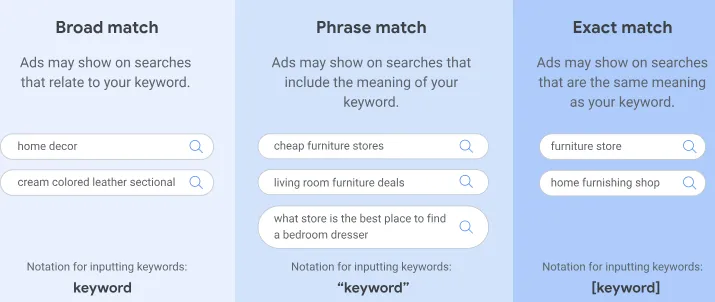
Review Match Types
Excessive use of broad match keywords can lead to irrelevant searches and wasted spend. Narrow your match types by using phrase match or exact match to improve targeting accuracy. Broad match should only be used selectively when there’s a clear intent or when testing new keywords.
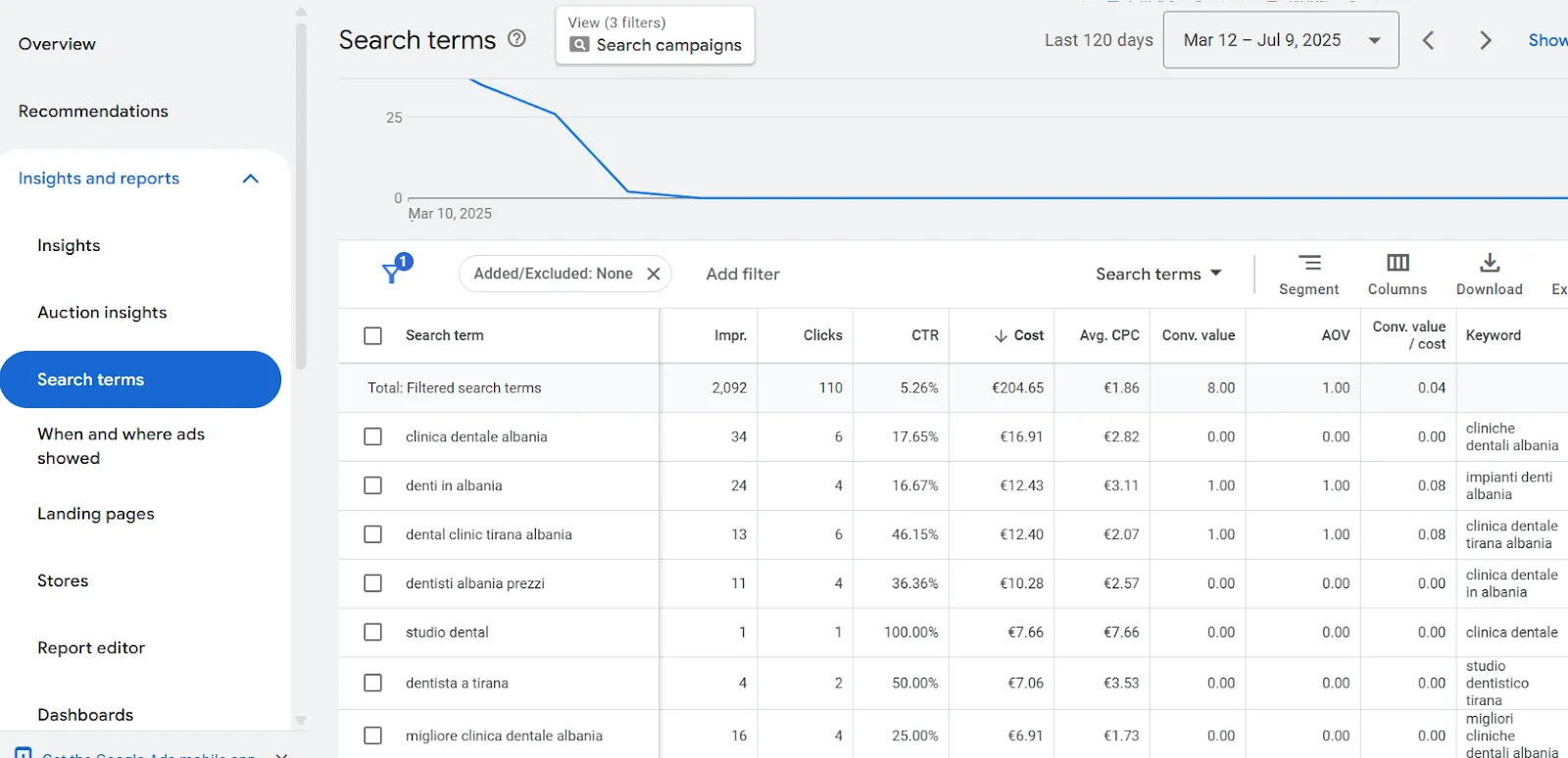
I’d recommend reviewing this report regularly to find irrelevant or non-converting terms that are triggering your ads. Usually, I run an SQR every 2 weeks, but it depends on the account.
The Search terms report on Google Ads helps you identify irrelevant keywords triggering your ads. You can exclude them to optimize ad spend.
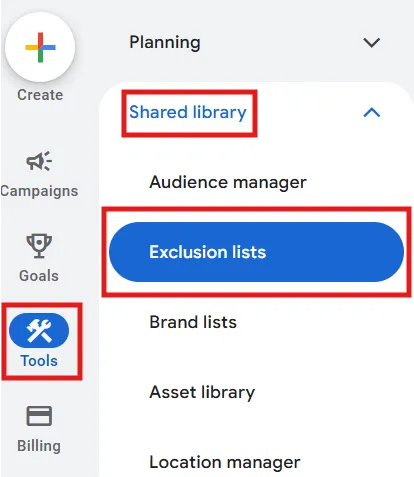
Negative Keyword List
This is a great way to reduce wasted spend on irrelevant clicks; in fact, it helps you filter out searches that are not relevant to your products or services.
By excluding terms that are unlikely to lead to conversions, you ensure that your ads are shown only to users who are more likely to be interested in what you offer
Consequently, when you add negative keywords, it ensures that your ads aren’t triggered by search queries that don’t align with the message or intent of your campaign.
In my opinion, this improves the relevance of your ads, which can positively impact your click-through rate and Quality Score.
You can find your negative keyword lists on the sidebar menu of the Google Ads platform.
5. Bidding Strategy Alignment
When running Google Ads, it’s essential to ensure that your bidding strategy is not only effective but also aligned with your campaign objectives.
You need to ask yourself the following questions:
Is the Right Bidding Strategy in Place?
As you might know, different bidding strategies serve different purposes. For instance, Maximize Conversions is ideal for driving as many conversions as possible, while Target ROAS (Return on Ad Spend) focuses on maximizing revenue for every dollar spent.
On the other hand, Manual CPC offers more control over individual keyword bids. The bidding strategy you choose must reflect your campaign’s overall goal.
Are Your ROAS or CPA Targets Realistic?
Setting ambitious ROAS or CPA targets can hinder your campaign’s performance. My recommendation for you, if you are reading this blog post, is to take a look at your historical data and ask yourself: are the targets you’ve set based on realistic expectations?
If your targets are far beyond what you’ve achieved in the past, the campaign may struggle to meet them. Set targets that challenge your campaigns without being unrealistic, and adjust them as needed based on performance.
6. Ad Copy & Assets Review
When it comes to Google Ads, the quality of your ad copy and creative assets plays a critical role in driving user engagement and conversions.
A well-optimized ad copy and creative assets can significantly improve your click-through rate (CTR), quality score, and overall campaign performance.
Do Headlines Cover Key Product Names, Brand Terms, and CTAs?
When reviewing your Google Ads headlines, it’s essential to ensure that they effectively cover key product names, brand terms, and clear calls to action (CTAs).
Your product names should be featured to capture user interest and improve relevance, especially for search queries related to specific items.
Another tip that I’d recommend is incorporating brand terms that help strengthen brand recognition and ensure your ads are competitive in searches for branded products.
Additionally, don’t forget a strong CTA in the headline, such as “Shop Now”, “Learn More” or “Get a Free Quote”, which encourages users to take immediate action.
Are You Using Ad Assets (a.k.a. Extensions)?
I’d suggest ensuring you’re using all available ad extensions in Google Ads to maximize the ad’s visibility and improve the CTR. Check that the account has the following:
Sitelink extensions: these allow you to include additional links to specific pages on your website, providing users with more options to engage with your content.
Callout extensions: these enable you to highlight unique selling points or promotions, such as “Free Shipping” or “24/7 Support,” adding more value to your ad.
Structured snippets: these provide detailed information, such as product categories or services, helping users quickly understand what you offer.
Additionally, image extensions: these can enhance your ads visually, making them more eye-catching and engaging.
By clicking “Assets” on the sidebar menu, you will find a wide range of ad assets that increase the chance your ads will convert.
7. Audience & Demographics Targeting
When conducting an audit of your audience and demographics targeting in Google Ads, I’d suggest you ensure that your campaigns are effectively reaching the right people.
Whether you’re using audiences in Observation or Targeting, I would advise you to check this information:
Performance by Audience Segment: Are Some Converting Better than Others?
By analyzing the conversion rates of different audience segments, you can identify which groups are delivering better results.
If certain segments, such as in-market/affinity audiences or custom segments, are outperforming others, consider optimizing or pausing/excluding the worst-performing ones.
This is especially important for targeting repeat customers or sending tailored ads based on past purchases.
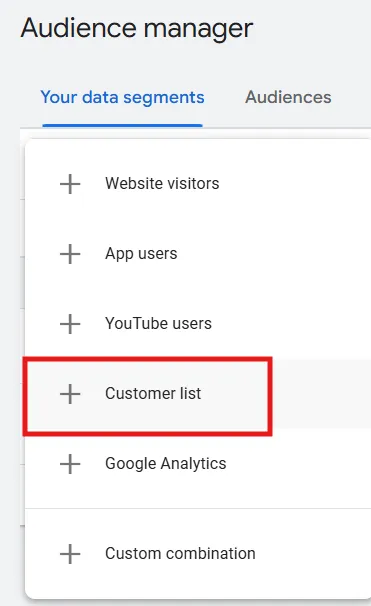
Verify that the account is not using outdated or inaccurate contact information, which could result in wasted ad spend or poor engagement.
A pro tip from me would be to syncronize the e-mail marketing platform audiences with Google Ads so they’re allways up to date.
Demographic Exclusions
Also, review demographic exclusions. If certain age groups or household income (available in the U.S. only) tiers are way off in performance, consider bid adjustments or exclusions.
8. Location Performance
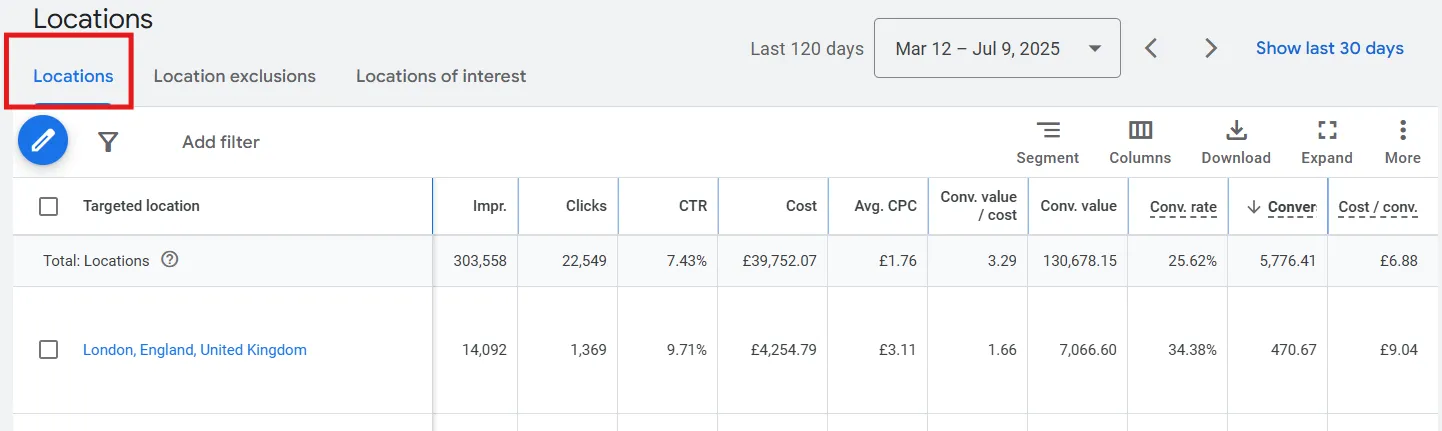
By analyzing how the ads perform in different geographic locations, you can ensure that the budget is being spent efficiently, targeting areas that generate the best results.
I’d recommend reviewing city and region-level performance and excluding poor performers.
If you notice that certain locations are consistently underperforming or generating irrelevant traffic, consider excluding those areas from your campaigns.
The experience users have once they click on an ad directly impacts the campaign’s performance.
Ask yourself these questions:
Is the Message Aligned with the Ad?
The message on the landing page should match the promise made in your ad.
If your ad promotes a discount or highlights a specific product feature, the landing page should immediately reflect that messaging to meet user expectations.
I had a client who asked to have a review of their ads and I found out that some campaigns were not converting properly, as the landing page did not reflect what the ad copy was stating.
Misalignment between the ad copy and the landing page can increase bounce rates and decrease your Quality Score, as it signals to Google that your ad is misleading or irrelevant.
Is the Page Mobile-Friendly and Fast?
One thing that I spotted the most among websites is that more and more users access websites from mobile devices, so it’s essential that landing pages are optimized for mobile viewing (and unfortunately, very often they are not).
A page that’s not mobile-friendly can result in a frustrating user experience, causing visitors to leave without converting.
Additionally, I would say that page speed is crucial; if your page takes too long to load, users are likely to abandon it.
When I edited one Google Ads account, I tested the speed of some pages within the website, and it resulted in a lot of ‘error 404’ or redirects, or it took approximately 10 seconds to open a page.
Fast-loading, mobile-responsive pages enhance the user experience and can improve your conversion rate, while also positively impacting your Quality Score.
10. Budget Allocation & Waste Analysis
One of the most important things to check is the account’s budget, which plays an important role in the success of the campaigns.
Too often, I noticed that some accounts we audited focused solely on individual campaign performance, but a broader perspective is needed to truly optimize your spend.
It’s essential to regularly assess how the budget is being distributed across campaigns to avoid waste and ensure that high-performing campaigns receive adequate funding.
Are Low-Performing Campaigns Draining Most of The Spend?
One of the first things to check when reviewing the budget allocation is whether any low-performing campaigns are consuming an outsized share of your budget.
As per my experience, often, campaigns that aren’t converting or meeting the KPIs are still eating up significant resources, which reduces the funds available for more successful campaigns.
To avoid this, I’d suggest identifying campaigns that have a high cost per conversion or low ROAS, and if these metrics aren’t improving despite optimizations, it might be time to reallocate funds elsewhere.
Are Best-Performing Campaigns Being Underfunded?
While it’s important to address underperforming campaigns, it’s equally important to ensure that the top-performing campaigns are receiving enough budget to drive results.
High-converting campaigns should be prioritized and funded adequately to maximize returns. If you notice that campaigns with a high conversion rate, low CPA, or high ROAS are being underfunded, it’s time to shift resources toward these campaigns.
Do Brand vs. Non-Brand Campaigns Have the Right Balance?
Brand and non-brand campaigns are two key components of any account but they require different budget considerations.
Brand campaigns are typically more cost-effective since people already know your brand and are specifically searching for it, leading to higher conversion rates at a lower cost.
Non-brand campaigns, however, are typically more competitive and can have a higher cost per click, especially if you’re targeting competitive keywords.
A common mistake that I often spot is underfunding non-brand campaigns in favor of brand campaigns, assuming the brand campaigns will generate most of the traffic.
In reality, both types of campaigns are essential for driving a balanced strategy:
Brand campaigns build on existing customer interest and drive direct sales, while non-brand campaigns help attract new customers and expand your reach.
My recommendation for you would be to make sure you’re not relying too heavily on one over the other. Review the budget allocation and adjust it for each type of campaign as necessary.
Is Your Performance Max or DSA Campaign Cannibalizing Search?
If the account you are auditing is running Performance Max campaigns or Dynamic Search Ads (DSA) alongside traditional Search campaigns, you may notice some overlap in targeting.
Performance Max campaigns are designed to run across all Google inventory (Search, Display, YouTube, etc.), and DSA campaigns dynamically target user searches based on your website content.
While these campaigns can be incredibly effective in reaching new customers, they may sometimes end up competing with your existing Search campaigns.
To analyze this, compare the performance of your Performance Max or DSA campaigns against your standard Search campaigns. Are they driving quality traffic, or are they overlapping with your Search campaigns and cannibalizing conversions?
I would recommend checking the URLs: are URLs targeted in Search Campaigns excluded from the DSA and PMAX campaigns?
This will help prevent cannibalization and allow each campaign type to reach its optimal audience.
Wrapping Up: Make PPC Audits a Habit
A proper PPC audit isn’t just about fixing what’s broken. It’s about refining your strategy, cleaning up noise, and getting the most out of every dollar spent.
I’d suggest you can do this at the very least or yearly. You’ll uncover new trends, correct tracking issues, and stay ahead of platform changes.
And don’t forget, Midsummer Agency is here to help. Explore our PPC services or reach out for a custom audit, and we’ll dig deep, clean up the mess, and help your Google Ads account perform the way it should.