When it comes to running successful Google Ads campaigns, A/B testing is one of the most powerful tools you can use to refine your strategy, increase conversions, and get the most out of your ad spend.
Whether you’re a seasoned marketer or just getting started, A/B testing Google Ads offers an actionable way to optimize your ads and landing pages, leading to better performance and improved results.
But how do you get started with A/B testing in Google Ads? And what exactly is A/B testing in the context of Google Ads campaigns?
In this guide, we’ll explore everything you need to know about how to A/B test on Google Ads, including step-by-step instructions, real-world examples, and tips on A/B testing landing pages on Google Ads, so you can boost your ad performance, reduce waste, and achieve your marketing goals more effectively.
From understanding the basics to discovering advanced testing strategies, we’ll dive deep into the world of A/B testing in Google Ads, so you can start optimizing your campaigns for greater success.
What Is A/B Testing in Google Ads?
A/B testing, also known as split testing, is a powerful technique for comparing two versions of an element within a Google Ads campaign to determine which one performs better.
It allows marketers to experiment with various components of their campaigns, such as ad copies, keywords, landing pages, or calls-to-action, and make data-driven decisions based on the results.
In Google Ads, A/B testing is primarily used for two key areas:
Ads: This involves testing different versions of your ads to see which copy, headline, description, or call-to-action (CTA) generates the highest click-through rate (CTR) and conversion rate.
For example, you could test two different headlines to see which one resonates more with your target audience.
Landing Pages: After a user clicks your ad, they are typically directed to a landing page. A/B testing landing pages involves testing different page designs, content, forms, or images to find out which version leads to more conversions.
For instance, you might test a landing page with a short form versus a longer form to see which one results in more sign-ups or purchases.
The beauty of A/B testing lies in its simplicity and effectiveness. Instead of guessing which ad copy or landing page will perform better, you create variations of the same element and let the data tell you what works.
Google Ads splits traffic between the two variations, collects data, and then helps you analyze which version had the better performance in terms of the chosen metrics (CTR, conversions, cost-per-click, etc.).
Ultimately, A/B testing in Google Ads is a way of experimenting with different approaches to see what works best, ensuring that you’re not just following best practices but actively improving your campaigns based on real, actionable data.
Why Should You A/B Test on Google Ads?
A/B testing is all about making your Google Ads campaigns more effective by continuously refining and optimizing key elements.
This powerful technique allows you to test variations of different components of your ads and landing pages, so you can make data-driven decisions rather than relying on guesswork.
Let’s break down the specific ways A/B testing can enhance your campaigns.
Identify What Works Best
One of the primary benefits of A/B testing is the ability to pinpoint what truly resonates with your target audience.
Through A/B testing, you can experiment with different combinations of ad elements like headlines, descriptions, call-to-action (CTA) buttons, and landing page designs.
By testing multiple variations, you can identify which components drive the best performance, whether it’s a more engaging headline or a clearer, more compelling CTA.
For example, you might try different headlines such as:
“Get Your Free Trial Today!”
“Start Your Journey with a Free Trial”
You may find that one version leads to higher click-through rates and more conversions, giving you valuable insights into how you can refine your messaging.
A/B testing ensures that you’re always working with the best possible version of your ads, allowing you to optimize content based on real data, not assumptions.
Boost Conversion Rates
Conversion rate optimization (CRO) is another major advantage of A/B testing.
By continuously optimizing both your ads and landing pages, you can significantly increase the chances that visitors will complete desired actions, such as signing up for your service, purchasing a product, or filling out a form.
For instance, you can A/B test your landing pages to see whether a short, concise form or a detailed, multi-step form converts better.
Alternatively, you can test how the design of the landing page, such as the positioning of a CTA button or the color scheme, affects conversion rates.
With each test, you’ll be able to make adjustments based on actual user behavior, ensuring that your website and ads are designed in the most effective way to guide visitors toward completing the actions that matter most to your business.
Higher conversion rates mean that you’re getting more out of the same amount of traffic, which ultimately boosts your overall campaign success.
Make Informed Decisions
A/B testing eliminates the need for guesswork by providing you with data-backed insights.
Instead of relying on intuition or industry trends to determine what works, you can gather concrete evidence on which elements of your campaign are performing well and which need adjustment.
For example, instead of guessing whether changing the CTA on an ad will increase conversions, you can run a test where half of your audience sees one version of the ad and the other half sees a different version.
The data will reveal which CTA drives more clicks or conversions, giving you the knowledge to make informed decisions going forward.
This removes any subjectivity or guesswork from your decision-making process, allowing you to confidently move forward with strategies that have proven to be effective.
Improve ROI
The ultimate goal of any marketing campaign is to achieve a high return on investment (ROI). By optimizing your campaigns through A/B testing, you can achieve higher CTR and conversion rates, which directly contribute to a better ROI.
When you test and optimize your ads and landing pages, you identify the most effective combinations, allowing you to focus your budget on what works best.
For example, if your tests show that certain headlines, ad copies, or landing page designs lead to better conversions, you can allocate more of your budget toward these high-performing elements.
This ensures you’re not wasting money on ads that don’t perform and instead are investing in strategies that drive results.
Furthermore, as you optimize your campaigns over time, you’ll gradually lower your cost-per-conversion and increase your return on ad spend (ROAS).
Pros and Cons of A/B Testing in Google Ads
Improved Performance
A/B testing helps identify winning ad creatives, keywords, ad copy, and landing pages, leading to better conversion rates and overall campaign performance.
Data-Driven Decisions
Rather than relying on gut feeling, A/B testing gives you concrete insights to guide your decisions.
Cost-Efficiency
By continually improving your ads and landing pages, you can increase your return on investment by reducing wasted ad spend.
Time Investment
It takes time to create variations, run tests, and analyze results. While the process is valuable, it requires effort.
Need for High Traffic
A/B tests call for sufficient traffic to reach statistical significance. Low-traffic campaigns might not provide reliable results in a short time.
Potential for Inconclusive Results
Sometimes, the results of an A/B test can be inconclusive if the changes made don’t significantly affect performance.
How to A/B Test on Google Ads: Step-by-Step Guide
Step 1: Define Your Objective
Before diving into A/B testing landing pages on Google Ads, you need a clear objective. Are you trying to increase clicks, drive more conversions, or lower your cost-per-click (CPC)?
Having a specific goal will help you determine which elements to test and measure success.
Step 2: Select What To Test
You can run A/B tests on different parts of your Google Ads campaign:
Ad Copy
You can test different headlines, descriptions, or CTAs to see what resonates most with your audience.
Landing Pages
You can A/B test the layout, design, copy, or form placement on your landing pages to see what drives the highest conversions.
A tip from me: make sure that the elements you’re testing are significant enough to impact performance.
What we haven’t mentioned yet is that you can also test other elements like campaign types. Let me guide you through it.
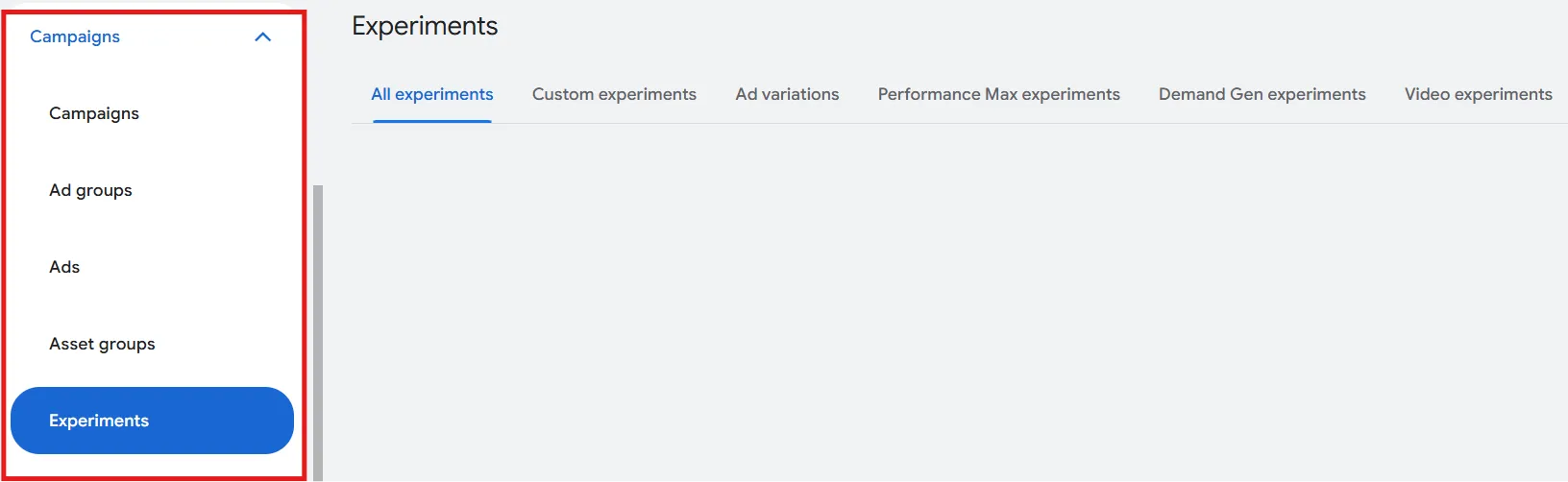
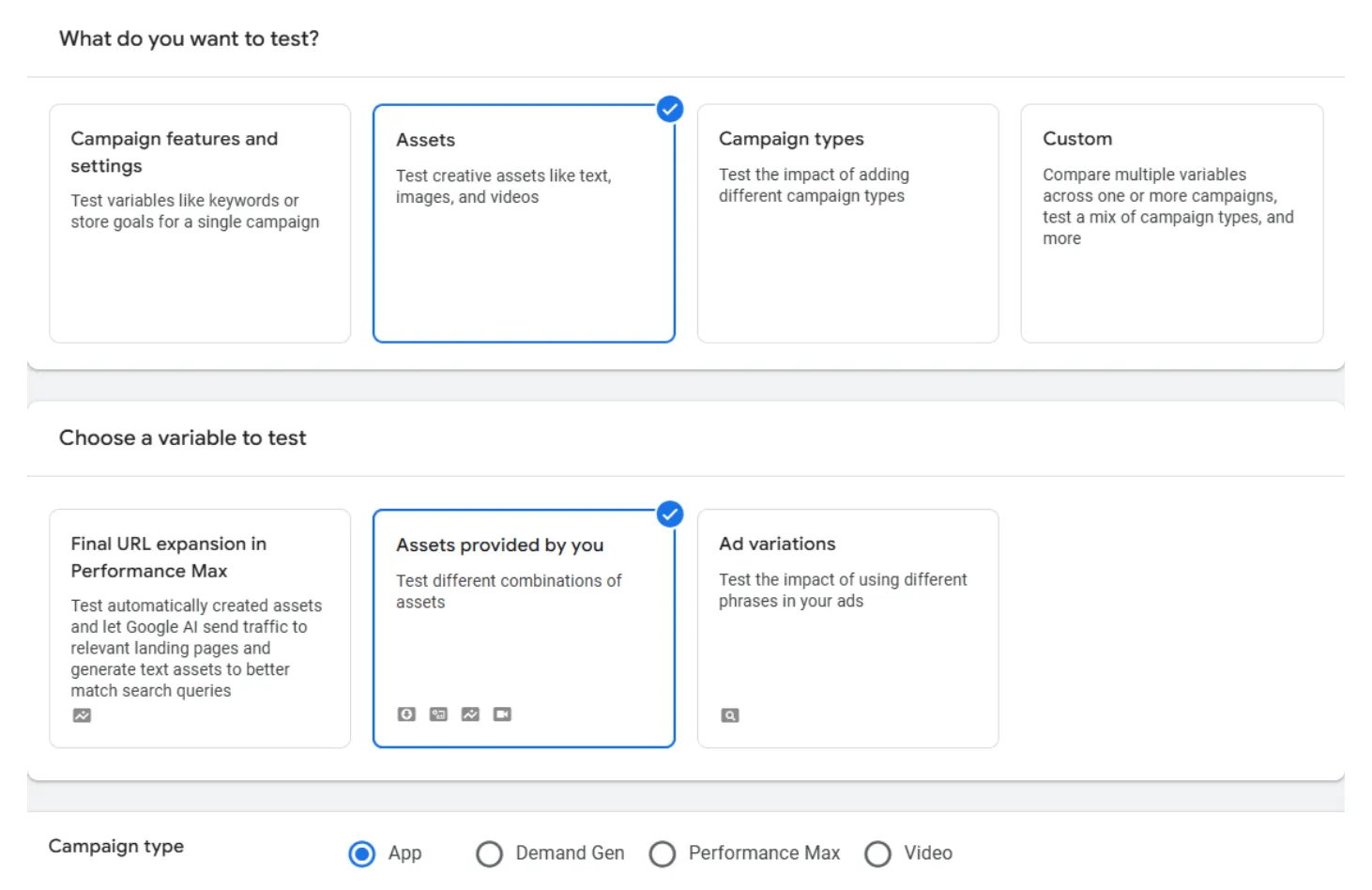
Here is a screenshot I took from one Google Ads account. Once you select the ‘Experiments’ tab, you may wonder what you need to choose from a variety of options:
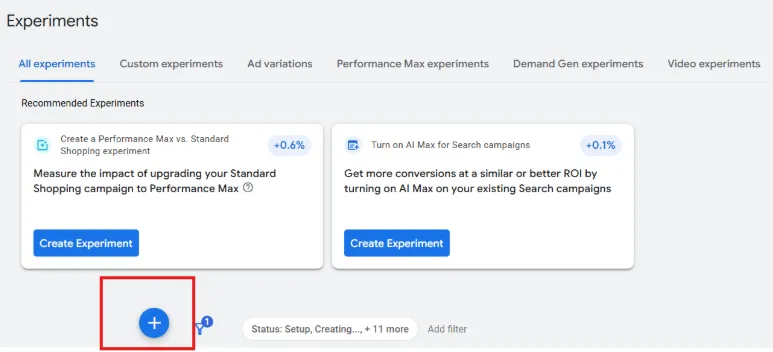
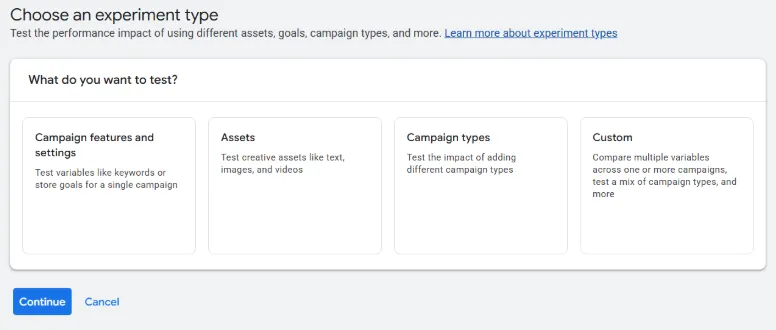
Let’s go through each option gradually. Once you click the ‘’+’’ sign you’ll be able to choose from a variety of options:
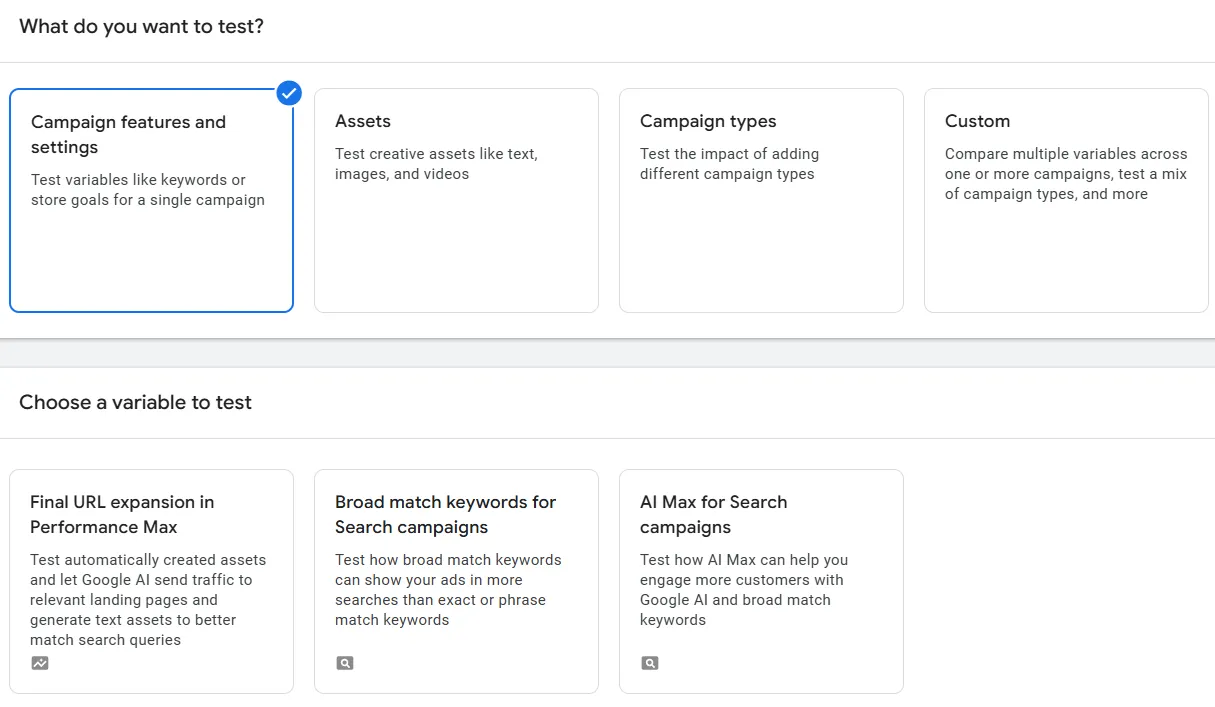
Campaign Features and Settings
Here, you can select ‘Final URL expansion inPerformance Max’ if you want to test automatically created assets, letting Google AI send traffic to relevant landing pages and generate text assets to match search queries.
You can also test how broad match keywords can show your ads in more searches than exact or phrase match keywords. This may help you understand if switching to broad match is a good idea without affecting your overall campaign performance.
The third option is about the new AI Max feature: you can test how it can help you engage more customers compared to a standard search campaign.
Assets
Here you can select the ‘Asset provided by you’ option, which is a test that works on Demand Gen, App, Video, and Performance Max campaigns.
You’ll select a control campaign and a treatment campaign, add or remove videos for the treatment arm, and set a success metric like Click-through rate or Absolute brand lift to evaluate asset performance.
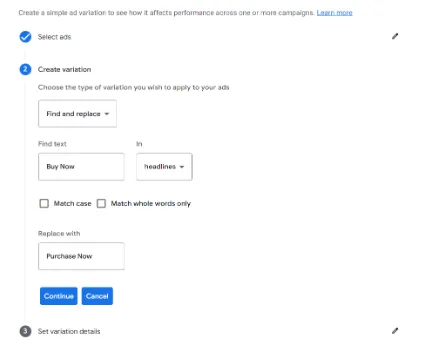
Finally, one of the most used experiments is the ad variations, which let you test the impact of using different phrases in your ads. Here, you just need to select the ad you want to run the experiment on, and then you create the variation:
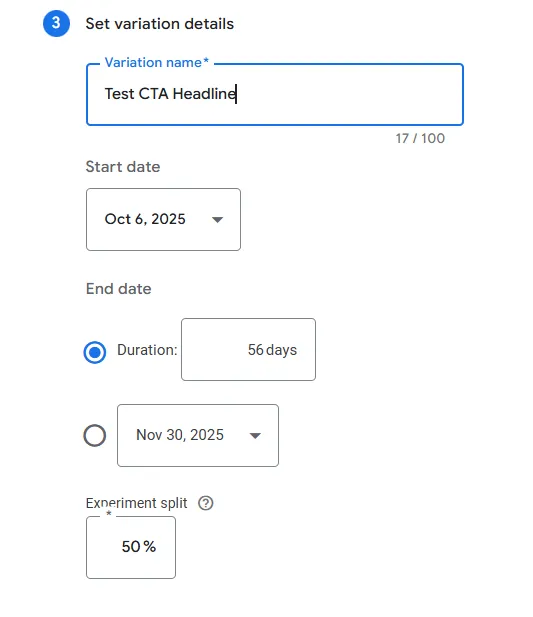
Next, you need to select the duration. Google recommends 56 days, but I would recommend a minimum of two weeks and a maximum of 6 weeks, as the platform optimizes after 30 days.
When it comes to splitting the budget, I would recommend a 50% split. This approach allocates half of the original campaign’s budget and traffic to the experiment, allowing you to test new ad copy, promotions, or URLs in a controlled environment and gather accurate performance data.
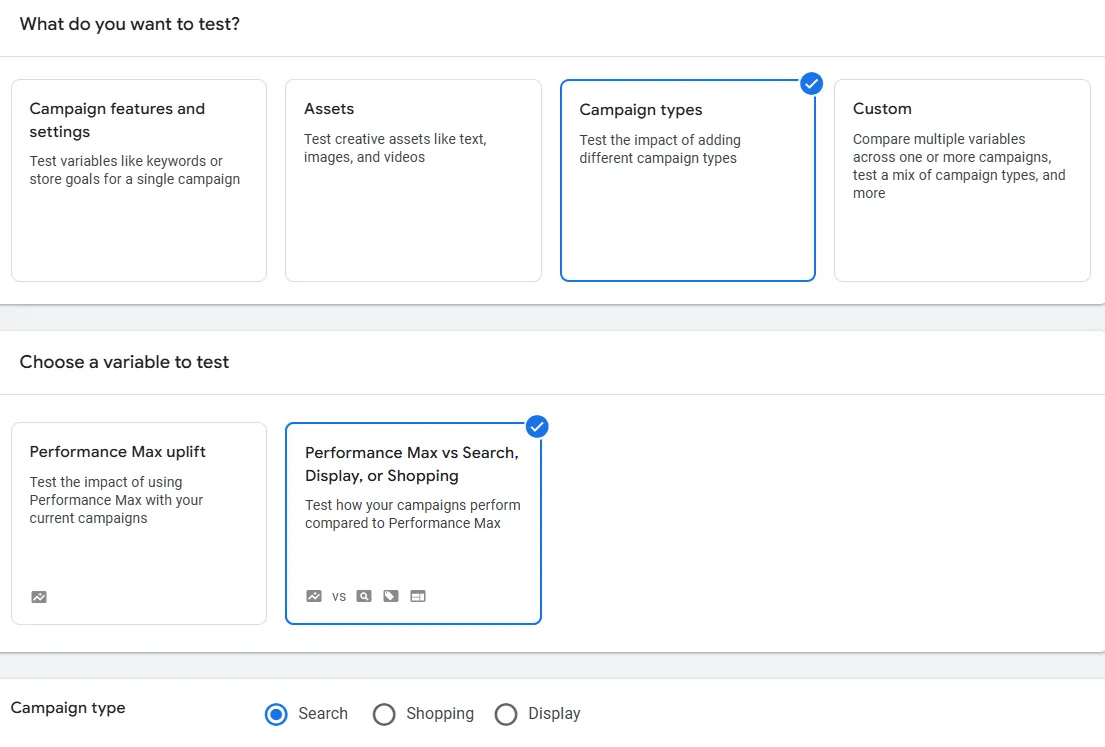
Campaign Types
Here you can test the impact of adding different campaign types without affecting the current campaign. You can test the impact of testing the Performance Max campaigns or test how your campaigns perform (search, display, or shopping) compared to the Performance Max one.
Step 3: Create Variations
For accurate A/B testing on ads, create at least two variations: the original version (the “control”) and the modified version (the “variant”). For example, if you’re testing ad headlines, try changing just one headline while keeping everything else the same.
For A/B testing on landing pages, you can create different versions with subtle changes (like different CTA buttons or different headline wording) or more substantial changes (like a completely different layout). The key is to isolate one element at a time to understand its effect on performance.
Step 4: Run & Analyze Results
After all is set, your experiment is ready to go! After running your A/B test for a sufficient amount of time, it’s time to analyze the results. Look at metrics such as conversion rates, conversions, revenue, and cost-per-conversion.
Examples of A/B Testing in Google Ads
Ad Copy
If you’re selling a subscription service, you could test different CTA phrases like “Start Your Free Trial” versus “Get Started Now” to see which one drives more clicks or conversions.
Landing Page Type
For an eCommerce store, you might test a product page VS a category page
Keywords
Test broad keywords vs exact keywords.
Best Practices for Google Ads A/B Testing
Here are a couple of tips and best practices I would recommend:
Test One Element at a Time
To get meaningful results, only test one element (like the headline or CTA) at a time. Testing multiple changes at once can make it hard to determine what caused the change in performance.
Allow Enough Time for the Test
Run your test long enough to gather sufficient data, but avoid running it so long that other factors (like seasonality) skew the results.
Conclusion
Mastering A/B test in Google Ads is an important step in optimizing your paid campaigns, so you can significantly improve your ad performance and ROI.
Start small, be patient, and keep refining your campaigns based on data. Whether you’re testing ads or landing pages, remember that continuous optimization is the key to success in digital advertising.
Now that you know how to A/B test in Google Ads, get started with your next campaign and test, measure, and refine to achieve better results.
And if you need help, contact us! Our team of PPC and CRO specialists is ready to make your ads shine!