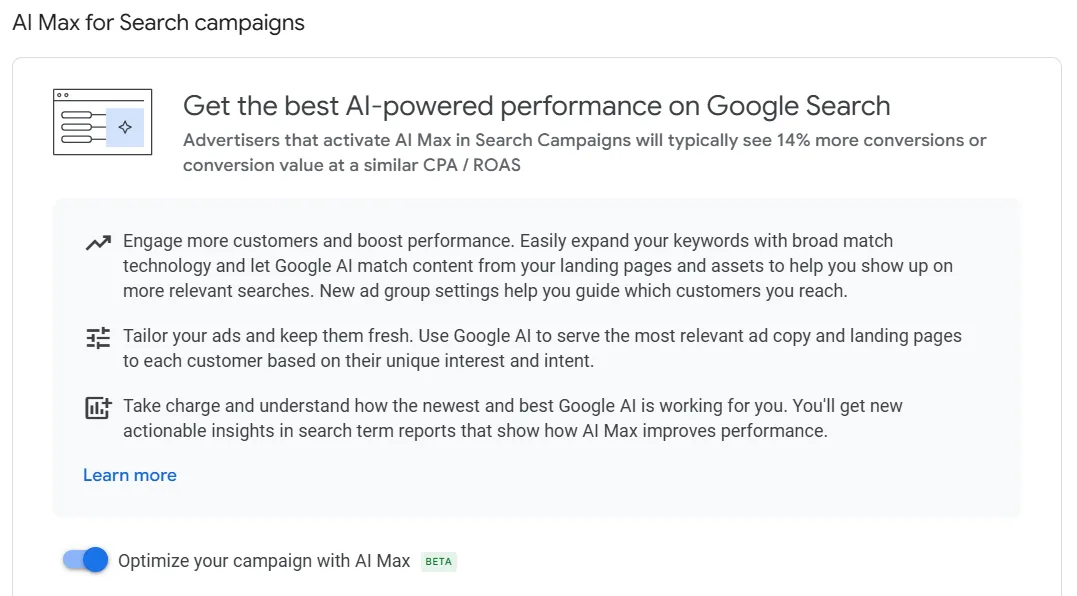
One of the most exciting new features in Google Ads is Google AI Max for search campaigns.
With AI Max, advertisers now have a powerful tool that leverages artificial intelligence to optimize search campaigns.
This new AI feature, launched in beta by Google, aims to change search campaigns. It will focus on what users want, not just on keywords.
In recent years, searches on search engines have changed. People are no longer looking for answers and solutions through simple words. Instead, they are asking more complex and detailed questions.
In this guide, I will show you how to use Google AI Max in your search campaigns. We will cover what it is, how to set it up, how to refine your settings, and how to avoid common mistakes.
If you are new to Google AI Max for search campaigns, this post is for you. It will help you improve your strategy, and you will learn about AI-driven advertising.
What is Google AI Max?
Google’s AI Max for search campaigns is a tool that uses advanced machine learning to improve your ads in real time. It also helps customize your message to connect with your customers.
How does it work? It uses search terms matching and asset optimization.
Search Terms Matching
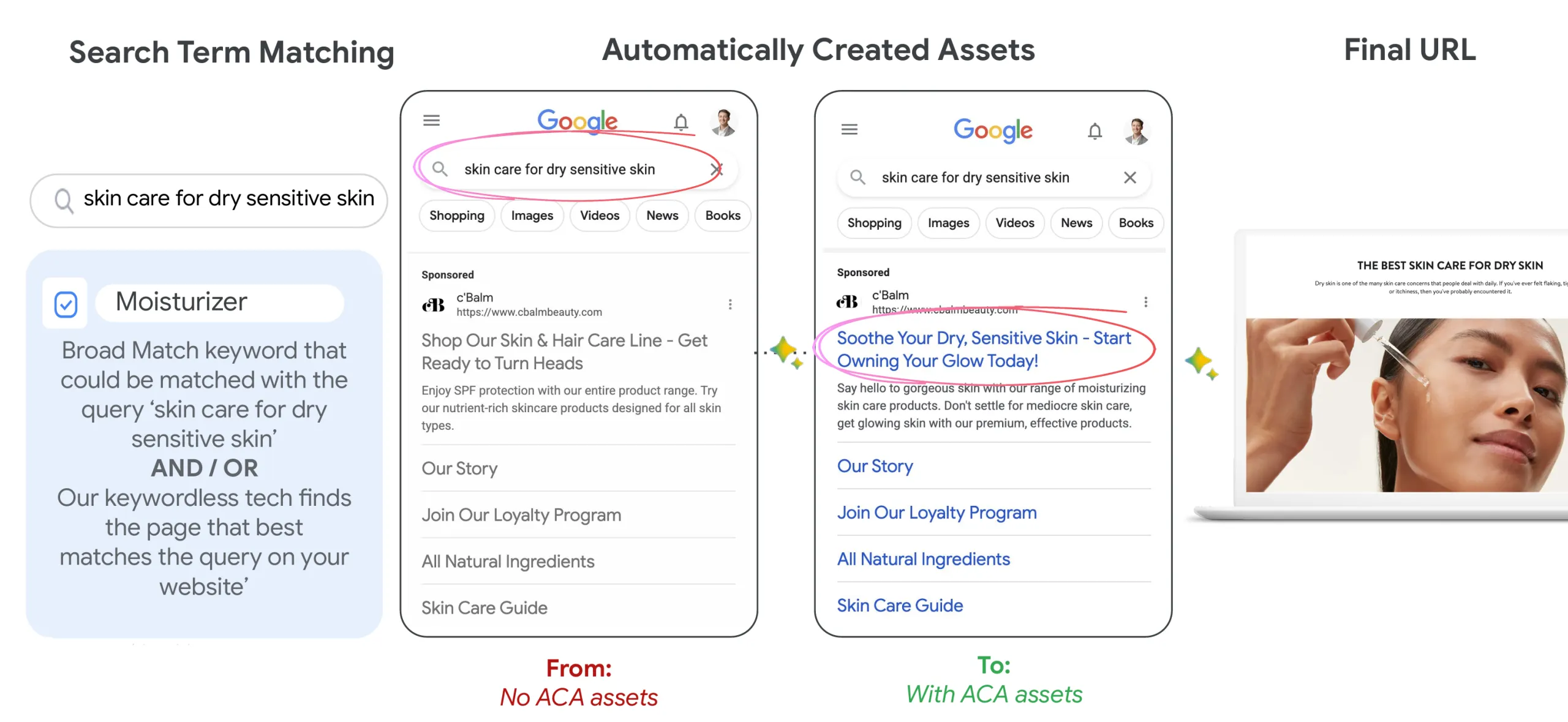
Google AI Max should help you find more relevant search queries by using broad match and keywordless technology.
It learns from your current keywords, ads, and URLs. This helps you appear in more successful searches and get conversions that you might miss.
Long story short, search terms matching uses intent-based technology to find your potential customers based on their history, making matching keywordless.
You can also manage brand associations by linking your ads to the right brands and stopping your ads from appearing next to certain competitors.
It also provides clearer insights into customer journeys, with search term reports showing headlines and URLs. Enhanced asset reports track performance based on key metrics like conversions, not just impressions.
Here’s an example from a Google guide:
Asset Optimization
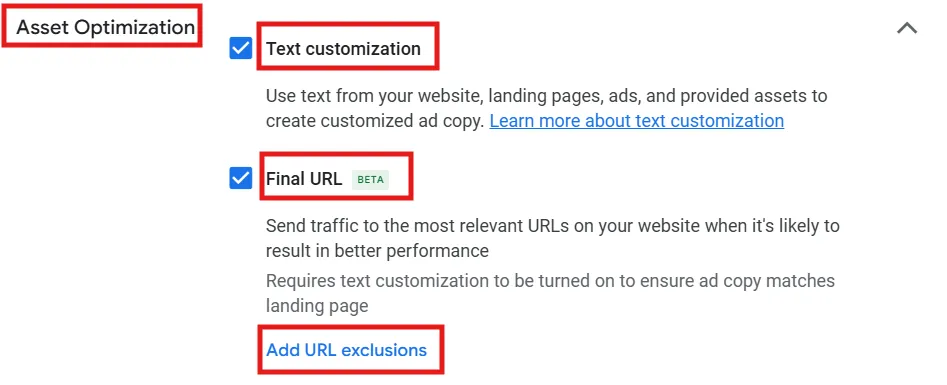
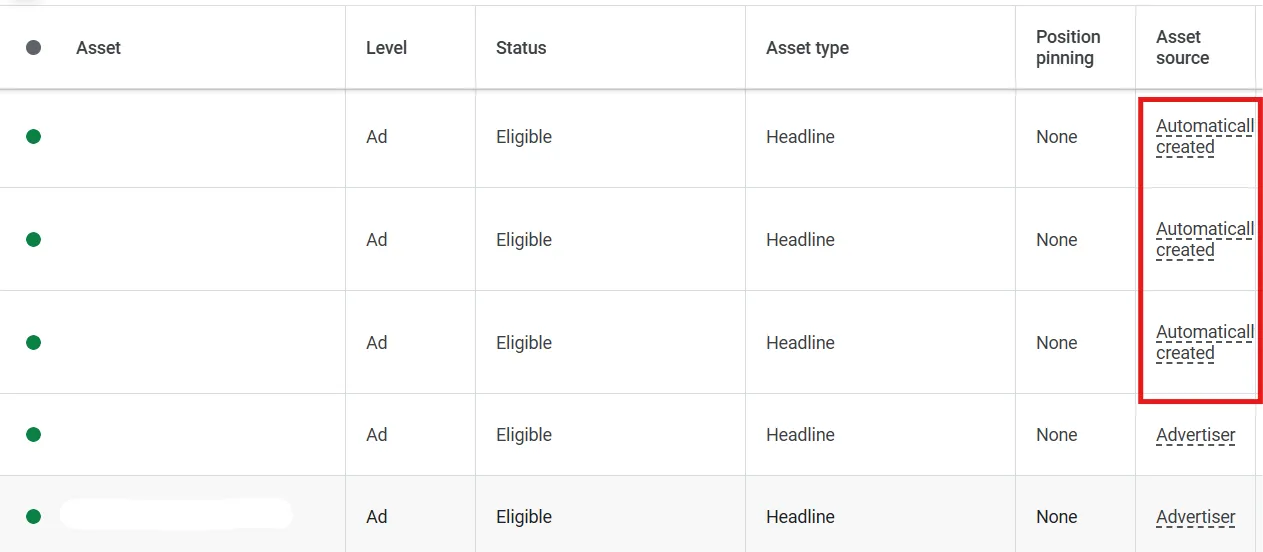
This feature should help deliver more personalized ad messaging at scale, using text customization (AKA automatically created assets) and final URL expansion settings. This could also help improve CTR.
Enabling AI Max automatically activates these settings, but you can turn them off individually in the campaign settings.
Remember that you need to turn on text customization for the final URL expansion. This makes sure the ad copy matches the landing page.
Final URL expansion means you will send traffic to the best ad group URLs on your website. This happens when it is likely to improve performance, such as in a DSA campaign.
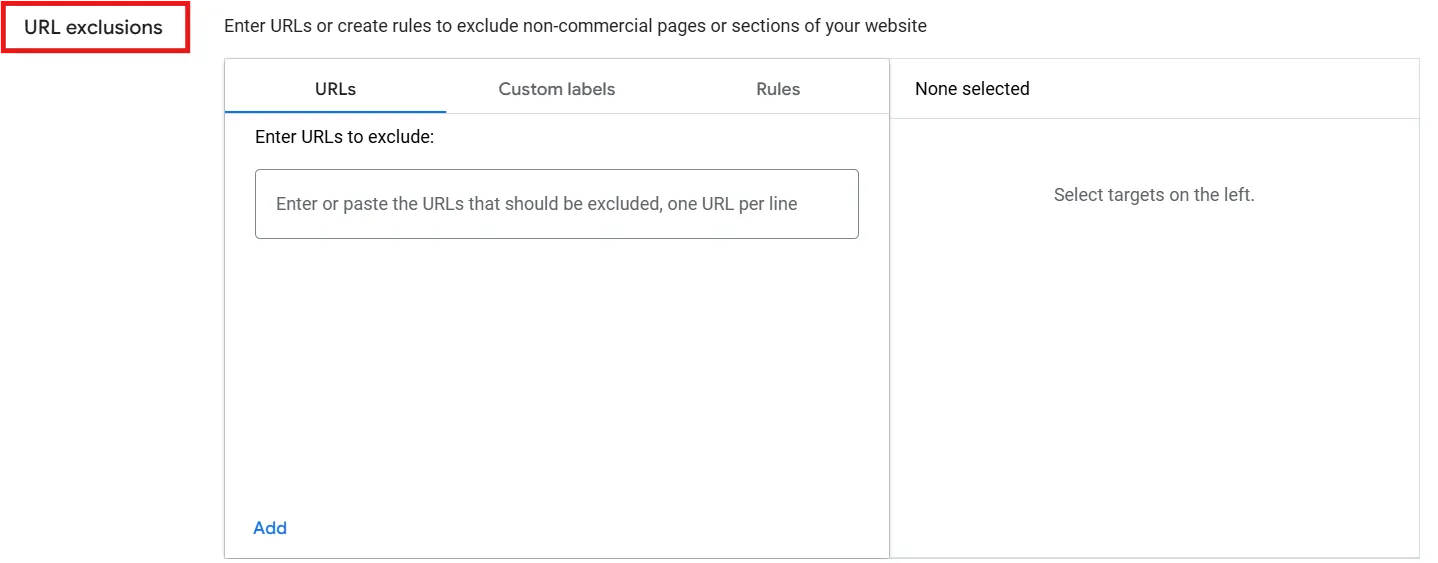
And yes, you can also exclude landing pages you don’t want to advertise.
Remember that when you turn on final URL expansion for your campaign, pinned assets will not be used: this only happens if a more relevant URL is selected.
AI Max VS DSA
You might ask yourself: what differentiates DSA from AI MAX campaigns?
DSA
The DSA (Dynamic Search Ads) campaign pulls the ad content directly from your website and uses meta tags, matching ads to user queries that align with your website content.
The DSA campaign works well when your website has well-structured pages.
The DSA automatically generates descriptions and landing pages and shows ads predominantly on search placements.
AI Max
AI Max does not rely 100% on your site copy to match queries; in fact, it primarily uses user behavior and purchase intent.
This means that AI Max gives you access to queries you haven’t created content for on your website.
AI Max gives you more control over ad copy by letting you upload your headlines and descriptions, and you can exclude some assets from the report.
Finally, AI Max ads can be placed inside the AI-generated answers, not only in the search results.
Why Google AI Max?
Based on my experience, I have noticed that AI MAX may work well for accounts and campaigns with enough data. However, the results can vary depending on the market and budget.
I’d suggest giving AI MAX a try and testing it for a couple of weeks. For some accounts, the performance improved; for some others, it didn’t.
I’d recommend not creating an AI MAX campaign directly. Instead, upgrade an existing one with data and check search terms constantly (it looks like AI MAX enjoys branded searches).
AI Max campaigns are quite similar to DSA campaigns, as they aim to understand what users want at the top of the sales funnel. This is done by using broad match types to reach more people and find new customers. They also focus on the lower funnel by using AI to drive conversions.
This is why many marketers combine both Demand Gen campaigns and AI MAX campaigns. The former primarily targets the mid-funnel, thanks to the latest Google updates.
Let me give you a real example from a campaign I launched within one of my clients’ accounts.
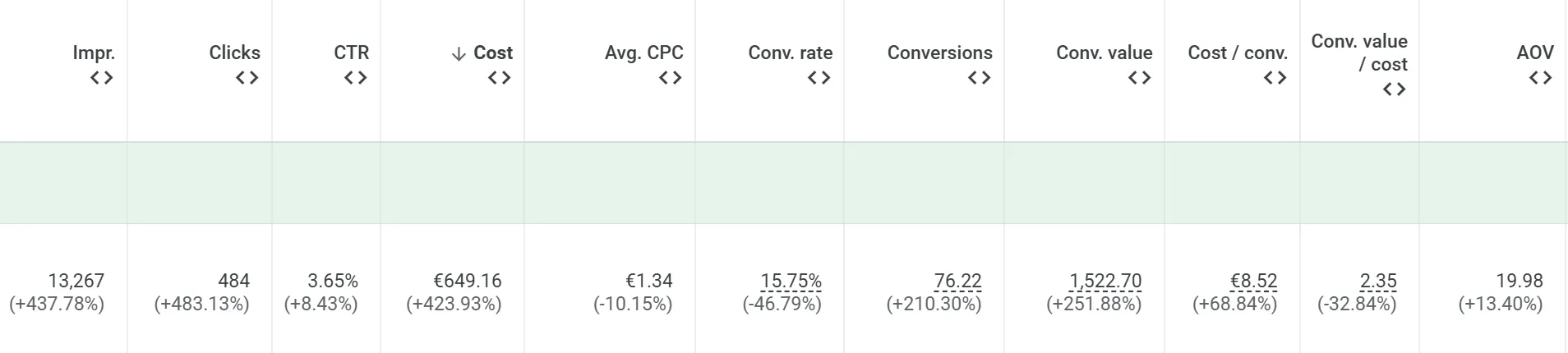
I have launched a new search campaign, and this has been running for at least 3 months. I upgraded this into AI MAX, turning on the final URL expansion. After 3 weeks of using AI MAX, here are the results compared to the previous period:
Our impressions massively increased by 438% and traffic improved by 483% as well, making the costs higher. The CPC improved by 10%.
Conversions increased by 210% and revenue increased by 69%. This was thanks to the uplift in traffic and a 13% higher AOV.
How to Use Google AI Max for Search Campaigns
To use Google AI Max for search campaigns, you need to understand how it works. You also need to know how to add it to your current campaigns.
Here’s a quick guide to help you set it up:
Set Up AI Max in Google Ads
Go to your Google Ads account and navigate to the “Campaigns” section.
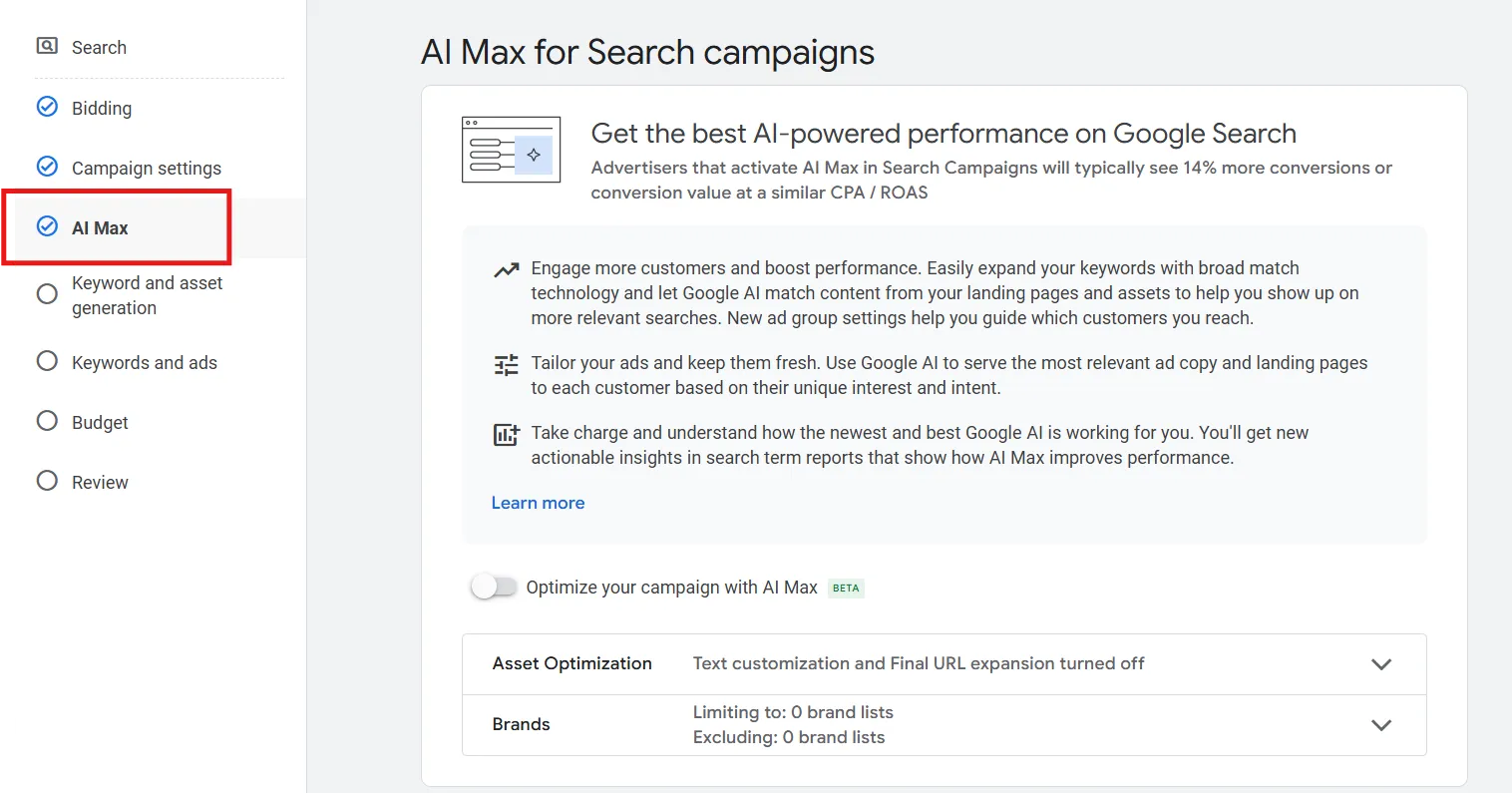
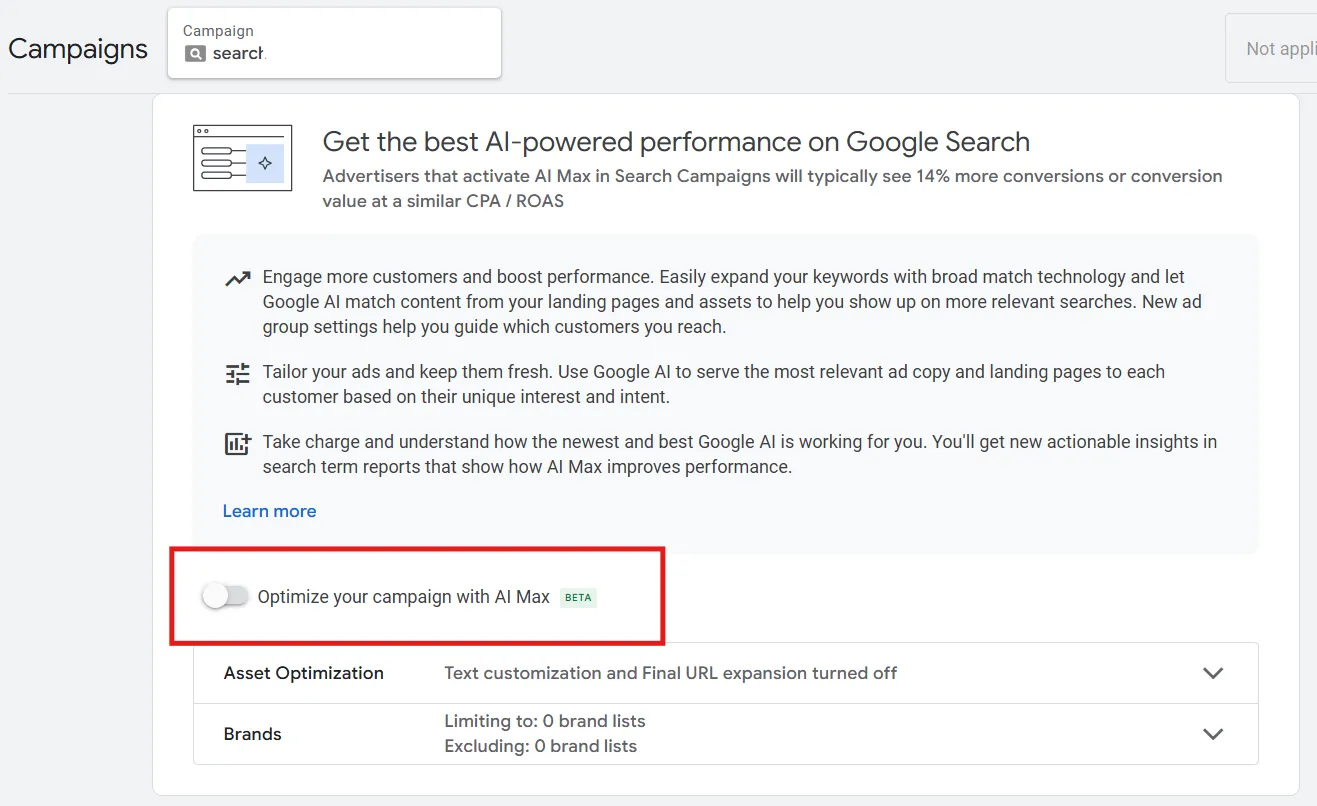
Create a new search campaign and fill out all the requested fields:
You can also select an existing search one and upgrade it by clicking into the campaign’s settings and scrolling down:
Monitor Manually
Once you create or upgrade your campaign, AI Max does a lot of the work. However, it is still important to check some elements regularly and make gradual improvements.
Negative Keywords
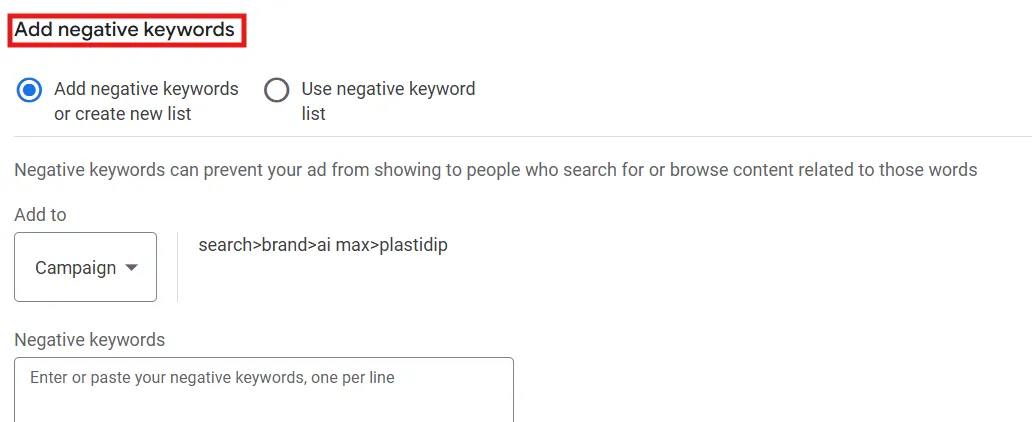
Especially in the first days and weeks, check search terms and exclude some irrelevant queries. Surely, always check the data, as sometimes a query that may be perceived as ‘not relevant’ could be a good one that converts well.
Long story short, to ensure targeting stays within your products or services, I’d suggest reviewing the search terms and adding a negative keyword list until you find a balance between reach and relevance.
URLs Exclusions
You need to ensure that your campaign is using the most relevant landing pages for the services or products you are promoting, so make sure to add URL exclusions to ensure that your customers are sent to a relevant area of your website.
If your website has a blog you don’t want to promote, be sure to exclude it. Do the same for any landing pages you think are not useful, like contact pages or terms and conditions.
Asset Report
I suggest regularly checking the asset report. Google can automatically create assets that might not align with your business’s tone. If this is the case, you have the power to remove them.
It’s true that you need to remove assets that don’t meet brand requirements, but note that an asset could have been generated by a specific user query (and history).
This means that sometimes providing some flexibility to meet customers with the language they are expecting will aid in relevance.
More on Reporting
As I mentioned previously, you need to regularly run an analysis and report of your AI MAX campaign.
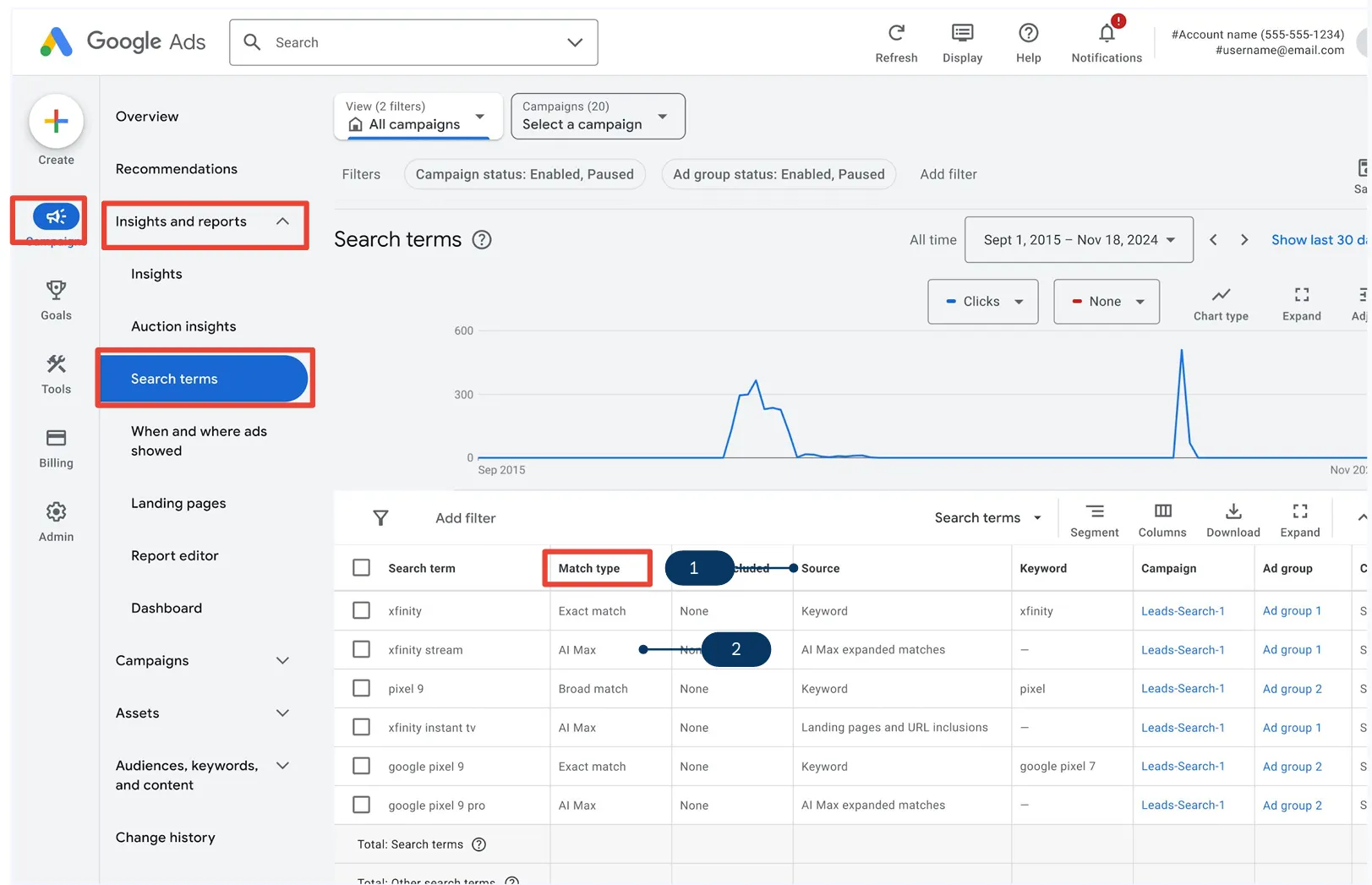
Search Terms Report
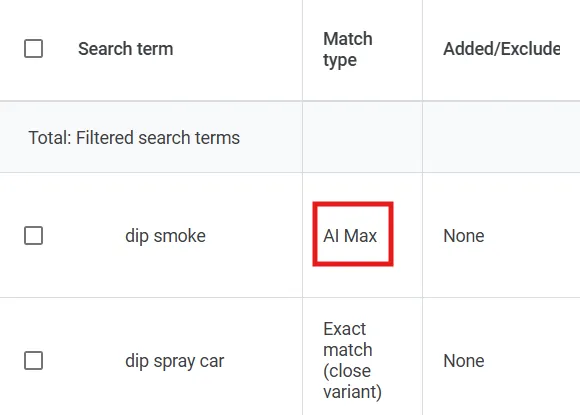
In the Insights and reports tab, you’ll find the Search terms report. Here, I’d recommend adding the column ‘Source’, where you’ll be able to discover which search terms were triggered by AI and not from the keywords
.
Search Terms and Landing Pages Report
Another important recommendation is checking if AI is targeting relevant queries for my services or products.
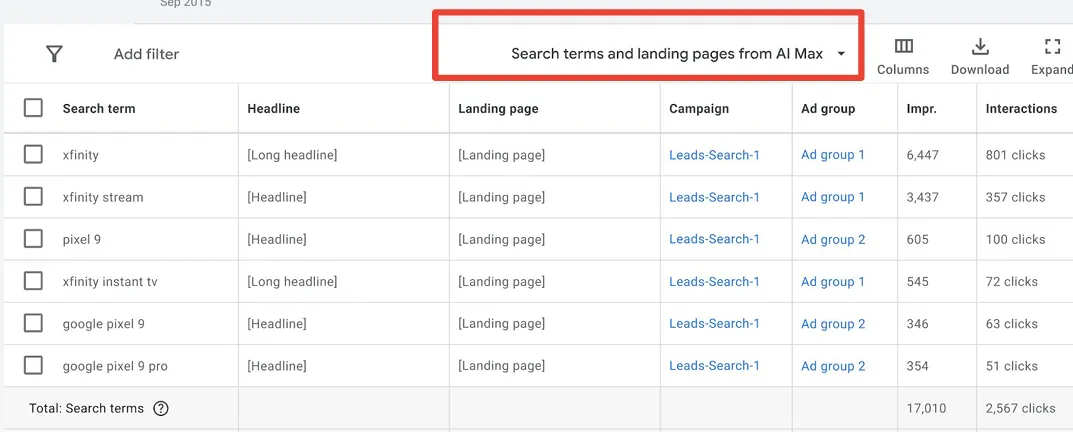
Just click on the ‘Search terms’ filter and add ‘Search terms and landing pages from AI Max’. This will show you the query, the matching headline, the description, the landing pages, and the performance metrics.
Landing Pages Report
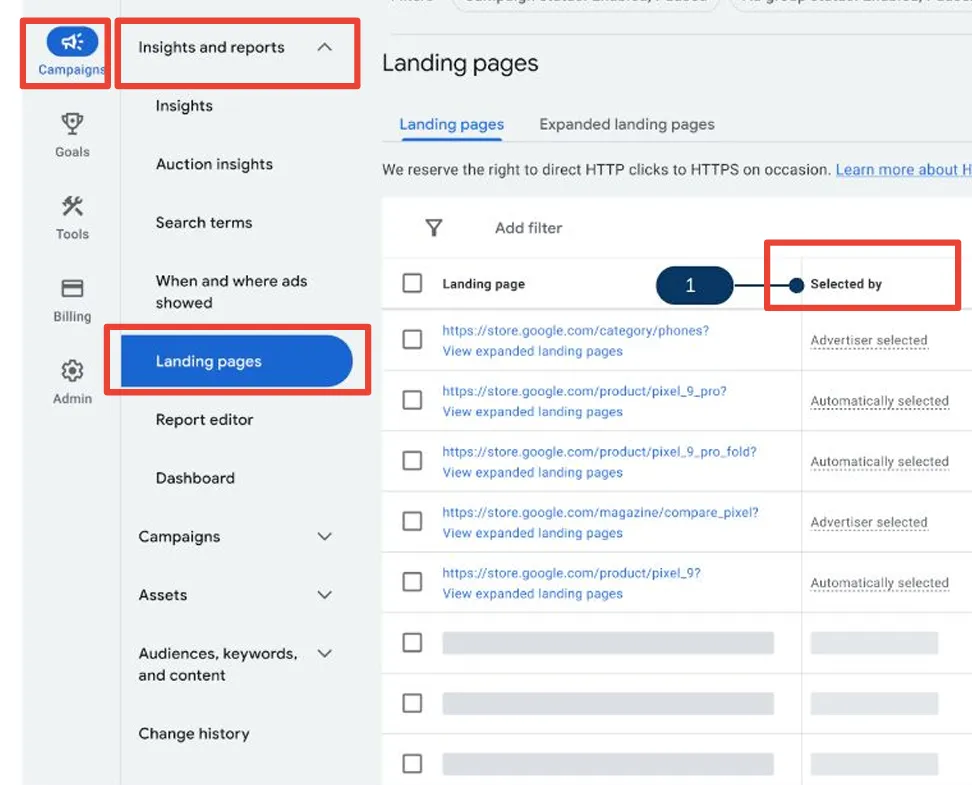
In the landing pages report, you will find all the landing pages for your search ads. By adding the ‘Selected by’ column, you can see whether the landing page was advertiser-created or automatically generated.
Best Practices
Daily Budget
One of the main things I was suggested by a Google rep was setting up a daily budget of at least $50 per day.
According to him, a low budget can limit the collection of data and signals, making it harder to analyze and improve the campaign.
Of course, whenever a Google rep gives you advice, it’s worth taking it with a grain of salt, as they have their own internal goals, which sometimes don’t align with the profit and revenue goals of businesses.
It’s always about testing, validating, and letting real performance data tell the truth.
In our experience with an automotive paint brand, we actually tested this approach, and not all AI Max campaigns performed as expected.
That’s why staying curious, and sometimes skeptical, is part of what keeps campaigns improving.
Upgrading VS Starting from Scratch
I would not recommend starting a fresh campaign with AI MAX. Instead, upgrade an existing one that has historical data.
Brand VS Generic Campaigns
Watch out before testing the AI feature in brand campaigns.
If you already have a campaign with broad match keywords, you could potentially test it; otherwise, I would recommend sticking with generic ones.
A/B Test With Experiment
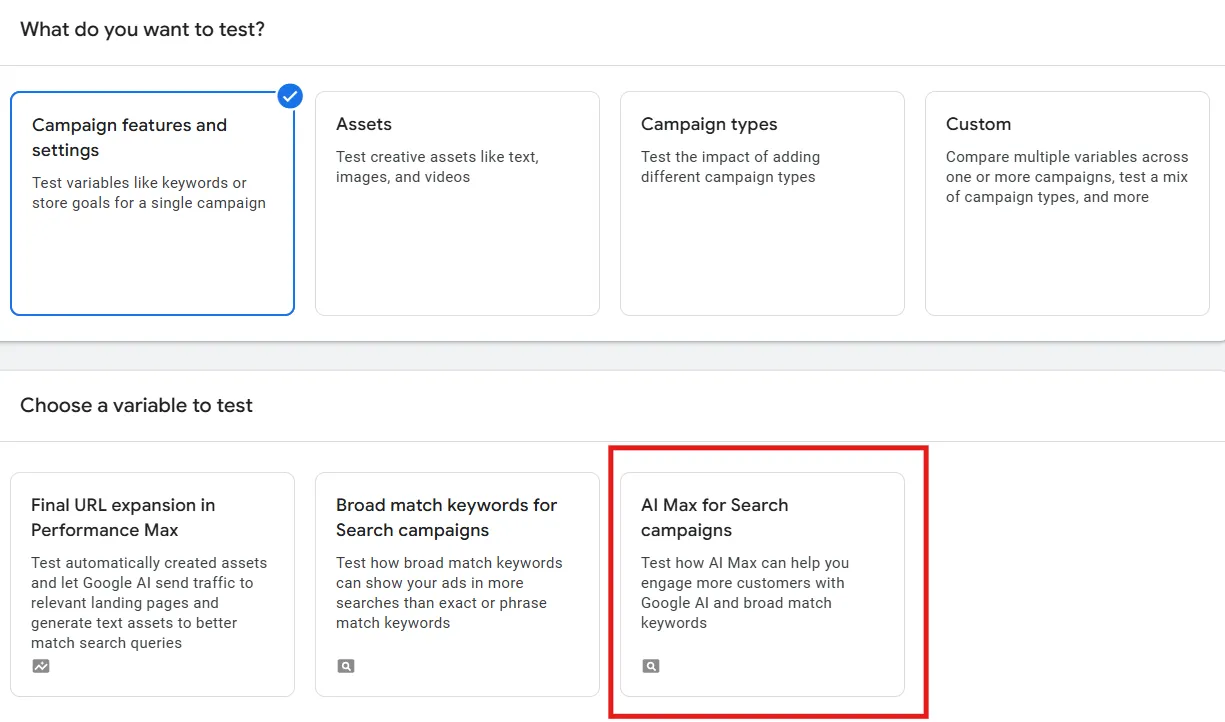
There is a new experiment that Google rolled out, which is the A/B test for AI Max functionality.
If you don’t want to directly impact the campaign’s performance or you don’t want to create a new campaign, it might be worth running an experiment.
Here, you can allocate 50% of the budget to the AI function and the remaining 50% to the same campaign without AI Max.
The existing search campaign without AI will be the ‘Control’, and the one with AI will be called the ‘Trial’.
In my opinion, this approach has less impact and is likely to have a reduced learning period, since traffic remains in the same campaign.
Bear in mind that sometimes you cannot run the experiment as the campaign might be part of a Portfolio Bidding Strategy or use Bidding exploration, or use Shared Budgets.
Sometimes it won’t allow you to run the experiment, as you might be targeting the display network or the campaign has other active experiments.
Test, test, test
The secret is testing. Usually, I would not recommend changing anything within the campaign settings for the first week. In the second week, I would watch the performance closely.
By the third week, I would begin to make changes, adjusting search terms, budget, and targets, especially at the ad group level.
After 4 weeks, I would compare the period during which AI MAX was enabled with the previous period. Remember that AI MAX works on some accounts, and in some others, it may not.
This is the challenge: understanding when and where to test this new feature.
Timeline
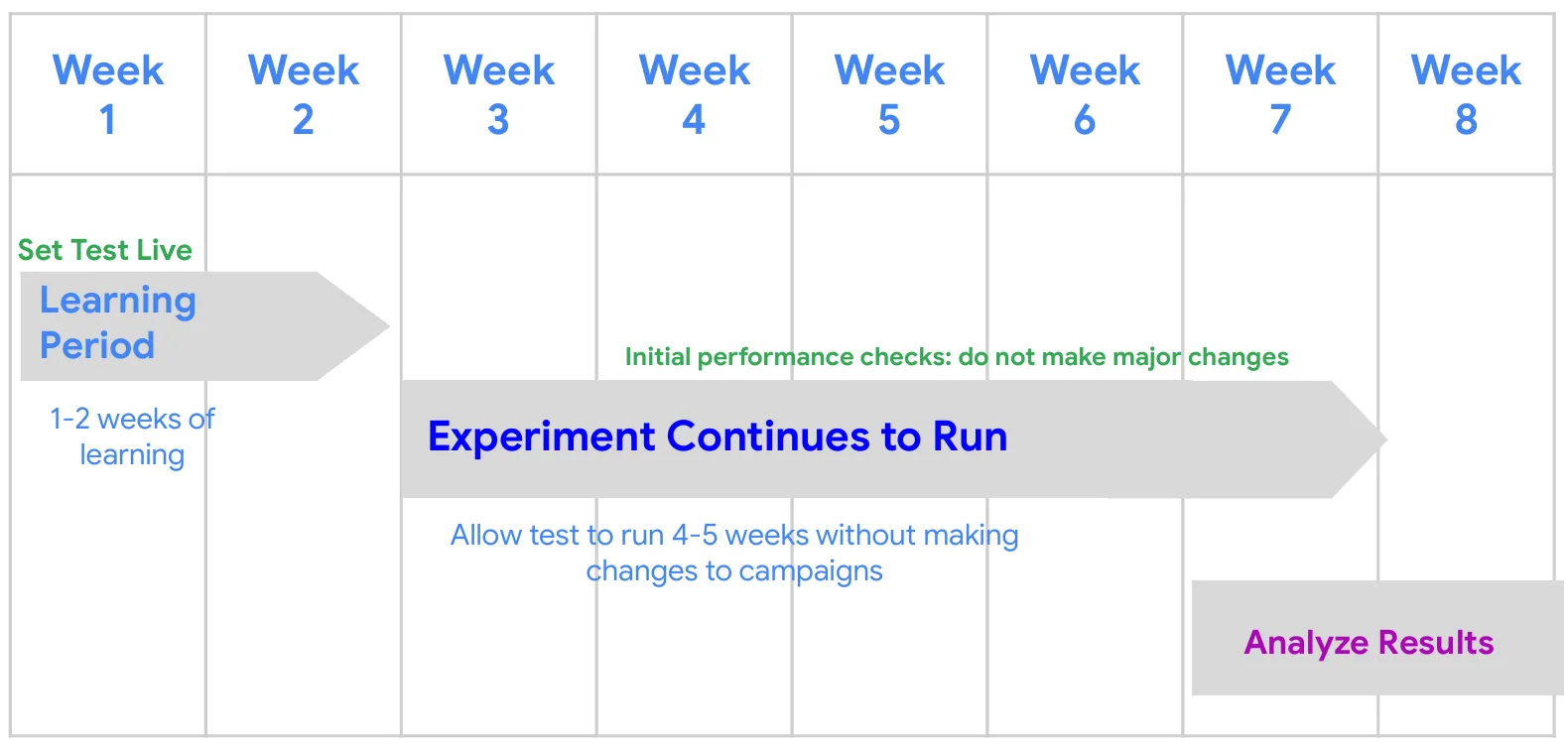
The learning period lasts about 2 weeks. Once the campaign exits this phase, keep it live for an additional 4 weeks before analyzing the results.
Conclusion
To wrap things up, Google AI Max is a powerful tool that marks a significant step forward in how we approach search advertising.
By shifting the focus from keywords to user intent, it enables more dynamic and effective campaigns. As artificial intelligence keeps evolving, its impact on digital marketing and other areas will keep growing.
The ability to customize ads to real human needs and actions is changing the game. It helps brands connect with customers in better ways. If you’re ready to embrace this cutting-edge technology, now is the perfect time to start exploring Google AI Max for your search campaigns.
Don’t let underperforming ads hold you back. Check out our PPC services or schedule a custom audit. We will find new opportunities, improve your campaigns, and make your Google Ads work better.


 .
.