Dynamic Retargeting That Brings Shoppers Back to the Exact Product
Dynamic retargeting ads pull the exact product a shopper viewed straight from your catalog. Here is the setup, the audience structure, and the frequency traps that…
Dynamic retargeting ads pull the exact product a shopper viewed or abandoned straight from a live product catalog, instead of showing everyone the same static creative. Done well, they recover revenue that acquisition has already paid for. Done poorly, with broken feed-to-pixel matching, no frequency control and no audience segmentation, they burn budget showing the same five people the same shoe ten times a day.
If your retargeting line item looks profitable on paper but your blended numbers never move, the problem is usually not the creative. It is the plumbing underneath it. This piece covers how dynamic retargeting actually works at the data level, the audience structure that separates browsers from near-buyers, the setup on both Meta and Google, and the frequency and attribution traps that make a campaign look better than it is. You will be able to check your own setup by the end of it.
What makes retargeting “dynamic” (and why it’s not remarketing)
A dynamic retargeting ad is generated at serve time from your product catalog, matched to what a specific person did on your site at the SKU level. Someone looks at the ribbed knit in oat, leaves, and the ad they see later contains the ribbed knit in oat, with its current price and image, not a brand banner. The platform assembles the unit; you supply the feed and the events.
Static retargeting is the other thing people usually mean when they say “we’re already retargeting”: one creative, one broad audience of site visitors, same message for everyone. It has its place, mostly for brand-level offers and mid-funnel reminders, but it cannot do what a feed-based ad does, which is to reflect intent at the person who showed it. And since the words get mixed up constantly: retargeting generally refers to ad-based follow-up, while remarketing historically covers owned channels like email and SMS too. We broke the distinction down properly in our guide on retargeting vs remarketing if you need the full version.
So, the short answer to the question people actually type: dynamic retargeting shows each shopper the specific products they interacted with, pulled live from a catalog, while regular retargeting shows one fixed creative to a general audience of past visitors. Dynamic requires a synced product feed plus event data that identifies products; static only requires an audience. On Meta, these are called dynamic product ads or Advantage+ catalog ads, and on Google they run as dynamic remarketing.
The technical backbone nobody talks about: catalog, pixel, and the deduplication problem
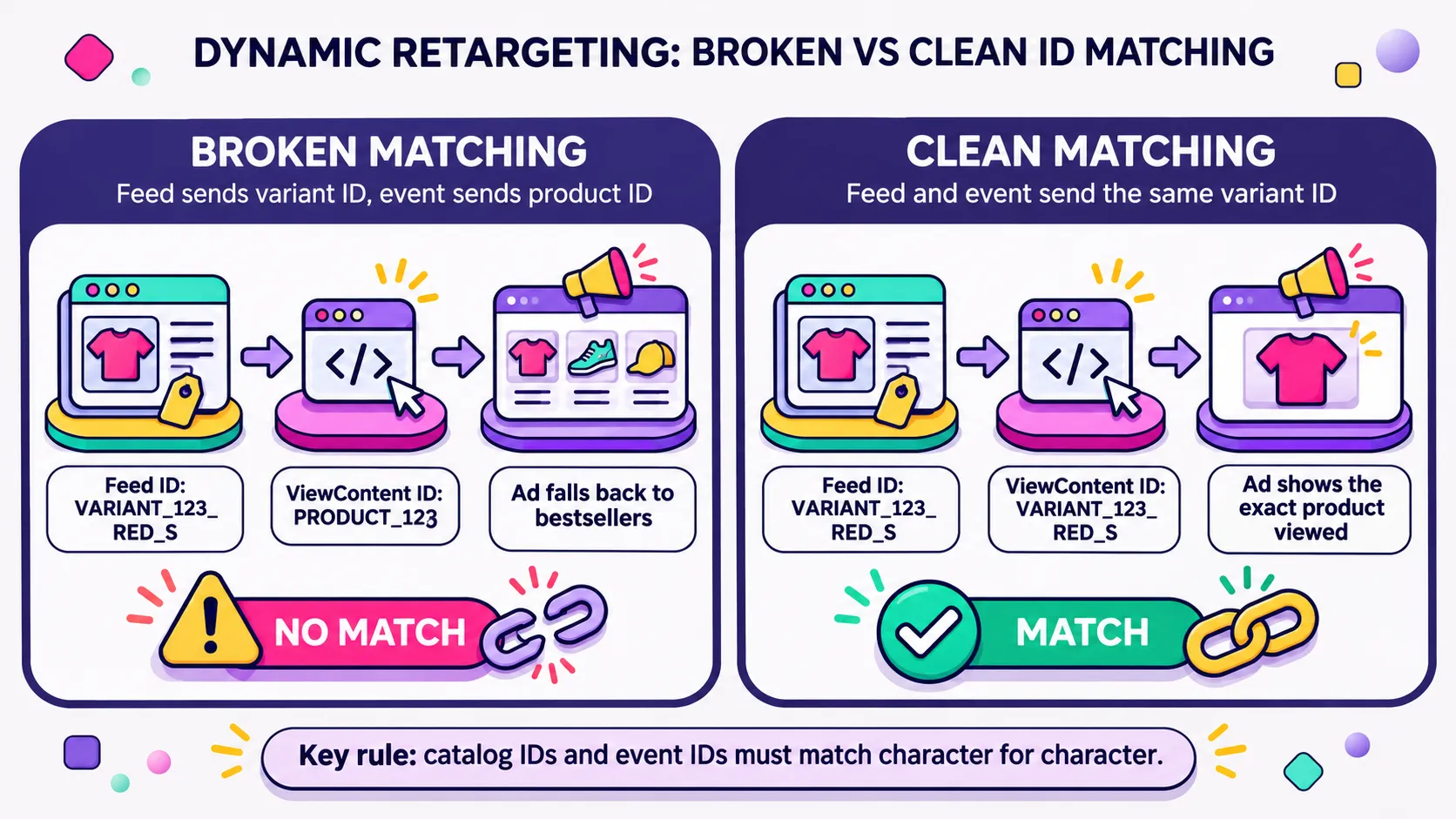
Here is where most underperforming dynamic campaigns are actually broken, and it is barely covered anywhere. Your product feed assigns every item an ID. Your on-site events (ViewContent, AddToCart, Purchase) send product identifiers back as parameters, content_ids on Meta, item IDs on Google. Those two sets of identifiers have to match character for character. If your Shopify feed exports variant IDs while your events fire parent product IDs, or your app appends a shopify_US_ prefix on one side and not the other, the platform cannot connect the browse to the product. The campaign still spends. It just serves bestsellers to people who never saw them, which is a static campaign with extra steps.
Selling in more than one country multiplies the problem. Multi-market stores often run a separate feed per market, each with its own currency, language, and ID format, and every extra market is another place where feed and events can drift apart. It usually happens in the market you check least.
The second layer is deduplication. Most serious Shopify setups now send events twice, once from the browser pixel and once server-side through the Conversions API, which protects signal against ad blockers and tracking prevention. For that to work, both hits need the same event name and a shared event_id so the platform can recognize them as one event instead of two. When they don’t line up, every event counts twice: purchase numbers inflate, reported CPA looks better than it is, and bidding optimizes against conversions that never happened. Nothing throws an error. The rule I apply before touching a campaign like this: prove the data is clean first, because broken matching looks exactly like weak performance. The same discipline applies on the Google side, where I’d start with how you set up Google Ads conversions for Shopify, and it is one of the practical reasons a first-party data strategy pays for itself.
Signals that your setup is broken rather than just tired:
Ads show products the user never viewed, or your top three sellers to everyone
Frequency climbs week over week while CTR stays flat
Commerce Manager reporting that a large share of your events match no catalog item, or event counts that don’t reconcile with Shopify orders
Catalog items sitting in “disapproved” or “pending” with no obvious policy reason
Add-to-cart audiences that are suspiciously larger than your actual cart sessions
Check those before you commission new creative. A refresh on top of a mismatch just repackages the same problem.
Building the audience structure that actually recovers revenue
One blanket “all site visitors, 30 days” audience is the default most accounts inherit, and it underperforms for a simple reason: it treats a person who bounced off a collection page in nine seconds the same as someone who filled in their shipping address and abandoned at payment. Those two people need different bids and different messages. Pooling them dilutes the bidding signal and averages your return down to something that looks mediocre because it is mediocre.
A four-tier structure fixes most of it. Each tier excludes everyone further down the funnel, and purchasers move to a campaign of their own, so nobody sits in two audiences at once. Every tier gets a creative angle that matches how close the person is to buying.
Tier
Audience
Excludes
Budget approach
Creative angle
1
Product viewers
ATC, checkout, purchasers
Lowest, broad reach
Product + social proof
2
Add to cart
Checkout, purchasers
Medium
Product + reassurance (returns, shipping)
3
Initiate checkout
Purchasers
Highest, tightest window
Urgency, stock, payment options
4
Past purchasers
Recent buyers (7-30 days)
Separate campaign
Cross-sell, replenishment
Exclusions matter as much as the tiers. Recent purchasers come out immediately, because nothing annoys a customer faster than paying for an ad that sells them what is already in transit. Lookback windows then need to follow the actual buying cycle of the category. For fashion, I keep windows short, usually 7 to 14 days, since desire for a specific piece decays fast and the product may sell through anyway. For beauty, the interesting window is the replenishment one: a 30- to 60-day cycle on a serum or a shampoo is a scheduled purchase, and the ad works best as a reminder rather than a pitch. Home and wellness sit somewhere in between, with longer consideration and higher AOV. If you want per-tier creative ideas that go beyond a single product shot, our breakdown of Meta collection ads covers formats that pair well with the upper tiers.
Setting it up on Meta (Advantage+ catalog ads)
Start in Commerce Manager with the catalog itself. On Shopify, the native Facebook & Instagram channel will push your products, but check what it actually sends: ID, title, description, availability, condition, price, link, image link and brand are the fields that decide whether an item is eligible. Set the feed to refresh at least daily, more often if you run flash drops or limited stock, and confirm the ID format matches what your pixel sends before you spend anything.
The ad itself is a template. You write one headline, one primary text and one description, and the platform fills the product name, image and price per user from the catalog. That means your copy has to work for every SKU in the set, so write around the brand promise and the reassurance (“free returns within 30 days”, “ships in 48h”) rather than around a specific item. Overlays, badges and frames can still be applied at catalog level, which is where a flexible Canva template earns its keep: one layout that holds up whether it is wrapping a lipstick or a lamp.
The mistake I see most often is a feed that has drifted out of sync with live inventory. Meta won’t serve items marked out of stock, but it only learns that an item has sold out at the next catalog update. If the feed refreshes once a day and a product sells through at 10 a.m., the ads keep showing it until the next sync: the shopper clicks, lands on an out-of-stock PDP, and you have paid for a bad experience and a trust hit in one go. Sync availability as often as your stock actually moves, and add an “in stock” filter to the product set as a second safety net. The full walkthrough lives in our Meta catalog ads guide, including how Advantage+ handles product set targeting.
Setting it up on Google (Merchant Center + dynamic remarketing)
Google starts in Merchant Center, and the same ID discipline applies. Your Shopify product IDs need to be consistent across the feed, the Google tag and GA4, because dynamic remarketing matches the item ID your tag sends (the id in the items array of GA4 ecommerce events, or the legacy ecomm_prodid parameter) against the Merchant Center item ID. A feed that validates perfectly and a tag that sends a different ID format will produce a campaign that runs, spends and personalizes nothing. Our guide on how Google Merchant Center works with Shopify covers the feed side in detail.
Tagging comes next. You can fire the dynamic remarketing parameters through the Google tag directly or inherit them from GA4 ecommerce events, then build audiences from product-level behavior. Watch the list size threshold: since late 2025, an audience needs around 100 active users over 30 days to serve, on Display, Search and YouTube alike (Google’s audience size requirements). That bar is low, but lower-traffic stores still regularly build a precise checkout-abandoner audience that hovers below it and sits idle, which is why tier consolidation sometimes beats tier precision at this revenue level.
The failure mode is identical on both platforms, but the naming is not. Meta talks about content IDs and product sets; Google talks about item IDs and Merchant Center feeds. Teams that copy the Meta logic across wholesale, or assume the Shopify app “handles it”, end up with two half-working setups. Verify each one on its own terms, with Google’s own documentation on tagging for dynamic remarketing open next to the account.
Frequency traps that quietly waste budget
Dynamic retargeting has a small audience by definition, so budget pressure turns into frequency almost immediately. The pattern is predictable: frequency climbs, CTR holds for a few impressions, then flattens, then drops, while CPM creeps up because the auction keeps charging you to reach people who have already decided.
On Google Display, you can set a frequency cap directly. Meta’s Sales campaigns don’t offer one, so there you steer frequency indirectly: shorter lookback windows, budgets sized to the audience rather than to a target, and exclusions that move people out the moment they buy. Either way, I aim for roughly 3 to 5 impressions per user per week on the viewer tier and tolerate slightly more on checkout abandoners, where the window is short, and the intent is real. Then I watch the curve rather than the average.
There’s a Back to the Future problem baked into repetition without variation. Marty watching the same scene from a different angle is interesting; watching the identical frame ten times is not. Repetition only functions as a reminder when the angle changes, a different product, a different proof point, a different format. Repetition of the same unit stops being a reminder and becomes noise your audience learns to skip, which is how you end up paying more for attention you already had.
On-site behavior tells you which one is happening. I pull Microsoft Clarity recordings filtered to returning visitors from paid social and look at what they do after the click. Genuine reconsideration looks like scrolling, zooming on imagery, opening the size guide, reading reviews. Fatigue looks like a two-second session, an immediate back-swipe, or rage clicks on a page that loaded slowly. Clarity’s dead click and rage click metrics make that distinction fast, and it changes the fix: fatigue means cutting frequency and rotating creative, hesitation means the PDP has an objection you haven’t answered yet.
Measuring it correctly: attribution windows and incrementality
Retargeting ROAS is the most flattering number in your account, and the least honest. Last-click attribution hands the credit to the last touch before the order, and dynamic retargeting is structurally positioned to be that last touch: it reaches people who already know the brand, already chose a product, and in many cases would have come back anyway. A 12x retargeting ROAS next to a stagnant revenue line is not a win; it is accounting.
Two adjustments help. First, tighten your attribution settings so view-through credit is not doing the heavy lifting: on Meta, I look at 7-day click separately from 1-day view, because a view-through conversion on a cart abandoner is the weakest form of evidence there is. Second, judge the channel on blended MER rather than in-platform ROAS. If retargeting spend goes up 40% and total revenue doesn’t move, MER drops: you are shifting credit around, not generating sales.
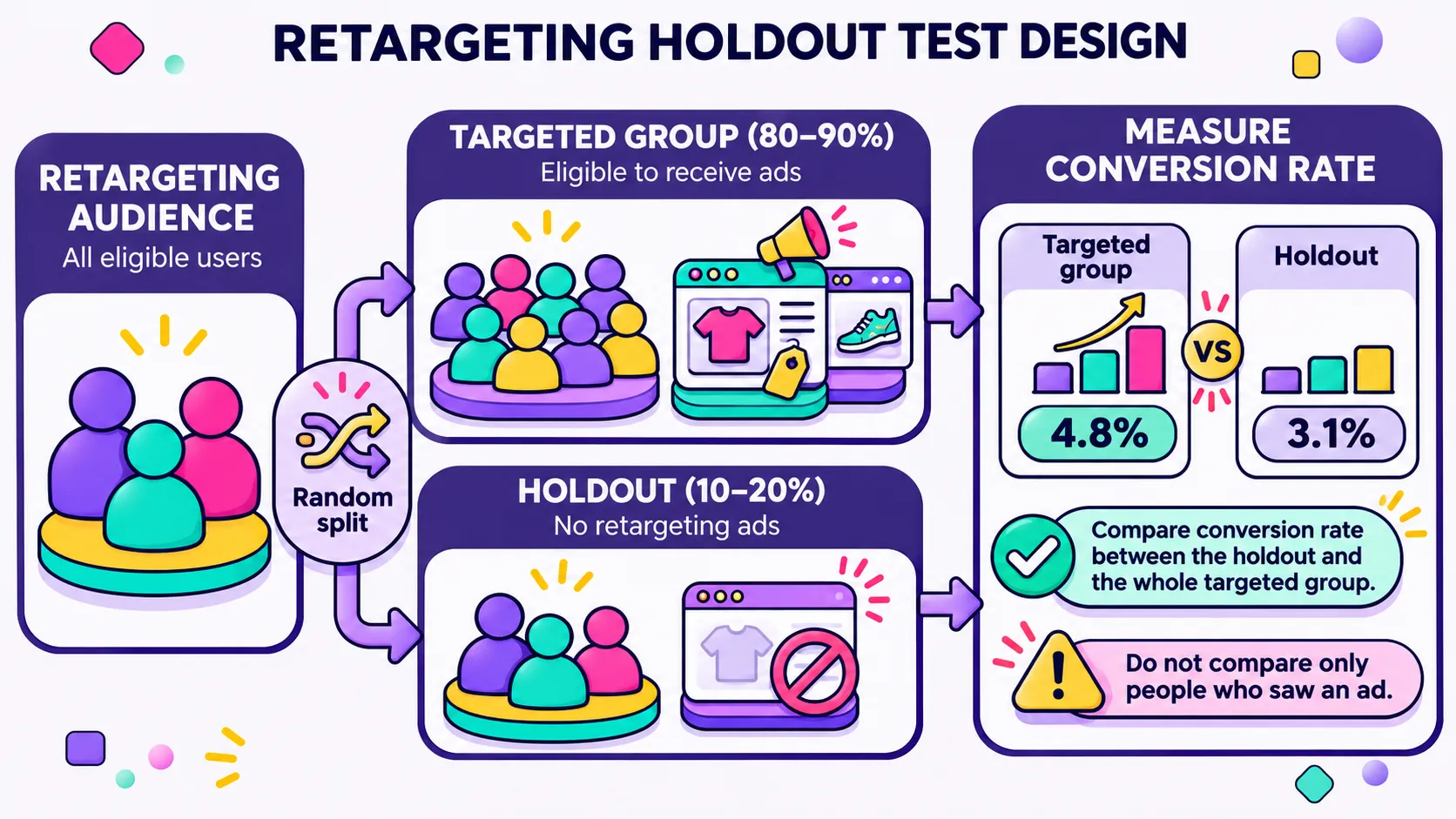
The real test is a holdout. Formal incrementality and geo testing is the clean method, and we walk through it in our piece on geo-lift tests and holdouts, but plenty of brands in the $1M to $10M range don’t have the traffic to power one properly. If your spend qualifies, Meta’s Conversion Lift studies handle the randomization for you. If it doesn’t, split the audience yourself: assign each visitor a random bucket in a first-party cookie, pass it as an event parameter, and build your retargeting audiences so that 10 to 20% of people are never targeted. Run it for three to four weeks, then compare conversion rate between the held-out group and the whole targeted group, including people who were never actually served an ad. Comparing only against people who saw an ad flatters the result, because the algorithm already picked the ones most likely to buy. It will not be statistically bulletproof. It will still tell you whether you are buying sales or buying attribution, and a rough answer beats a confident guess.
What broken dynamic retargeting looks like in practice
The version of this I run into most often arrives looking like a creative problem. A Shopify fashion brand, respectable spend, retargeting reported as the best-performing campaign in the account, and a founder who cannot work out why topline revenue is flat. Open the ads and every single one is showing the same handful of bestsellers to everyone, regardless of what they browsed. Open Commerce Manager, and most ViewContent events match no catalog item at all. The feed was exporting variant-level IDs, the events were sending product-level IDs, and no exclusion for recent purchasers existed at all, so the most loyal customers were getting served products they had bought the week before.
The fix in cases like this is rarely glamorous: align the IDs, deduplicate pixel and CAPI events with matching event names and IDs, rebuild the audiences into intent tiers with proper exclusions, bring frequency under control, then refresh creative last. Reported ROAS usually drops after that, because the campaign stops claiming purchases it never influenced, while blended MER improves, because the budget is now reaching people who needed the nudge. That trade is the whole point, and it is why dynamic retargeting isn’t a set-and-forget channel. Feeds drift, apps update, themes change, and the matching layer breaks silently. Put it on a quarterly check alongside your creative calendar.
If your dynamic retargeting looks great in-platform and invisible in your bank account, that gap is diagnosable. Have a look at our paid social services or ask us for an account audit.
We’ll trace your feed-to-event matching, rebuild the audience structure around real intent, and tell you plainly which part of that ROAS you are actually earning.