If your Meta ads still look like a single static image with a “Shop Now” button, I need to have a quick word with you. Meta Collection Ads are one of the most powerful, criminally underused ad formats available to eCommerce brands today, and they were built to do exactly one thing: turn mobile scrollers into buyers without making them leave the app. In this guide, I’ll break down what Collection Ads actually are, how to set them up correctly, how to write creative that converts, and how to squeeze every last drop of ROAS out of this format.
What Are Meta Collection Ads?
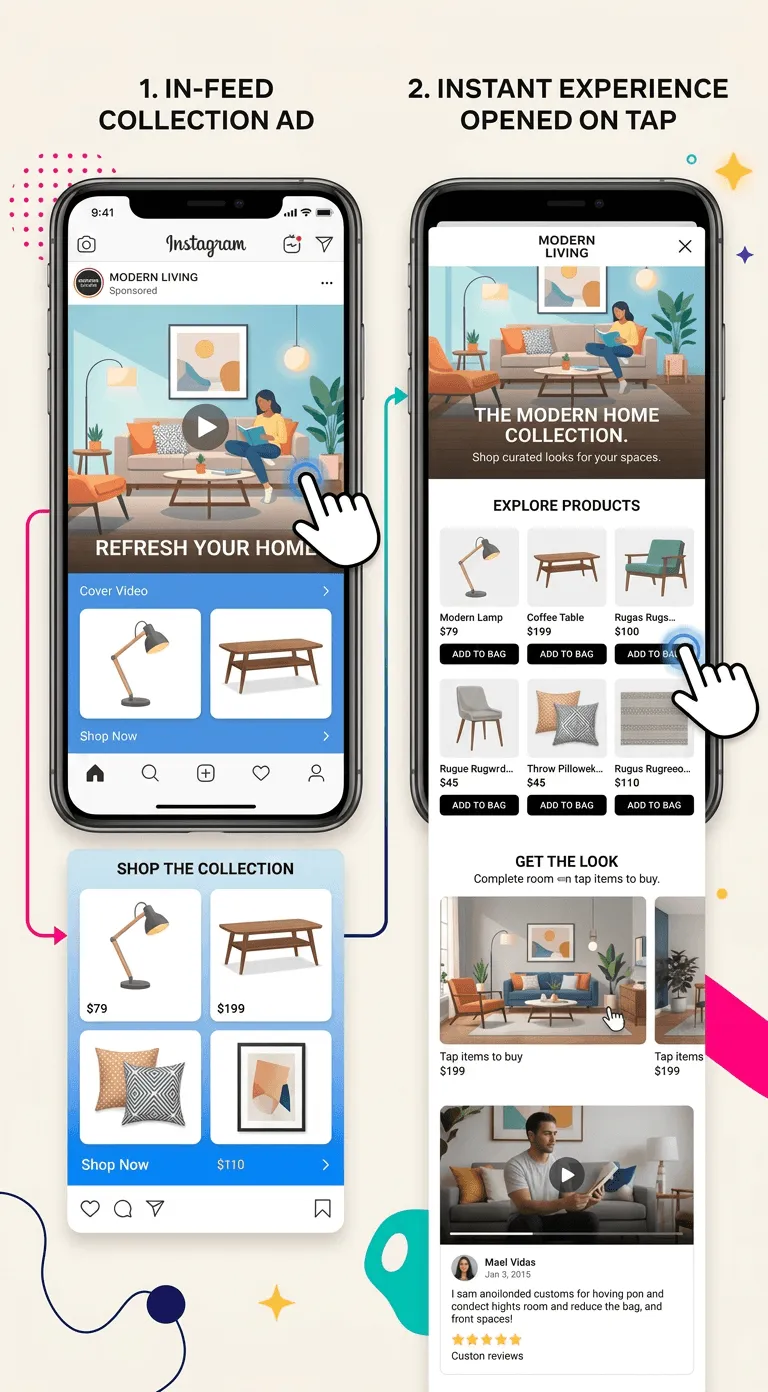
Let’s start from scratch, because “Collection Ads” is one of those terms that gets dropped in every Meta strategy deck but rarely gets a proper explanation. A Meta Collection Ad is a mobile-first ad format that combines a large cover image or video at the top with four product tiles displayed directly below it, all visible in the feed before the user has even tapped anything.
When a user taps the ad, they enter a full-screen Instant Experience (formerly called Facebook Canvas), which loads entirely within the Meta app. No browser, no redirect, no loading spinner while half your audience bails. The whole experience stays inside Instagram or Facebook, which is exactly where your audience already is.
Think of it as casting a net rather than a fishing line. A single image ad hooks users on one product and hopes for the best. A Collection Ad spreads your catalog across the feed, surfaces four products immediately, and then pulls interested users into an immersive shopping environment the moment they engage. It’s the kind of current that moves people toward conversion naturally, without them even realizing they’ve started moving.
The Anatomy of a Meta Collection Ad
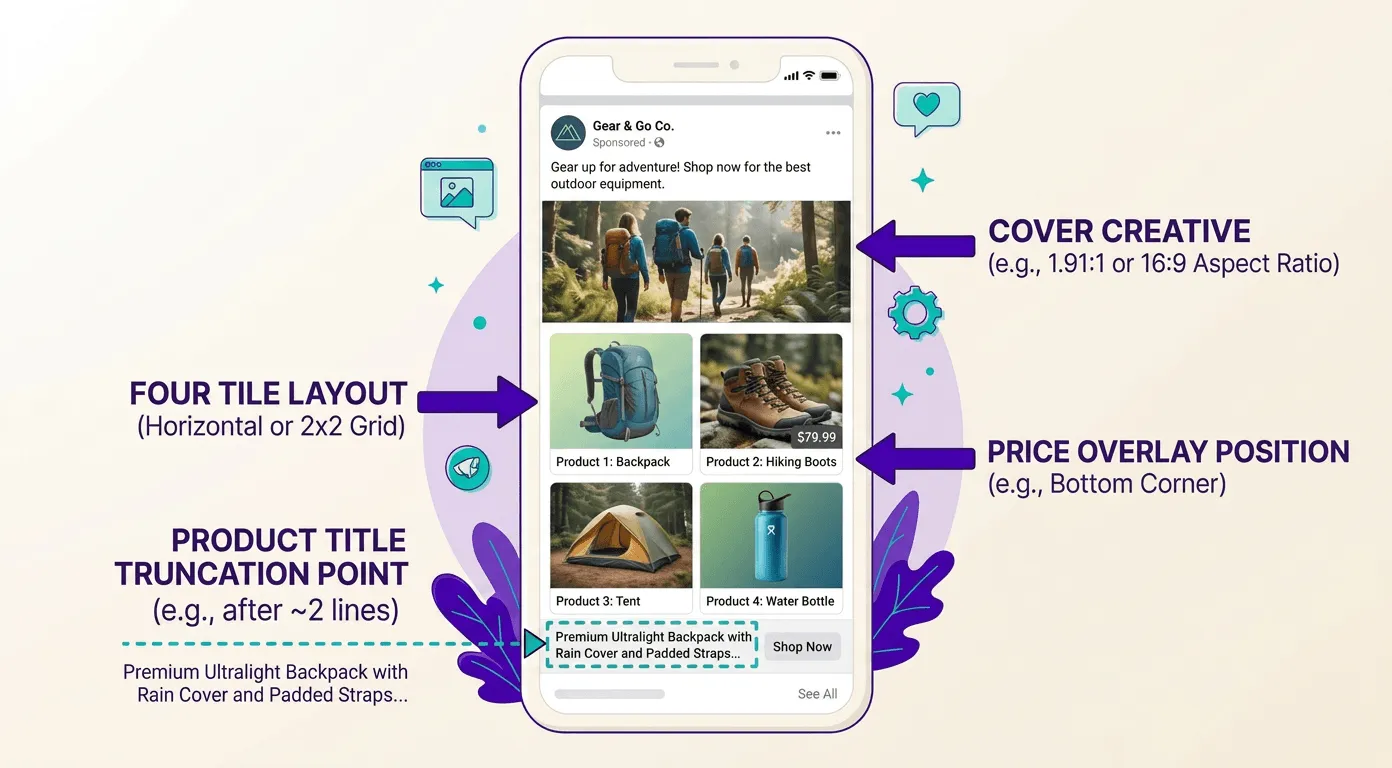
Every Collection Ad is built from two core components. The first is the cover creative: the hero image or video that occupies the top of the ad unit and is responsible for stopping the scroll in the first place. The second is the product grid: four product images pulled automatically from your Meta catalog and displayed as tiles below the cover.
When a user taps anywhere on the ad, they enter the Instant Experience, which is a full-screen, fast-loading mobile page built entirely within Meta’s infrastructure. Inside, users can browse your full product range, view descriptions and prices, tap through to individual product pages, and start the purchase journey, all without leaving the app.
The Instant Experience itself can be customized using several templates that Meta provides. You can showcase a curated product collection, build a brand story, or simply display your best sellers in a clean grid layout. That flexibility is one of the format’s biggest structural advantages over every other option in Ads Manager.
How Collection Ads Differ from Other Meta Ad Formats
Before we go deeper, it’s worth quickly mapping Collection Ads against the formats you’re probably already running. Not a “Meta format tier list” (that’s a future article, honestly), but enough context to understand when Collection Ads are the right call and when they’re not.
Single Image Ads are the workhorses of Meta advertising: fast to produce, easy to test, and versatile across objectives. But they’re capped at one product, one message, one creative. If your catalog has fifty products, you’re leaving a huge amount of discovery potential on the table with every single image you run.
Carousel Ads let you show multiple products or features in a swipeable format, which is great for storytelling and comparison. The downside is friction: the user has to actively swipe to see more products, which adds a step between “I’m interested” and “I’m engaging.”
Format
Best For
Products Shown
Friction Level
Single Image
Brand awareness, hero product push
1
Low
Carousel
Multi-product storytelling, feature comparison
2-10
Medium (requires swipe)
Collection
Catalog discovery, mobile shopping, prospecting
4 in feed, full catalog in Instant Experience
Very Low
Dynamic Product Ads
Retargeting specific viewers and cart abandoners
1-3 dynamic tiles
Low
Why Meta Collection Ads Work for Ecommerce
Now that you know what Collection Ads are, let’s talk about why they consistently outperform other formats for catalog-based eCommerce brands. Because the answer isn’t “they look good.” It’s grounded in how mobile users actually shop.
The fundamental insight behind Collection Ads is that mobile shopping behavior is fragmented and impulsive. Your potential customers aren’t sitting at a desk with a coffee, methodically comparing products on a spreadsheet. They’re on the sofa half-watching a show, or waiting for an espresso, scrolling with one thumb and a sub-two-second attention span. The format was engineered to meet that reality exactly where it lives.
Mobile-First Shopping and the Friction Problem
Mobile now accounts for the majority of Meta ad impressions across every vertical. For most Shopify fashion, beauty, and lifestyle brands, mobile is the dominant traffic source. Yet mobile conversion rates consistently trail desktop, and the core culprit is friction. Every redirect, every slow page load, every moment between “I tapped” and “the page appeared” is a conversion killer.
Collection Ads attack this problem at its root. Because the Instant Experience loads inside Meta’s infrastructure rather than on your external website, it loads significantly faster than even a well-optimized Shopify storefront. According to Meta, Instant Experiences load up to 15 times faster than standard mobile websites. For brands focused on post-click engagement and conversion rate, that speed differential is not a minor detail.
Furthermore, the product grid displayed directly in the feed acts as a passive discovery engine. A user who wasn’t specifically searching for your product might notice one of the four tiles and feel a spark of interest before they’ve consciously decided to engage with the ad. That passive discovery moment is impossible to manufacture with a single image or a plain link click ad.
The Instant Experience: Your Storefront Inside the App
The Instant Experience is where Collection Ads earn their keep. When designed correctly, it functions as a fully branded micro-website inside Meta: visually rich, fast, and purpose-built for conversion. You can include full-screen videos, image carousels, product carousers with pricing, lifestyle imagery mixed with shoppable product cards, and strong call-to-action buttons.
For Shopify brands in fashion, beauty, or lifestyle, this is particularly powerful. Picture a user tapping on your Collection Ad for a new summer capsule. The Instant Experience opens with a five-second brand video, then flows into a curated product grid with prices, then surfaces a “Shop the Look” section with complementary items. That full journey, from feed to brand story to purchase intent, can happen in under thirty seconds inside Instagram without the user ever touching a browser.
Not surprisingly, Meta’s own performance data consistently shows that Instant Experiences drive higher engagement rates and lower cost per conversion compared to equivalent link click campaigns. The enclosed environment simply reduces the number of exits between “I saw this” and “I bought this.”
Example of a Meta Collection Ad in the Instagram feed showing the cover video with four product tiles below, and the Instant Experience that opens on tap
Setting Up Meta Collection Ads: Step by Step
Enough theory. Let’s get into the actual setup, because knowing what Collection Ads are doesn’t help you if you can’t get one live. The process is straightforward once you’ve done it once, but there are a few decision points that consistently trip people up. I’ll walk you through each one.
Prerequisites: What You Need Before You Open Ads Manager
Before you touch anything in Ads Manager, make sure you have the following in place. Skipping this list is the setup equivalent of the “this is fine” meme: everything looks okay for about thirty seconds, and then your ad gets rejected and you’ve burned an afternoon debugging something avoidable.
A Meta Business Manager account with your Facebook Page and Instagram account correctly connected. If you’re managing a Shopify store’s ads without Business Manager configured, stop here and sort that first.
A Meta Pixel or Conversions API correctly installed on your Shopify store and firing on the right events (ViewContent, AddToCart, InitiateCheckout, Purchase). Collection Ads tied to Sales objectives use pixel data to optimize delivery and measure performance. Without accurate event signals, Meta is optimizing blind, and your ROAS will reflect that.
A product catalog in Meta Commerce Manager with your Shopify products synced, approved, and actively serving. The catalog is the engine inside every Collection Ad, and we’ll cover this in detail in the next section. If your catalog has a high rejection rate or missing required fields, fix those before running a single euro of Collection Ad spend.
Creating Your First Collection Ad in Ads Manager
Open Meta Ads Manager and click Create. The campaign objectives that support Collection Ads are Sales, Traffic, and Engagement, though Sales is by far the most relevant objective for eCommerce. Select Sales, name your campaign, and proceed to the Ad Set level.
At the ad set level, configure your audience, budget, and placements as you normally would. Here is a critical point most guides skip: Collection Ads are a mobile-only format. If your placement selection includes Desktop News Feed or any other desktop placement, the Collection format simply won’t be available at the ad level. Restrict your placements to mobile feeds (Facebook Mobile News Feed, Instagram Feed, and Instagram Stories or Reels where creative dimensions allow) to unlock the format.
At the Ad level, after selecting your Facebook Page and Instagram account, choose Manual upload and select Collection as format. You’ll then be prompted to select an Instant Experience or create a new one; in this case, you can either choose a template or build your own layout. Meta recommends a 1:1 ratio for feed placements. Video almost always outperforms static for Collection Ads because it earns more attention in the feed, though a high-quality lifestyle image can absolutely hold its own if your creative budget doesn’t yet accommodate video.
Choosing the Right Instant Experience Template
Meta provides four main Instant Experience templates, and selecting the wrong one is one of the most common reasons Collection Ads underperform. Here’s how to think through the choice:
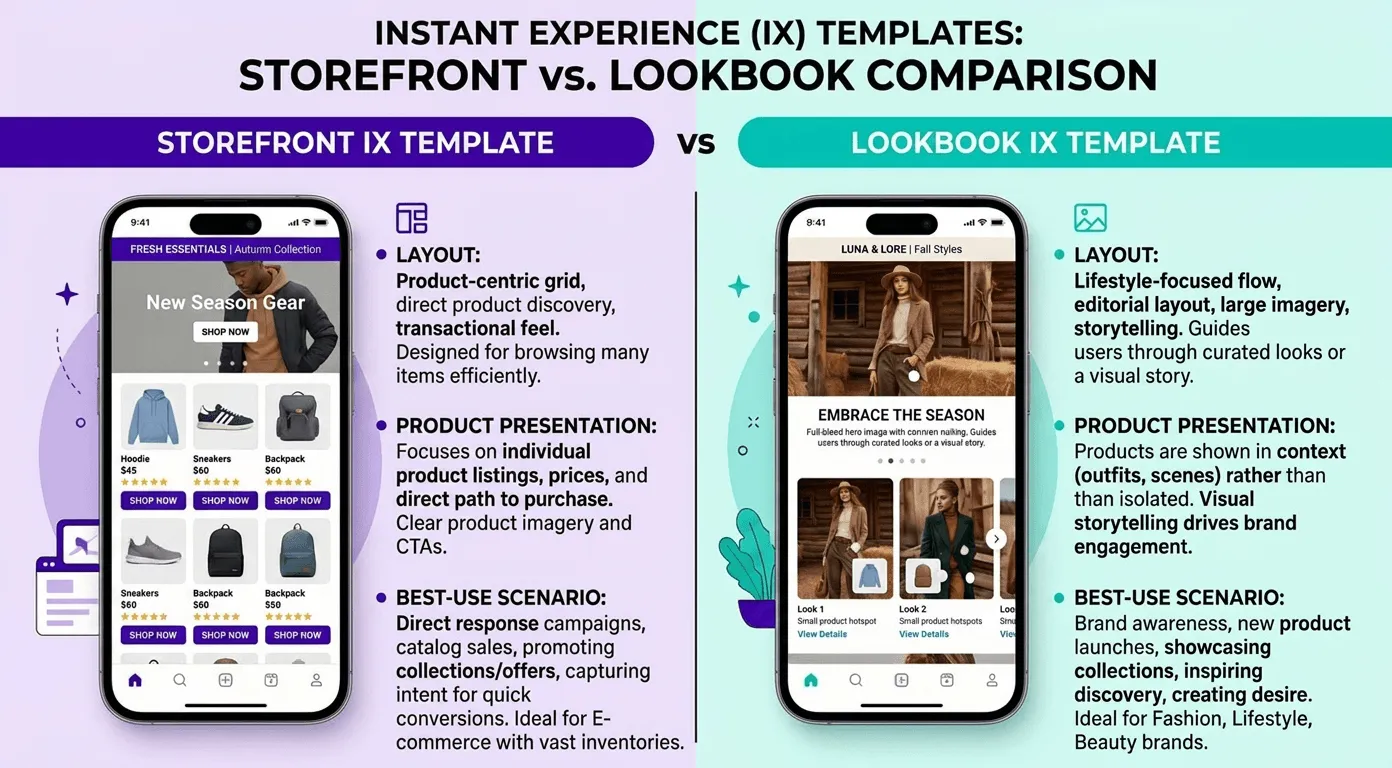
Storefront: Displays a grid of products from your catalog. Best for prospecting campaigns where the goal is broad catalog discovery.
Lookbook: Combines lifestyle imagery with shoppable product tags. Ideal for fashion and beauty brands launching a new collection or seasonal campaign.
Customer Acquisition: Brand storytelling with a prominent CTA. Better suited for awareness objectives than direct purchase intent.
Custom: Build your own Instant Experience from scratch in the Canvas editor. Highest effort, highest reward if you have strong brand creative assets and a clear narrative.
For most eCommerce brands starting with this format, Storefront is the right call for prospecting campaigns, and Lookbook works best when you’re launching a specific collection or seasonal story.
Side-by-side comparison of the Storefront and Lookbook Instant Experience templates, showing their layout, product presentation style, and best-use scenario
Connecting Your Shopify Catalog to Meta Collection Ads
The product catalog is the engine inside every Collection Ad. A broken, incomplete, or poorly optimized catalog will undermine every euro you spend on creative and media, no matter how good the ad looks in the feed. Think of your catalog like your crew: if they’re not properly briefed, the whole ship goes off course.
Syncing Your Shopify Catalog with Meta Commerce Manager
The fastest route for most Shopify merchants is the Meta (Facebook) channel app available in the Shopify App Store. Once installed and authenticated, it automatically syncs your product catalog to Meta Commerce Manager, pushing titles, descriptions, prices, images, URLs, and availability in real time.
After the initial sync, updates to your Shopify products propagate automatically, though large catalogs can have a sync delay of a few hours. For time-sensitive changes like flash sale pricing or limited-stock urgency, manually triggering a catalog refresh in Commerce Manager is worth the extra step to ensure your ad tiles reflect the correct information.
Once your catalog is live, check the Diagnostics tab in Commerce Manager regularly. Meta reviews each product against its Commerce Policies, and rejections for issues like mismatched pricing, prohibited content, or missing required attributes are very common. Catching and resolving these issues proactively prevents them from silently degrading your Collection Ad delivery.
Catalog Quality Checklist
A high-quality catalog is the difference between a Collection Ad that drives purchases and one that generates clicks that go nowhere. Before connecting your catalog to any Collection campaign, work through this list:
Product titles: Descriptive and search-relevant (e.g., “Women’s Linen Wide-Leg Trousers, Ivory” rather than just “Trousers”)
Pricing: Accurate and precisely matching what appears at checkout (price mismatches cause policy violations and erode trust)
Availability status: Correctly set to in\_stock, out\_of\_stock, or preorder, and kept in sync with real inventory
Product descriptions: At least 200 characters, clear and factual, no promotional language
GTINs or MPNs: Included for branded products wherever applicable
Catalog Field
Required
Impact on Performance
Product Title
Yes
Very High (affects relevance matching and CTR)
Product Image
Yes
Very High (directly displayed in ad tiles)
Price
Yes
High (shown in tiles, directly impacts CTR)
Availability
Yes
High (out-of-stock items shown waste impressions)
Description
No
Medium (used inside Instant Experience)
GTIN / MPN
Conditional
Medium (affects approval rate for branded products)
Product Category
No
Medium (improves Meta’s targeting accuracy)
Creative Best Practices for Meta Collection Ads
Here’s where most brands leave the most money on the table. They set up the format correctly, sync the catalog, and then recycle a static product image they’ve been running for six months as the cover creative. The technical foundation is solid, but the creative is doing all the work against them. Let me fix that.
Nailing the Cover Creative: Stop the Scroll First
The cover creative has exactly one job: stop the scroll and earn the tap. Everything that follows, the product tiles, the Instant Experience, the product page, depends on winning that moment in the feed. If your cover creative doesn’t command attention, the rest of your setup is irrelevant.
For video covers, aim for a clip between 6 and 15 seconds that leads with action in the first three seconds. No slow fades, no three-second logo reveals. Open with the product in use, a strong visual hook, or a bold text overlay that speaks directly to your audience’s desire or pain point. For a fashion brand, this might be a fast-paced outfit transition that shows the collection in motion. For a beauty brand, a satisfying product application with a visible before and after implication. The opening frame has to earn the next three seconds.
For static image covers, use high-contrast, lifestyle-forward imagery that puts your product in an aspirational context. A flat lay on a white background belongs in your catalog tiles, not in the cover position. The cover should show the life your customer is buying into, not just the product they’d be buying. The image should feel achievable, like the result is one purchase away.
Regardless of format, add a brief, punchy headline overlay on the cover that gives context to the Instant Experience about to open. Something like “Shop the New Summer Collection” or “Your Next Favorite [Product Category]” is enough. Don’t try to compress your full value proposition onto the cover. Tease, don’t tell.
Product Tile Optimization: The Four Slots That Do More Work Than You Think
The four product tiles below your cover aren’t decoration. They’re active decision-making inputs for your audience. A user who spots a product they viewed last week, or discovers a product tile that immediately resonates, has started a micro-conversion before they’ve even consciously engaged with the ad.
Product selection is a strategic decision. For prospecting campaigns, prioritize your top-selling products or highest-margin items in the first four tile positions. These are your proven performers and most likely to resonate with a cold audience. For retargeting, use Advantage+ Catalog Ads to serve tiles dynamically based on each user’s specific browsing and purchase history. The two use cases require different setups, but both benefit from the same underlying principle: relevance drives taps.
Price visibility in the tiles improves CTR. Make sure your catalog pricing is accurate and up-to-date so tiles display prices correctly. Users who see a price in the tile and immediately feel it’s within their range are significantly more likely to tap through than users who have no pricing signal at that stage.
Targeting Strategies for Meta Collection Ads
Setting up the format correctly is half the job. Making sure the right people see it is the other half. Collection Ads work across the full funnel, but the targeting strategy needs to shift meaningfully depending on whether you’re prospecting or retargeting.
Prospecting: Reaching Cold Audiences
For cold audiences, Meta Advantage+ Audience is the recommended starting point if you want to let the algorithm do the heavy lifting. Feed it your pixel data, your customer list, and your catalog signals, and Meta’s machine learning will identify users most likely to engage with your Collection Ad and convert.
If you prefer more direct control over your targeting, build a Lookalike Audience based on your top purchasers or your email customer list. For a Shopify brand in the $1M-$10M revenue range, a well-constructed lookalike combined with a Collection Ad featuring bestsellers is one of the most reliable prospecting combinations on Meta. It works because you’re effectively asking Meta to find more people who behave like your existing best customers, and then serving them a format specifically designed for product discovery.
Interest-based targeting remains an option, but treat it as a fallback rather than a primary approach. For Collection Ads specifically, catalog-driven optimization outperforms manual interest targeting because the format is inherently built around product discovery, and Meta’s algorithm is genuinely good at matching catalog signals to the right users when given sufficient data.
Retargeting: Converting Warm and Hot Audiences
For retargeting, Collection Ads perform best when paired with Advantage+ Catalog Ads targeting users who have viewed specific products, added items to cart, or started checkout without completing a purchase. The Instant Experience functions as the bridge between “they almost bought” and “they bought.”
Segment your retargeting audiences by funnel stage and adjust your creative accordingly. Users who viewed a product in the last seven days are warmer and more conversion-ready than users who browsed 14 to 28 days ago. For recent viewers, cover creative that signals urgency (“Low Stock,” a direct callout of the specific product) tends to perform well. For older audiences, a “new arrivals” or “here’s what you’ve been missing” angle can re-engage users who drifted without a strong urgency trigger.
One targeting move I consistently recommend for Collection Ads is building a Custom Audience of previous Instant Experience engagers. Users who have already tapped into one of your Instant Experiences and spent meaningful time inside have demonstrated high intent. Retargeting them with a new Collection Ad featuring different products, updated inventory, or a specific offer reliably delivers strong conversion rates for the brands we work with at Midsummer.
Audience Type
Recommended Targeting
Best Instant Experience
Primary Goal
Cold (Prospecting)
Advantage+ Audience / 1-5% Lookalike
Storefront (bestsellers)
Catalog discovery, first-touch engagement
Warm (Product Viewers)
Catalog retargeting (viewed, not purchased)
Lookbook or dynamic catalog
Re-engagement, purchase nudge
Hot (Cart/Checkout Abandoners)
Catalog retargeting (ATC / Initiate Checkout)
Storefront (abandoned products + related)
Direct purchase conversion
Existing Customers
Custom Audience (customer email list)
Lookbook (new arrivals, upsell)
Repeat purchase, AOV growth
Measuring Collection Ad Performance: The Metrics That Actually Matter
The campaign is live. Now what do you actually look at? This is where a lot of brands get lost, because Collection Ads generate a different set of engagement signals than standard link click campaigns, and optimizing off the wrong metric will send your performance in the wrong direction.
Core KPIs for Collection Ads
Cost per Purchase (CPP) and ROAS remain your north star metrics. Everything else is diagnostic context for understanding why those numbers are where they are. If ROAS is where it needs to be, you’re in good shape. If it isn’t, the following secondary metrics tell you exactly where to dig.
Instant Experience Click Rate measures what percentage of users who tapped into your Instant Experience then clicked through to your website. A low Instant Experience Click Rate (below 15-20%) signals that your Instant Experience content is not compelling enough or your product selection is not resonating with the audience that tapped in. This is a creative and catalog problem, not a targeting problem.
Outbound Click Rate (website clicks divided by total impressions) tells you how effective the full ad unit is at generating qualified traffic. For Collection Ads, a healthy Outbound Click Rate typically sits between 0.8% and 1.5% depending on vertical and audience temperature.
Thumb Stop Rate is not a native Meta metric, but you can calculate it by dividing three-second video views by total impressions for any video cover creative. A Thumb Stop Rate above 30% means your cover is successfully stopping the scroll. Below 20%, the cover creative needs reworking before you scale budget.
Common Pitfalls (and How to Avoid Them)
The single most common Collection Ad mistake I see is treating the Instant Experience as an afterthought. Brands invest time and budget in a strong cover creative, then leave the Instant Experience on the default template with zero customization. The result is a well-designed entry point that leads into a generic, unbranded product list that breaks the narrative continuity you just worked to create. The Instant Experience deserves the same creative attention as the cover.
A second frequent issue is catalog data mismatches. If pricing or availability changes in Shopify but the catalog sync is delayed, users tap into your Instant Experience and encounter different prices or out-of-stock items. That’s both a conversion killer and a trust issue. Schedule regular catalog audits and set up automatic sync refreshes to stay on top of this.
Finally, many brands run Collection Ads without properly configured UTM parameters on their catalog product URLs. If you cannot trace post-click behavior from Collection Ad traffic in GA4 or your attribution platform, you’re undervaluing the format’s true contribution to revenue and making media mix decisions based on incomplete data.
How We Use Meta Collection Ads at Midsummer Agency
I want to give you a concrete picture of how we actually deploy this format with clients, because strategies that work in theory don’t always look the same in execution.
At Midsummer, every Collection Ad setup for a new eCommerce client starts with a catalog audit. Before we spend a cent on Collection Ads, we go through every product in the Meta catalog and check title quality, image quality, pricing accuracy, availability signals, and GTIN coverage. A clean catalog is the non-negotiable foundation, and it’s the single highest-ROI task you can do before any paid Collection Ad spend begins.
Once the catalog is clean, we build a two-layer campaign structure: one campaign targeting cold audiences with bestseller-focused Collection Ads using the Storefront template, and one campaign targeting warm and hot audiences with dynamic catalog retargeting, using Lookbook for broader retargeting and straight catalog ads for cart and checkout abandoners. Keeping these audiences and objectives in separate campaigns gives us cleaner performance data and full control over budget allocation by funnel stage.
We consistently A/B test video versus static cover creatives in separate ad sets to understand which format performs better for each client’s specific vertical and audience. For fashion and lifestyle clients, video almost always wins on Thumb Stop Rate and Outbound Click Rate. For more functional product categories, strong lifestyle photography can match or exceed video performance on ROAS, particularly for warm audiences who already have brand familiarity.
We also build Instant Experience engager audiences from every campaign that runs long enough to accumulate meaningful data. Users who’ve spent over ten seconds inside one of our clients’ Instant Experiences are consistently among the highest-converting retargeting segments we work with. Adding them as a dedicated mid-funnel layer, separate from standard product viewer retargeting, is a structural move that pays off reliably.
Furthermore, we tie Collection Ad performance data into full-funnel attribution reporting using Supermetrics to pull Meta data into Looker Studio dashboards. This lets us show clients the complete picture: reach, Instant Experience engagement, outbound click rate, and final ROAS, with proper credit given to Collection Ads even when they’re acting as a discovery touchpoint rather than the last click before purchase.
From Browsers to Buyers: Your Next Move with Collection Ads
Meta Collection Ads reward the brands that invest in three things: catalog quality, creative intentionality, and structured testing. When all three come together, the result is one of the most effective discovery-to-conversion formats available on Meta for eCommerce.
To recap the key principles: your cover creative earns the tap, your Instant Experience earns the click, and your catalog earns the purchase. Each layer does a specific job, and each layer deserves specific attention. Neglect any one of them and the whole system underperforms.
If you’re running a Shopify store in fashion, beauty, or lifestyle and Collection Ads are not yet part of your paid social strategy, you are leaving meaningful revenue on the table. The format was designed for exactly your use case, and the brands deploying it well are consistently outperforming those running standard link click or carousel campaigns for catalog-based objectives.
Ready to get your Collection Ads performing at the level your catalog deserves? Explore our Paid Social services or reach out for a personalized audit of your Meta account.
We’ll review your catalog setup, your creative strategy, and your campaign structure to identify exactly where the performance gaps are and build a plan to close them fast.
Let’s turn your audience into revenue, side by side.