Best Practices to Create Successful Ad Creatives for Meta
In the changing world of digital marketing, ad creatives are key. They help capture attention and drive success, especially on social media like Meta. With millions…
In the changing world of digital marketing, ad creatives are key. They help capture attention and drive success, especially on social media like Meta.
With millions of ads shown daily on Facebook, Instagram, and other Meta platforms, your ads need to stand out.
The right image or video can grab attention in the blink of an eye, spark interest, and convert viewers into customers.
But creating the perfect ad creative isn’t just about using flashy visuals. It is about delivering the right message to the right audience, using a format that fits the platform and speaks to your audience’s needs.
Your ads are important. This is true whether you are starting a campaign for a new product, promoting a seasonal sale, or building brand awareness. They can greatly affect how well your campaign performs.
So how do you create ads that resonate with your target audience and generate measurable results?
Let’s dive into the best practices to ensure your ad creatives stand out and drive results.
Know Your Audience
Before you create your ad visuals, it is important to know your target audience. Meta offers many different targeting options.
My recommendation would be to tailor your images and messaging to address your audience’s specific needs, behaviors, and motivations.
To get it right, start by asking yourself a few important questions:
What are their pain points?
Knowing the challenges your audience faces can help you create ads that provide real solutions. This positions your product or service as the answer to their problems.
Let me give you a real-life example: imagine you run a pest control company. Your audience’s pain points aren’t “wanting pest control”.
Their pain points are surely sleepless nights from bed bugs, pigeons dirtying their balconies, or rats chewing through electrical cables.
If you understand these struggles, your ads can speak directly to them. I would use something like this. Instead of saying “Professional pest control services available,” try to say something like:
“Tired of finding droppings on your balcony every morning? Our pigeon control solutions keep your home clean and safe.”
By focusing on real problems, your ad shows that your service is the best solution. This makes it feel more relevant than a generic offer.
What motivates them to act?
Understanding what your audience wants is important. They may value convenience, cost savings, or luxury. This knowledge helps you match your message to their needs. It also makes your call-to-action (CTA) more appealing.
Suppose you’re advertising an at-home beauty service. Your audience isn’t just looking for “a spray tan”. What motivates them is convenience. They don’t have to drive to a salon.
They save time by getting it done before an evening event. Sometimes, they enjoy a bit of luxury by feeling pampered at home.
If you know this, your ad messaging can tap into those drivers. Instead of saying “Book your spray tan today,” try to say “Skip the salon, get your flawless glow at home, right when you need it.”
This way, your CTA aligns with what truly motivates them, making it far more persuasive.
What kind of content do they engage with most?
Pay attention to the types of content that perform best in their feed. Are they drawn to educational content, entertaining videos, or emotional storytelling? This will guide the tone, style, and format of your creatives.
By knowing your audience inside and out, you can craft images and videos that truly resonate.
If you want to reach a young, trendy audience, use bright colors and fast editing. Bold visuals can show their lively energy.
If you are targeting a professional audience, a simple design is best. Focus on efficiency and trust to be effective.
Ultimately, the more personalized and relatable your creatives are, the more likely your audience is to engage with them. When you connect with your audience’s emotions, challenges, and desires, your ad will not just be seen, it will inspire action.
Use Eye-Catching Visuals
The first few seconds are crucial when it comes to image ads. People scroll quickly, and your visual needs to grab attention immediately. Here are some image best practices I discovered through my experience:
High-Quality Imagery
Always use clear, high-resolution images. A blurry or poorly lit photo can turn potential customers away. Your visuals should represent your brand and product in the best possible light.
Let me give you an example: think about a restaurant running Meta ads for a new menu. If the ad uses a dark, grainy photo of pasta, it looks unappetizing and unprofessional. Consequently, people will keep scrolling.
If the ad shows a bright, clear picture of steaming pasta with fresh basil and parmesan, the dish looks amazing. Users are much more likely to stop, click, and book a table.
Bright, Bold Colors
Meta platforms are visually stimulating. I would suggest using contrasting, bold colors that pop off the screen and stand out in the feed.
Imagine you’re promoting a summer clothing line. An ad that blends beige text over a soft beige background will disappear in the feed.
If you show your new collection with bright yellows and bold blues, it will grab attention. The strong colors make people stop scrolling. This gives your message a better chance to be seen.
Focus on Product
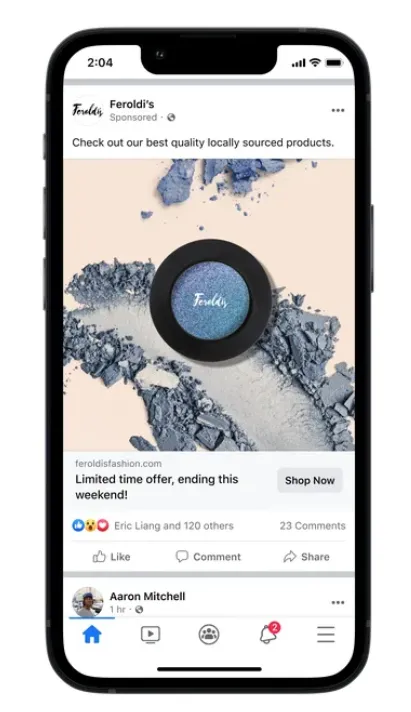
If you’re advertising a product, make sure it’s the hero of the image. Keep your product in focus and clearly visible to drive attention to what you’re selling.
Say you’re running an ad for a new pair of wireless earbuds. If your image shows a crowded desk with a laptop, coffee mug, phone, and the earbuds hidden in the corner, the product gets lost.
If you put the earbuds in the middle of a clean background, your audience will know what is being advertised. Adding a hand reaching for them helps grab their attention and focuses it on the product.
Here’s a helpful tip: include close-up shots of your products. This helps users see what they will get when they click. Users tend to connect more with details they can clearly see.
Text on Images?
Sometimes I get asked whether we should include text within the images (like an infographic) or images only.
First of all, the image is the detail that catches your attention, and the secret is always A/B testing. Maybe an infographic works better than an image-only creative.
Secondly, I also happened to see that many creatives with too much text on it did not perform well. This happens because text sometimes is a distraction.
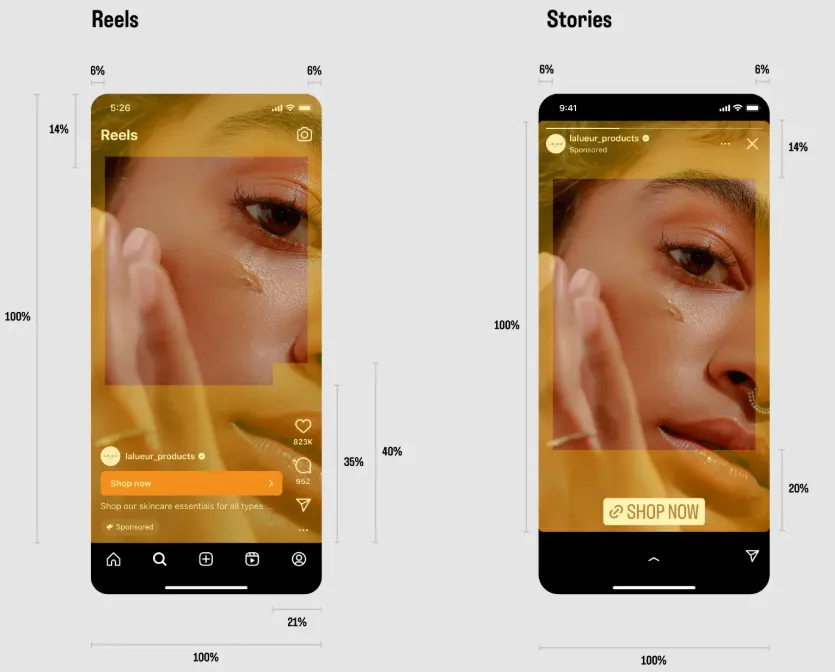
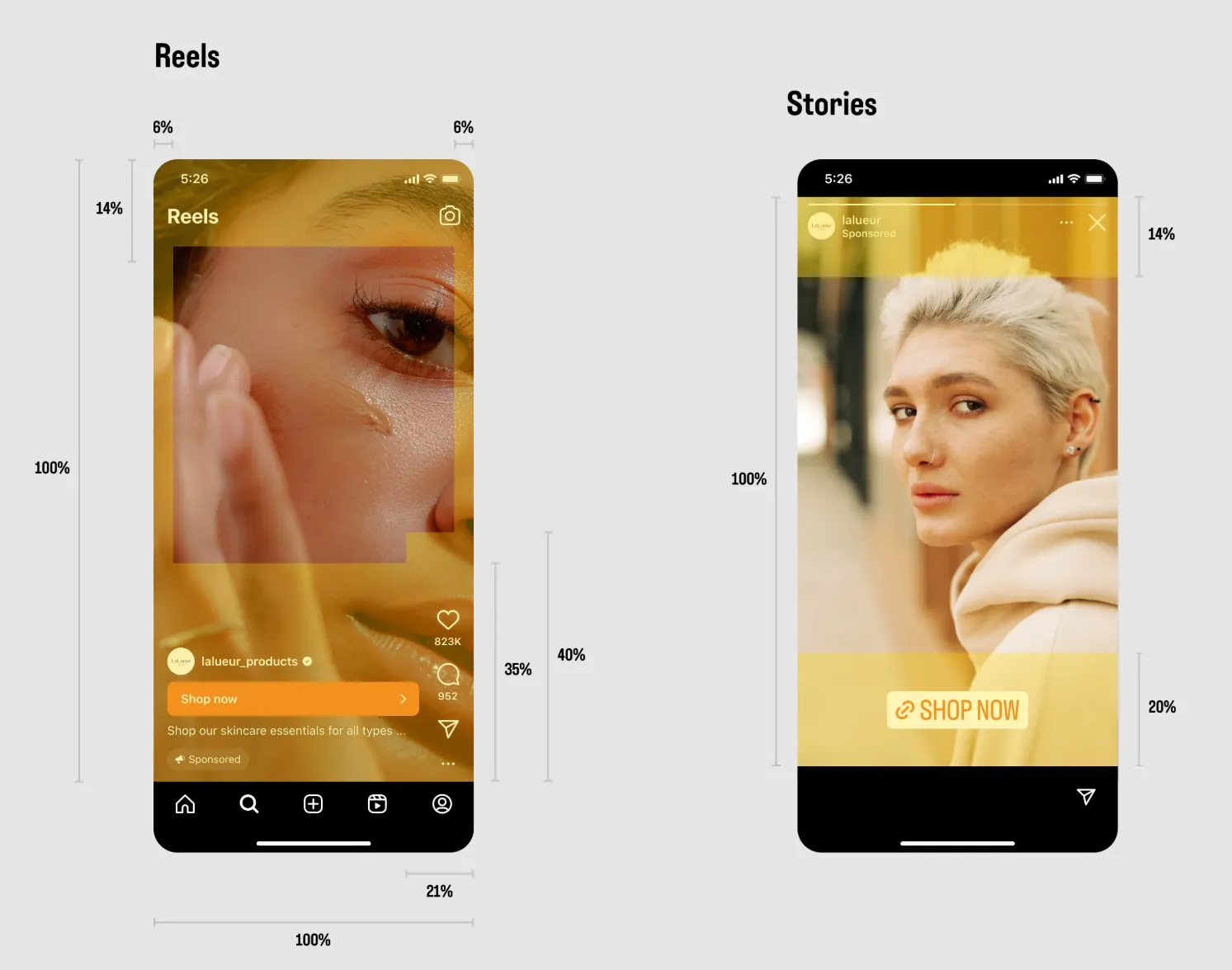
Do not overwhelm people with too much information; make them click into the ad to find out more. I also find some static images hard to look at. Another mistake I often see is that safety zones are not followed, especially in stories and reels.
What Are The Ratios and Specs
When creating eye-catching and engaging visuals, remember to use the right ratios and specifications.
Square (1:1)
This option is recommended for Feed, Stories, Reels, Marketplace, and Right Column placements.
The recommended size is 1080 x 1080 pixels.
Vertical (4:5)
This option is recommended for Feed placements, and the suggested size is 1080 x 1350
Full-screen Vertical (9:16)
This option is recommended for Stories and Reels, and the suggested size is 1080 x 1920 pixels
Landscape (1.91:1)
This option is excellent for Facebook and Instagram Feeds, and the suggested size is 1200 x 628.
I recommend choosing the Square option, though it works with many placements. Also, make sure to create JPG or PNG files. These files should not exceed 30MB.
If you or your client can create different versions of your creative, that is my best tip. This way, you can optimize for each placement.
Also, make sure to respect the ‘safe zone’ to avoid your images being cut.
Create Videos that Tell a Story
Video ads are arguably the most engaging ad format on Meta. With the right approach, they can boost your engagement rates and drive conversions.
Your videos can run as in-stream ads, in the feed, or in the stories.
In-stream
In-stream Meta ads can show targeted brand messages in Facebook’s content. This helps increase brand awareness.
They play wherever that content is viewed and primarily deliver as mid-roll ads within video content.
Advertisers can add ads that last from 5 seconds to 10 minutes. However, Meta (and I) usually suggest a maximum of 15 seconds. There are both skippable and non-skippable options available.
There are also different design recommendations to follow, as well as text recommendations and technical requirements.
Feed
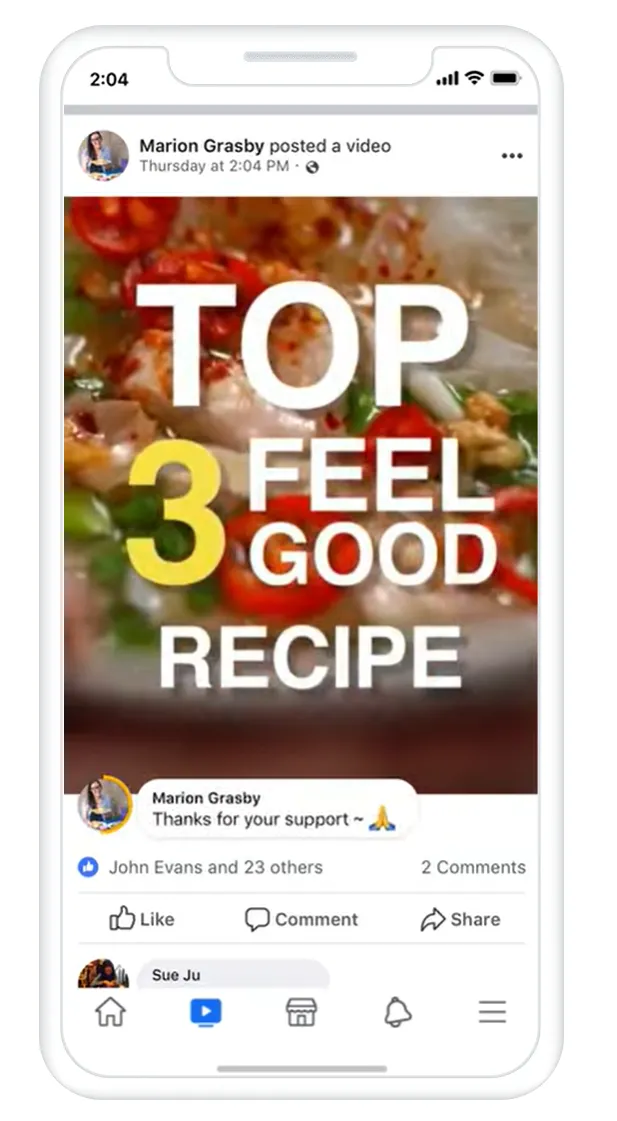
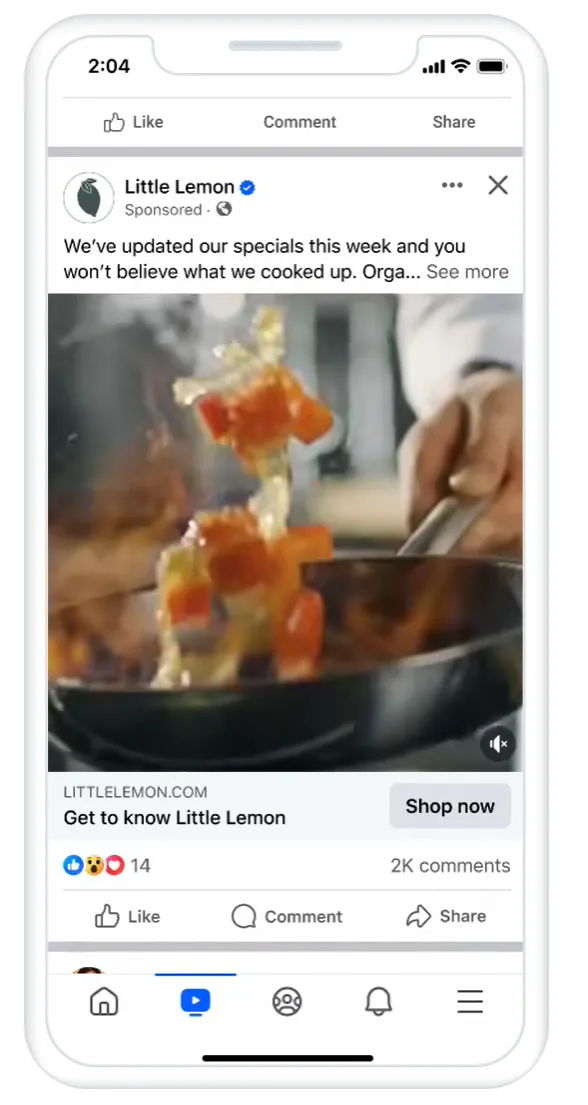
In-feed ads show up when people click a video in their Facebook News Feed. The video then opens in the Video Feed. This feed has more videos that they can watch.
When you use the Video Feeds placement, you can show your video ads. These ads will appear between regular videos in the Video Feed.
Facebook will show 1, 2, or 3 cards first. Then, viewers can tap Play Full to watch the rest of the video.
Here again, there are different design recommendations to follow, as well as text recommendations and technical requirements.
Stories
Facebook Stories will show video ads that are 10 seconds or less for the full duration of the video.
Bear in mind that video ads that are longer than 10 seconds will be split into separate Stories cards. Facebook will show 1, 2, or 3 cards first. Then, viewers can tap Play Full to watch the rest of the video.
By default, the number of cards shown before asking viewers to watch the full video is customized for each viewer.
Here again, there are different design recommendations to follow, as well as text recommendations and technical requirements.
Here’s how to make videos that get results, based on my experience, after looking at the different types of placements.
Get to the Point Quickly
On platforms like Facebook and Instagram, users scroll quickly. You have just a few seconds to catch their attention.
I recommend starting your video with a hook. This could be a question, a problem, or a striking visual.
Imagine you’re promoting a fitness app. If your video starts with a slow intro and logo animation, most people will scroll past before you say anything.
Start with a hook like, “Having trouble finding time for the gym?”, showing a quick clip of someone working out at home. Within the first three seconds, you’ve highlighted the problem and set the stage for your app as the solution, keeping users engaged.
Tell a Story
Successful videos aren’t just about showing a product; they tell a story. Show how your product solves a problem, enhances the user’s life, or provides value.
Build a narrative around your brand that connects emotionally with your audience.
Think of a skincare brand advertising a new moisturizer. A simple product shot with text saying “Hydrating cream, now available” won’t stick in people’s minds. Don’t you think so?
I have been testing videos that show real people, behind-the-scenes clips, or content made by users. This helps create more relatable videos.
It’s not just a product, it’s the solution to a problem, an emotional shift from frustration to confidence. That narrative connects with viewers on a deeper level and makes the ad memorable.
Be Authentic
What I understood during my PPC experience is that people love authenticity.
Meta’s audience is diverse, and the more genuine your video feels, the better the response.
Let me give you an example: imagine a coffee brand running Meta ads. Instead of a perfect studio shot of a cup, they show a real customer at home. The customer films themselves enjoying their morning coffee and says, “This is my little ritual before work.”
That real, user-made video feels more genuine and relatable than a staged ad. It connects with viewers who see themselves in the same everyday moment.
Keep it Short and Sweet
On Meta, less is more. Make videos that are 15 to 30 seconds long. Short videos get more views because people watch them to the end. This also encourages users to engage with your content.
Video ads that are 15 seconds or less are also eligible for Instagram Stories and Facebook in-stream placements. If you want to use a video that wasn’t made for mobile, I suggest trimming it down.
However, don’t cut out the call-to-action as you still need to drive users to take the next step.
Optimize for Mobile Viewing
Most users access Meta on their mobile devices. So, it’s important to design your creatives for mobile use.
Here’s how to make sure your images and videos look great on mobile screens:
Vertical Video Format
Use a 9:16 aspect ratio for videos. This is the standard for mobile-first placements like Instagram Stories and Facebook mobile ads. Vertical videos take up more screen space, making them more engaging for users.
Readable Text
Text should be large enough to read on a small screen. Don’t overload your image or video with too much text; keep it concise, and use large fonts for important information.
Simple Composition
Mobile screens are smaller, so you don’t have a lot of space to work with. Keep your composition simple. Focus on one main element (like your product or message) without cluttering the visual.
Test Different Variations
Creating successful ad creatives for Meta is an ongoing process of testing and iteration. One of the most important best practices is to A/B test your creatives. Here’s what you should test:
Different Formats
Test both image and video ads to see which format resonates most with your audience.
Varied Messaging
Try different headlines, captions, and calls-to-action (CTA). See which messages drive the most engagement.
Creative Elements
Test different styles, colors, and angles for product photos or video sequences. Even small changes can have a significant impact on performance.
Include a Clear Call to Action (CTA)
No matter how great your creative is, a strong call-to-action (CTA) is important to getting results. Your CTA should be clear and direct. Whether it’s “Shop Now,” “Learn More,” or “Sign Up,” make sure it tells users exactly what you want them to do next. Additionally, make sure your CTA is visually distinct, so it doesn’t get lost in the creative.
Leverage User-Generated Content (UGC)
User-generated content (UGC) is one of the most powerful tools in advertising. Customers trust the opinions of other consumers more than branded content.
If your customers are already talking about your brand, encourage them to share their experiences. You can even use these organic videos and images in your ads.
Feature real customers, their testimonials, or how they use your products. This not only builds trust but also creates a sense of community around your brand.
Conclusion
Making successful ads for Meta is not just about great visuals. It also involves strategy, relevance, and connection.
By understanding your audience, choosing the right format, and delivering a clear, compelling message, your ads can capture attention, spark engagement, and drive meaningful results.
Remember, every element of your creative matters, from the image or video to the copy and call-to-action.
By following these best practices, you’ll be better equipped to make your campaigns stand out in a crowded feed, maximize performance, and turn viewers into loyal customers.