How to Use Meta Ads Library to Analyze Competitors and Find Winning Creatives
In today’s digital advertising world, it’s not enough to just launch a few Facebook or Instagram campaigns and hope for the best. Every industry is crowded…
In today’s digital advertising world, it’s not enough to just launch a few Facebook or Instagram campaigns and hope for the best.
Every industry is crowded, every brand is competing for the same attention span, and creative fatigue hits faster than ever.
That’s why the most successful marketers don’t just rely on intuition; instead, they rely on data, patterns, and insights pulled directly from their competitors.
Today, we’re gonna talk about the Meta Ads Library, one of the most underrated and powerful tools for advertisers.
Whether you call it the Facebook Ads Library, Meta Ads Library, or just “that place where you can spy on your competitors,” it’s a treasure chest of information about what’s working (and what’s not) in your niche.
You can use it to analyze your competitors’ campaigns, understand creative trends, track seasonal patterns, and even benchmark your own brand’s ad strategy.
And the best part? It’s completely free and publicly accessible.
In this guide, we’ll break down exactly how to use Meta Ads Library to analyze competitors, find winning creatives, and improve your own eCommerce campaigns.
We’ll also discuss where to find it, how it compares to Meta Ads Library competitors, and common mistakes to avoid when utilizing it.
What Is Meta Ads Library
Meta Ads Library, formerly known as Facebook Ads Library, is an online database where you can view all active and inactive ads running across Meta’s platforms.
It’s like having a window into your competitors’ advertising playbook. It provides full transparency into what brands are doing, how they’re communicating, and what creative strategies they’re testing.
If you’re wondering what Meta Ads Library is and why everyone should care about it, think of it as a free, unlimited competitive research tool built right into Meta’s ecosystem.
Here’s what, in my opinion, makes it a goldmine for advertisers:
See Every Live Ad Your Competitors Are Running
One of the most powerful features of Meta Ads Library is the ability to see every live ad a competitor is currently running across Meta platforms.
That means you can instantly access your competitors’ creative strategy: from the copy and visuals to the type of offers and calls to action they’re using. You can see if they’re promoting sales, launching new products, or running brand awareness campaigns.
This level of visibility helps marketers stay up-to-date on market trends and identify what’s working in their industry. Instead of guessing what others are doing, you can base your strategy on real examples of live campaigns.
Filter by Country, Platform, or Keyword
Meta Ads Library isn’t just a static repository; in fact, it’s fully searchable and filterable. You can filter by country, keyword, or platform to focus on exactly what matters to you.
For example, if you run ads in the UK, you can filter to see only campaigns targeting that market. Or, if you’re researching Instagram-specific ads, you can isolate those easily. You can even search by keywords like “Black Friday” or “Summer Sale” to see how brands craft their messaging around seasonal events.
This makes the library an incredibly efficient research tool for both global and local advertisers. Whether you’re benchmarking creative trends or exploring new markets, the filters help you quickly narrow down the insights you need.
Analyze Ad Formats and Creative Trends
Meta Ads Library lets you explore every ad format your competitors use: from static images and carousel ads to videos, reels, and collection ads.
By browsing across different creatives, you can start spotting patterns in your niche.
You can ask yourself if most competitors use video ads to explain complex products or if they are running static ads for promotions or retargeting campaigns. Or, again, which formats seem to dominate among top brands in your category?
This type of analysis helps you understand creative best practices and guides your own testing strategy. If most of your competitors use short-form video content, for example, it might be worth testing similar formats to stay competitive.
Spot Testing and Optimization Behavior
Another hidden advantage of Meta Ads Library is the ability to spot testing patterns.
If you notice a brand running multiple ads for the same product (each with different visuals, copy, or CTAs), that’s a clear sign they’re A/B testing creative performance.
You can learn a lot by observing these testing strategies: how do they vary their headlines? Do they change color schemes or ad placements? Which versions stay active longer (an indicator of better performance)?
By identifying these behaviors, you can reverse-engineer their testing framework and apply similar methodologies to your own campaigns (without spending extra budget to “discover” what already works).
How to Access and Navigate the Meta Ads Library
If you’re wondering where Facebook Ads Library is, the answer is simple: it’s public and doesn’t require a login.
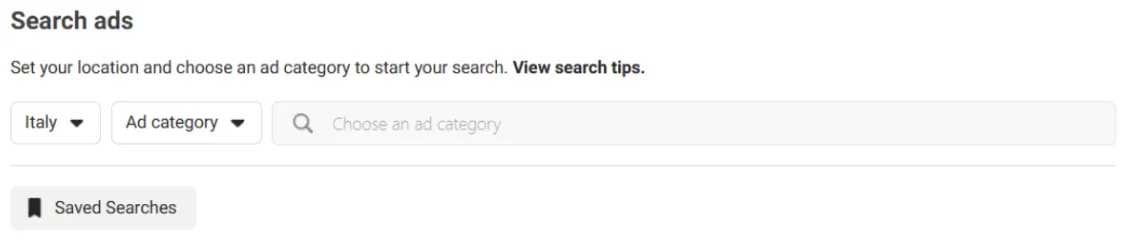
Once you’re there:
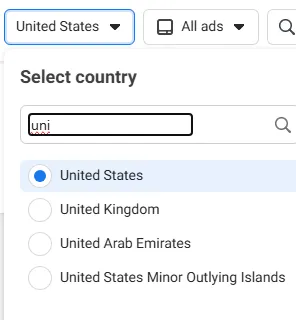
Country
The first step is to select a country. This determines which region’s ads you’ll see in your search results.
For example, if you choose the United States, you’ll only see ads that are currently running in the U.S. market.
This is particularly useful if you operate in multiple countries or want to analyze how global brands adapt their messaging and offers based on geography.
You might notice that big brands localize their creative assets, pricing, and tone depending on the region; something you can easily spot using this filter.
Ad Category
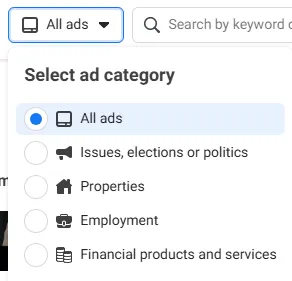
Next, you’ll be prompted to select an ad category. For most advertisers and eCommerce professionals, the best option is “All Ads.”
This setting allows you to view every commercial and promotional ad currently running across Meta’s platforms (including those from brands in your niche).
There are other categories as well, such as “Issues, Elections, or Politics,” which are used mainly for political transparency.
But for competitive research, “All Ads” is where you’ll find everything from product launches to retargeting campaigns, sales promotions, and seasonal offers.
Keyword or Advertiser
You can search by keyword, advertiser name, or product type, depending on what you want to find.
Searching by brand name (e.g., “Nike”) will show all the active and inactive campaigns from that advertiser.
Searching by product type (e.g., “running shoes”) lets you discover brands advertising in that category.
Searching by keyword (e.g., “Black Friday,” “free shipping,” or “new collection”) helps you analyze messaging and seasonal promotions.
This is where Meta Ads Library becomes a true competitor research tool. You can instantly see what copy, visuals, and formats your competitors are using (and even how often they test new angles or offers).
Turn Meta Ads Library into a Competitor Research Tool
The real power of Meta Ads Library, as we mentioned earlier, lies in competitive analysis. Here’s how you can use it strategically to get ahead of the competition:
Identify Key Players in Your Market
One of the first things you can do with Meta Ads Library is to map out your competitive landscape.
By searching within your niche or category, you can instantly see which brands are advertising most actively and how they position themselves.
For example, if you sell skincare products, you can look up both big names and emerging brands to see who’s investing in Meta ads right now.
This helps you identify who your main competitors are, which segments of the market they’re targeting and how often they’re running campaigns.
This kind of insight is invaluable for understanding where your brand stands and how saturated your space is.
Understand Pricing, Positioning, and Messaging
Meta Ads Library isn’t just about visuals; in fact, it’s also a powerful tool to study how competitors communicate.
Look closely at their ad copy (how do they describe their value proposition?), their offers (are they emphasizing price, quality, or uniqueness?), and finally their tone of voice (are they formal, friendly, or aspirational?).
By comparing these elements across multiple brands, you can start identifying trends in positioning. For instance, if several competitors push “affordability,” there may be room for you to differentiate with a message centered on premium quality or speed of delivery.
Spot Launch Cycles and Seasonal Trends
Another key advantage of using Meta Ads Library is the ability to track timing patterns.
By scrolling through ads and checking their start dates, you can identify when brands typically launch major campaigns (whether for Black Friday, new product drops, or seasonal promotions).
For example, you might notice that your competitors start promoting summer products as early as April or begin teasing holiday deals in late October.
Understanding these cycles allows you to plan your campaigns proactively and avoid launching at the exact same time as everyone else.
Here’s how to use Meta Ads Library effectively for competitor research:
Search Direct Competitors
Start by looking up brands that offer similar products or services. These are the companies targeting the same audience as you.
Review their entire ad catalog (not just one campaign) to see how they vary their messaging for different stages of the funnel (awareness, consideration, and conversion).
You’ll likely discover new creative angles or audience segments you hadn’t considered.
Search Indirect Competitors
Next, explore brands in adjacent or complementary categories.
If you sell coffee, for instance, check out cafes, kitchenware brands, or food subscription services; they share your audience’s lifestyle and purchasing habits.
Indirect competitors often reveal creative ideas and emotional hooks that can inspire your own campaigns without directly copying your niche.
Track Winning Creatives Over Time
One of the simplest yet most effective habits you can adopt is to save or screenshot ads that appear repeatedly over several months.
When a brand runs the same creative for a long time, that’s a strong signal it’s performing well. No one keeps paying for underperforming ads.
By collecting these examples, you can build your own inspiration library of proven ad formats, hooks, and designs.
Compare Formats and CTAs
Pay attention to the ad formats competitors use (static, video, carousel, reels) and their calls to action (“Shop Now,” “Learn More,” “Book Today”).
These details reveal how brands tailor their approach depending on their goals. For example, if most brands in your niche rely heavily on video ads, it might be a sign that storytelling performs better than static images.
Similarly, the choice of CTA gives insight into whether competitors are focused on direct conversions or brand awareness.
How to Combine Meta Ads Library Insights with Your Own Campaign Data
The smartest marketers don’t stop at observation; in fact, they cross-reference what they see in Meta Ads Library with their own campaign data.
For instance, if your CTR (Click-Through Rate) is dropping, check what top competitors are doing differently with their headlines or visuals. Or, if you’re testing new angles or offers, compare them against industry norms visible in the library.
And remember, don’t copy, but adapt what clearly works.
Common Mistakes When Using Meta Ads Library
Even though it’s a powerful tool, many marketers misuse or underestimate it.
I would suggest avoiding these pitfalls:
Copying Ads
As mentioned above, you don’t need to copy what others do, but you can take inspiration and adapt what works.
When you simply duplicate a competitor’s ad, you’re also copying their positioning, tone, and assumptions about their audience, which may not match yours at all.
Instead, try to understand patterns: hooks that grab attention, formats that get used often, or angles that appear in top advertisers’ creatives.
Then, adapt those ideas to your own brand voice, products, and customer pain points.
Duplication kills originality and relevance; smart inspiration does the opposite.
Ignoring Context
A winning ad for one brand might completely flop for yours if the audience, offer, or funnel is different.
Seeing a carousel with a bold discount or a UGC-style video doesn’t mean it will work in your niche, with your price point, or at your stage of growth.
Always ask yourself: what is this brand selling, to whom, at what price, and with what expectations?
Use Meta Ads Library data as context, not as a universal recipe. Bring it back to your business model, your AOV, your margins, and your customer journey.
Not Tracking Changes
Meta Ads Library is not a “one and done” research step.
If you look at competitors only once, you miss the bigger picture: which creatives stick around, which ones disappear quickly, and what kind of tests they are running over time.
Failing to revisit your competitors regularly means missing out on new messaging angles, seasonal campaigns, fresh formats, and shifts in offer strategy.
Set a recurring reminder (weekly or monthly) to review key competitors, take notes, and look for trends in what they keep, stop, or scale.
Final Thoughts
Meta Ads Library isn’t just a place to snoop on competitors; in fact, it’s a strategic advantage for marketers who know how to use it.
By consistently tracking your competitors’ creatives, testing your own variations, and staying alert to shifts in messaging or offer structures, you’ll build campaigns that not only perform better but evolve faster.
Use it as your creative radar, and you’ll never run out of ideas that convert.
And if you need any help in achieving this, remember that Midsummer Agency is here to help.