I know why you’re here. You looked for the best ppc strategy for your website, you created great creatives for your ads, and you’re 100% ready to get new customers. But you know that Meta may disagree and you want to run you’re ads risk-free, or find a way to get your rejected ads running. You’re in the right place.
Running successful ads on Meta platforms like Facebook and Instagram requires more than just creativity and targeting – you need to play by the rules. Meta’s ad policies exist to keep the ecosystem safe, fair, and effective for all advertisers and users alike.
Ignoring these policies can lead to ad rejections or account suspensions, derailing your marketing efforts before they gain traction. You don’t want this, and I’m here to help you.
I know – sometimes ads are rejected even when you haven’t clearly violated the rules. However, this is often a one-off situation. If rejections become frequent, there’s likely an issue to address.
In this article, I’ll outline the basics of the Meta Ads Policy and highlight key considerations when creating your ads.
Why Meta Ads Policy Compliance Is Crucial
If you’re wondering why Meta created these policies, well, they’re of course needed to protect users and maintain platform integrity.
Meta platforms are primarily social networks designed for users, and their goal is to show content that aligns with that purpose.
Ignoring the rules can seriously hurt your marketing results. Ads that violate policies might never see the light of day, or worse, your whole account could be restricted.
Think of Meta’s policy like the rules of a chess game. Each piece has specific allowed moves, and playing outside these rules results in penalties or losing your turn. Similarly, violating Meta’s policies means losing visibility and wasting budget – no one wants that.
Meta Ad Restrictions You Need to Know
Meta has clear guidelines regarding the types of ads that can be approved on its platform. Understanding which content is forbidden is crucial to avoid having your account suspended.
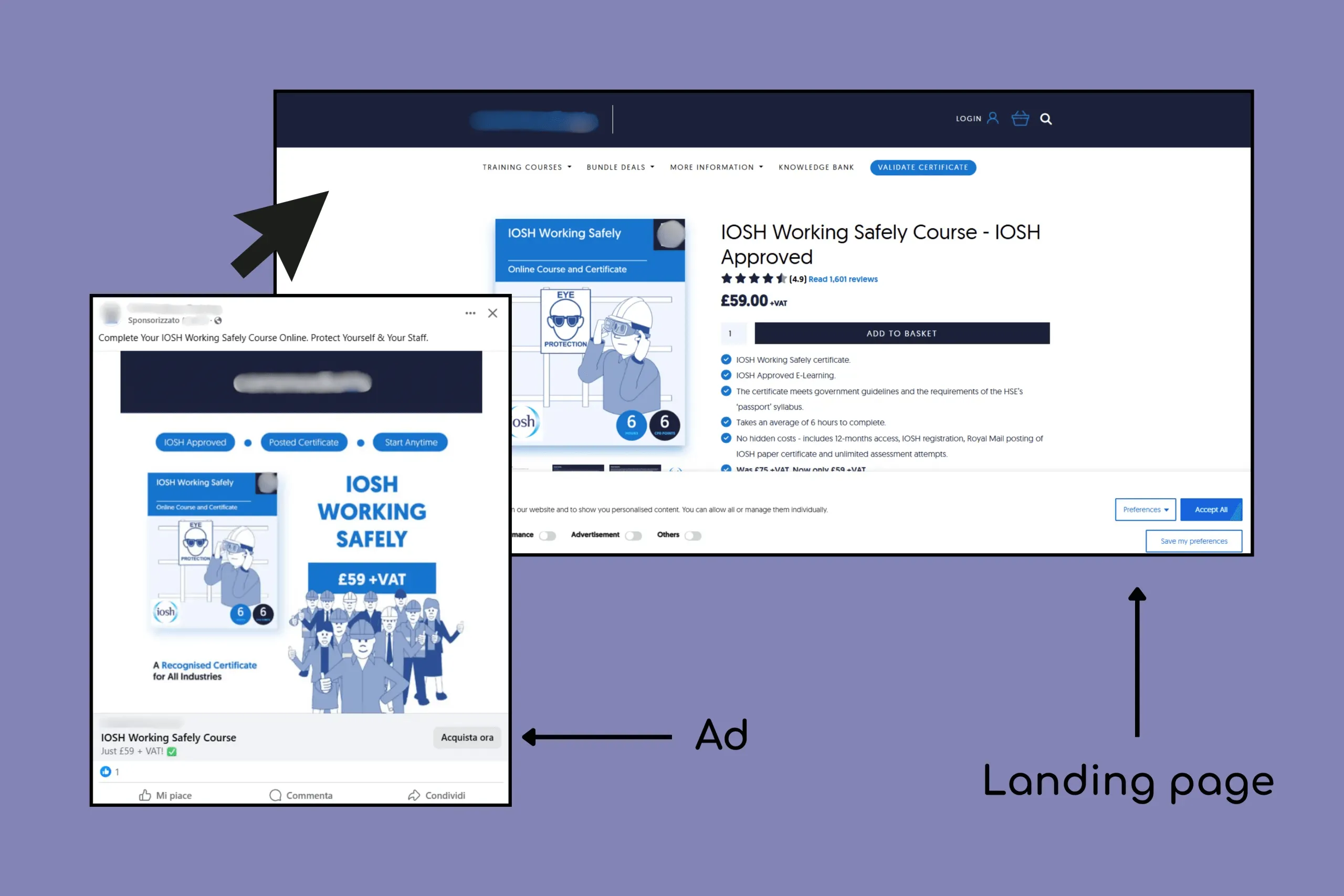
⚠️ Consider that your landing pages also need to be aligned with these policies!
An example of landing page aligned with its Facebook ad.
Prohibited Content
These ads are strictly banned:
Illegal products such as counterfeit goods
False or misleading health claims
Hate speech, violence, or shocking content
Exploitation of fear or trauma
I’m sure you already know that trying to promote any of these is a guaranteed losing move. It’s important, though, to note that Meta uses bots and AI to review your content. Make sure to double-check your ads for any elements that could unintentionally mislead the AI and cause it to flag your content as non-compliant.
Even something as simple as a “before/after” layout or words like “instant” or “guaranteed” can trigger a false flag – even when your offer is legit.
Restricted Content
Certain ads are allowed but with strict conditions:
Alcohol ads must comply with legal age restrictions and local laws.
Gambling-related ads often require prior approval
Health and pharmaceutical products face stringent vetting
If you run ads for one of those industries, you’ve probably already faced some issues. In these cases, it’s almost inevitable that you’ll see the ‘Ads rejected’ notification on Business Manager at some point. Sooner or later, the bots will block one of your ads. No worries! You can ask for a review, it will take some time, but in most cases your issue will be solved.
💡 At Midsummer Agency, we manage a large alcohol-focused eCommerce brand, and we’ve managed to get most of their ads approved just by avoiding in the ad copy any direct encouragement to drink.
With time, you’ll start noticing the small patterns that Meta’s bots don’t like.
Ad Format Rules
Meta requires clarity and balance in your ads:
Keep text-to-image ratio optimal to avoid reduced reach
Avoid ALL CAPS in your headlines or too many emojis at the start of your copy – Meta’s system often treats them as low-quality content
These are basic principles that every ad should follow. While ads are rarely rejected for these reasons, they might suffer from reduced reach or higher CPMs if not optimized.
Targeting Rules and Audience Considerations
Meta’s targeting tools are powerful, but come with important restrictions to protect privacy and prevent discrimination:
Avoid targeting based on sensitive data
Comply with age and location restrictions per content type
Respect user data and privacy standards
🚩 Real-World Experience: Ad Rejections and Workarounds
At Midsummer Agency, we’ve encountered situations where ads were mistakenly flagged under the “Drugs and Pharmaceuticals” category. In one case, client testimonials were incorrectly flagged, despite containing no prohibited content. The business operated in the home design industry, thus completely unrelated to drugs or pharmaceuticals. Here’s how we navigated the issue:
Duplicate and Modify: We duplicated the ads and made minor changes (e.g., altering a word or two).
Monitor and Adjust: The modified ads were approved, indicating that the issue was likely due to the AI’s misinterpretation. We didn’t need to ask for a review for the previous ad.
This experience underscores the importance of adaptability and persistence when dealing with Meta’s ad review processes. Of course, if the ad keeps getting rejected, contact the Meta support to avoid restrictions!
Navigating Meta’s Special Ad Categories
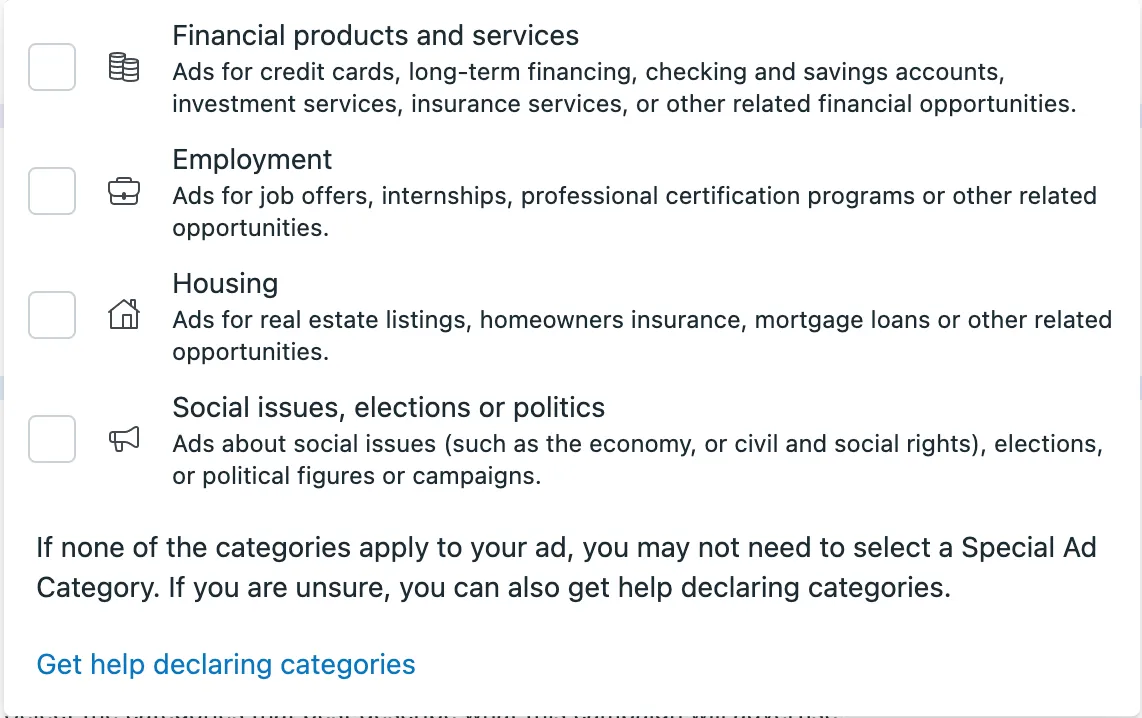
Meta’s Special Ad Categories are designed to prevent discrimination in sensitive sectors like Housing, Employment, Credit, and Social Issues. If you’re advertising real estate or mortgage services, understanding and complying with these categories is crucial.
Meta’s Special Ad Categories as they appear on Meta Ads Manager..
Key Restrictions in Special Ad Categories
When your ad falls under a Special Ad Category, certain targeting options are disabled to promote fairness. It’s important to note that these restrictions may vary depending on where you’re located and where you want your ads to reach.
Demographic Targeting: You cannot target or exclude based on age, gender, or detailed demographics.
Geographic Targeting: ZIP code targeting is unavailable. You can only target by city, state, or country, with a minimum 15-mile radius.
Lookalike Audiences: This feature is disabled to prevent discriminatory practices.
Detailed Targeting: Options like behaviors, interests, and exclusions are limited.
Practical Strategies for Compliance
To effectively advertise within these constraints:
Leverage Custom Audiences: Use your own data (e.g., website visitors, email subscribers) to create Custom Audiences. Ensure that the data complies with Meta’s policies and does not discriminate.
Utilize Special Ad Audiences: These are similar to Lookalike Audiences but adjusted to comply with SAC restrictions. They help reach people similar to your Custom Audiences without violating targeting rules.
Focus on Creative Excellence: With limited targeting options, compelling and inclusive ad creatives become paramount. Highlight the benefits of your offerings without focusing on specific demographics.
Tips to Create Meta-Policy-Compliant Ads
Creating Meta-Ads that comply with the platform’s policies doesn’t need to be a headache. In fact, it can be pretty simple if you approach it with the right mindset. Here are some steps to help you stay on track:
**Be Transparent and Authentic
**Meta’s primary goal is to ensure that the ads people see on their platform are trustworthy and represent real products or services. So, be honest about what you’re offering. Avoid exaggerating or promising something that your product can’t deliver. Nothing strange here, as you would want to operate the same way in real life. Ads that mislead or exaggerate are usually flagged by Meta’s AI.
Regularly Review Meta’s Policy UpdatesJust like any other platform, Meta occasionally updates its policies. Stay up-to-date with these changes to ensure your ads never fall out of line. A good rule of thumb is to check the Meta Policy Center once a month – this way, you’ll stay ahead of any potential issues.
Use Meta’s Tools for SupportMeta offers various tools like the Ads Manager and Policy Center that provide insights into your ad performance and policy compliance. These tools can guide you in making tweaks that not only keep your ads compliant but also optimize them for better results.
If you’re ever unclear about why an ad was flagged, don’t hesitate to contact Meta’s support team. They can help you understand the issue and offer guidance on how to fix it.
What to Do If Your Ad Is Rejected
It’s frustrating when your ad gets rejected, especially when you’ve followed the rules. However, don’t panic – this is a common occurrence, and it’s an opportunity to improve. Here’s what you should do.
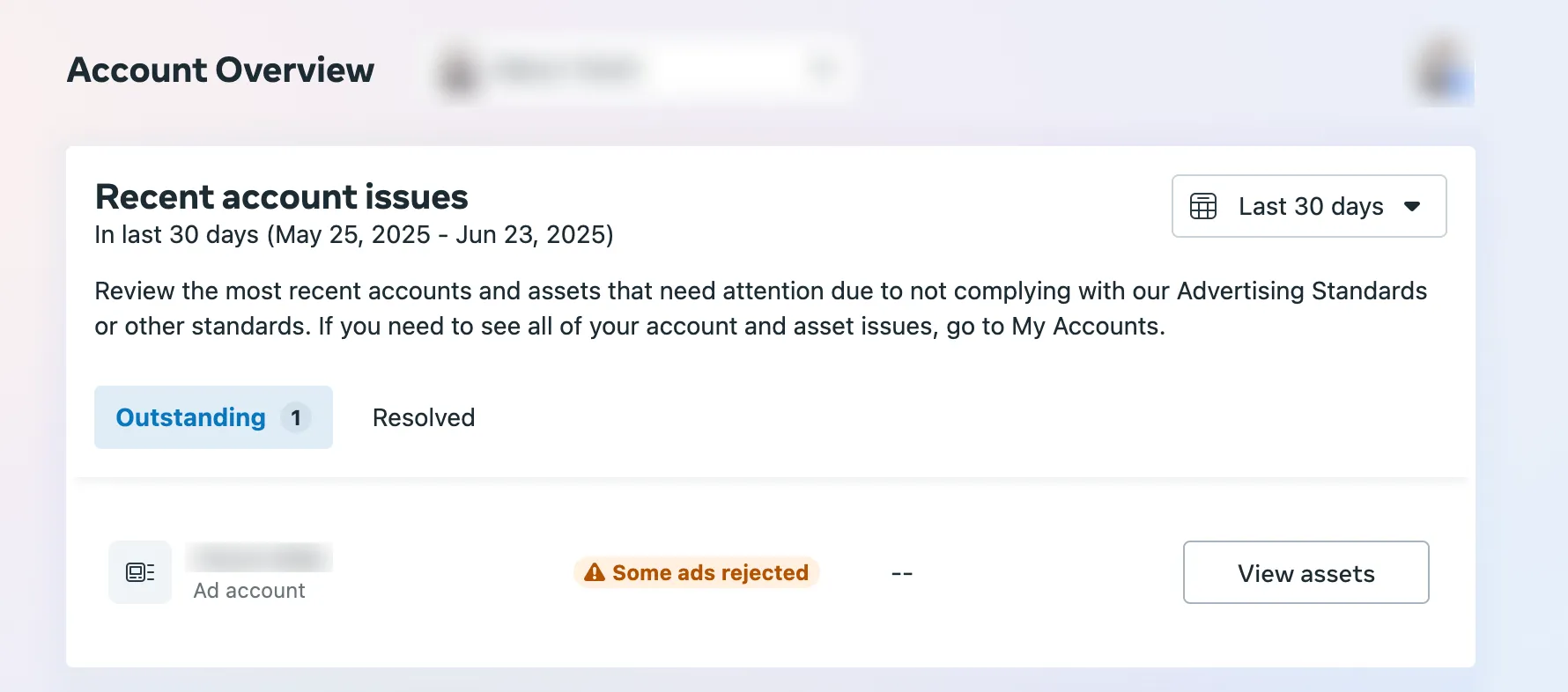
On Meta Ads Manager, you will see this flag warning you that some of your ads have been rejected.
**Understand Why It Was Rejected
**Meta usually provides feedback on why your ad was rejected and you can check your support page for tickets you opened. An ad could be rejected due to misleading content, inappropriate language, or even failing to comply with community standards. Take the time to read through the feedback carefully and try to see things from the platform’s perspective. Sometimes, the reason might be a small technical mistake you can easily fix.
Appeal the Rejection If NecessaryIf you believe that the rejection was a mistake or that your ad is fully compliant, you can ask for a review. This can be done directly from the Business Manager. Meta typically re-reviews the ad in a short time, but remember that there are no guarantees. If your ad is rejected after the review, be sure to learn from the feedback and try again.
**Iterate and Learn
**Even when things don’t go as planned, think of it as part of the process. Every rejection is a chance to fine-tune your strategy, whether it’s tightening your targeting, reworking your copy, or testing new formats. Remember, even seasoned advertisers face rejections – what matters is how you adapt and evolve your approach. But yes, I get it, it can be a bit frustrating at times.
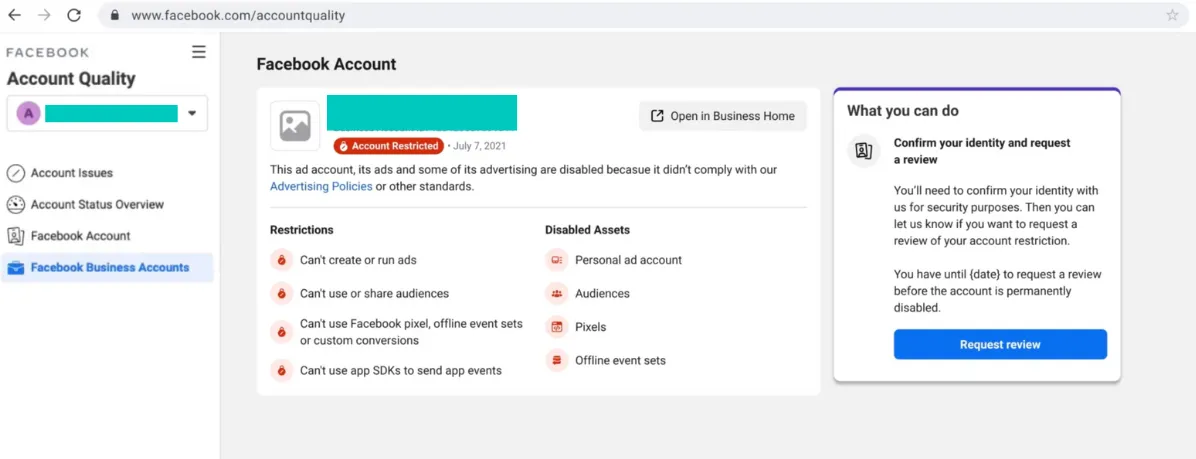
⚠️ Watch out: if your ads keep getting rejected, your account may be suspended! All of your ads would be stopped till you get verified, so be very careful if you see multiple ads rejected at the same time – it may be better to wait for approval before running new ads.
To check whether your account has been suspended, go to Facebook Business Accounts.
Frequently Asked Questions about Meta Ads Policy
1. Why do my ads keep getting flagged even though I followed all the rules?
Ugh, I totally get it. Meta’s AI can sometimes be a little too overzealous when reviewing ads. Even if you’ve done everything right, things like “before/after” images or words like “instant” might trigger a false flag. It’s just how the system works sometimes. A quick workaround? Duplicate the ad and make small tweaks – like changing a word or two. You’d be surprised how often that does the trick.
2. How do I deal with Meta’s rules for sensitive categories like alcohol or health?
It’s definitely a bit more challenging, but Meta rightfully so wants to keep things compliant with local laws and avoid any misleading claims. So, if you’re running alcohol ads, avoid encouraging people to drink directly. With health ads, stay away from promises that sound too good to be true. Keep it honest and transparent, and you’ll be in a good spot. And, check for updates – Meta loves throwing in a curveball here and there.
3. What can I do to make sure my ads aren’t rejected?
A few things you can do to stay on track: First, keep your ads clear and real – no over-the-top claims. Stick to what you can actually deliver. Also, make sure your landing page matches the vibe of your ad, Meta doesn’t like it when they don’t align. Oh, and if you’re using “guaranteed” or “instant,” you might want to rethink that. It’s a little too much for the bots to handle sometimes.
4. How often do Meta’s ad policies change, and how do I stay on top of them?
They change, quite often, actually. But don’t stress, staying up to date is easy. Just check the Meta Policy Center every 2-6 months (it’s a solid habit). That way, you’ll catch any changes before they become a problem. Keeping an eye on the updates will help you avoid any nasty surprises and keep your ads rolling smoothly.
Final Thoughts
Understanding and respecting the Meta Advertising Policy is essential to running effective, trustworthy campaigns. By playing smart and sticking to the guidelines, you avoid costly penalties and ensure your ads reach and engage the right audience.
And always assume, when in doubt, that the bot is stricter than the human.
Like in chess, the path to victory in advertising is about knowing the rules and planning your moves thoughtfully. Need help navigating Meta’s ad policies or want to optimize your paid social? Reach out anytime – we’re here to help you win the game :D.