Competitor PPC Analysis: Tools & Tips to Find Competitor Keywords
Understanding what your competitors are doing in PPC advertising is key to outperforming them. Competitor PPC analysis helps you uncover their keyword strategies, ad copy, and…
Staying ahead in the world of Pay-Per-Click advertising means keeping an eye on what your competitors are up to. By using the right tools and strategies, you can get a sneak peek into their keyword choices, ad copy, and how their campaigns are performing.
In this blog post, we’ll walk you through how to effectively analyze your competitors’ PPC strategies and uncover keyword opportunities to make your own campaigns even better.
What is a Competitor PPC Analysis
A competitor’s PPC analysis is a process of evaluating the advertising strategies of your competitors in the PPC field. The goal is to gather insights about their keyword choices, ad copy, landing pages, and creatives…to help you improve your PPC campaigns.
Why Competitor PPC Analysis Matters
Before diving into tools and tactics, it’s important to understand why competitor PPC analysis is a must for your business:
Discover Keyword Opportunities: Competitor analysis can reveal profitable keywords you’re not targeting.
Benchmark Campaign Performance: It helps you understand how your PPC efforts stack up against your competitors.
Refine Ad Copy: See what messaging resonates with your target audience and adjust your ad copy accordingly.
Uncover Gaps: Identifying areas your competitors aren’t targeting can provide an opportunity to fill those gaps with strategic ads.
Optimize Cost Efficiency: Analyzing metrics like CPC (Cost Per Click) and Impression Share can help you fine-tune your budget allocation and bidding strategies.
Key PPC Metrics to Monitor in Competitor Analysis
When performing PPC analysis, it’s not just about the keywords competitors are targeting; in fact, understanding key metrics can offer deeper insights into the effectiveness of their strategies. Here are some essential metrics to monitor:
1. Cost Per Click (CPC)
CPC is a critical metric that reveals how much you’re paying for each click on your ads. By analyzing the CPC of your competitors on GAds (don’t worry, we’ll explain later how to do this!), you can gauge the competition for certain keywords and get a sense of how much you might need to bid to rank effectively.
If competitors are bidding high, it could mean high competition, but it could also indicate that the keyword is driving high-value traffic. On the flip side, a low CPC might indicate a less competitive keyword or a less effective campaign.
2. Search Impression Share
Impression Share refers to the percentage of times your ads are shown compared to the total number of times they could have been shown. In competitor PPC analysis, this metric helps you understand how much of the potential audience share your competitors are capturing.
If a competitor has a higher impression share, it could suggest they’re outbidding you or targeting more keywords, which can inform your bidding strategy.
Keeping an eye on impression share alongside your target KPIs (e.g. CPA, ROAS, or profit) is essential for making smart budget allocation decisions. A low impression share suggests you’re missing valuable exposure, while a high impression share indicates your ads are effectively dominating the auction.
3. Search Top Impression Share
Search Top Impression Share refers to the percentage of times your ad appears in the top position (above the organic search results) when it’s shown. This is an important metric because ads in the top positions tend to receive more clicks, leading to higher traffic and potentially higher conversions.
By looking at your competitors’ top impression share, you can determine how often they dominate the top spot for certain keywords, which can help you decide where to focus your own efforts.
If competitors are consistently ranking in the top position, you might need to adjust your bids, improve your Quality Score, or experiment with better ad copy and landing pages to increase your chances of appearing at the top.
4. Search Absolute Top Impression Share
Search Absolute Top Impression Share takes things a step further by showing the percentage of times your ad appears in the very first position: the absolute top of the search results. This position is the most coveted, as it generally receives the highest number of clicks. Understanding your competitor’s absolute top impression share helps you gauge how often they’re securing this prime ad space.
If your competitors have a high absolute top impression share, it may be time to revisit your bids or explore additional ad formats, like Ad Extensions, to stand out more.
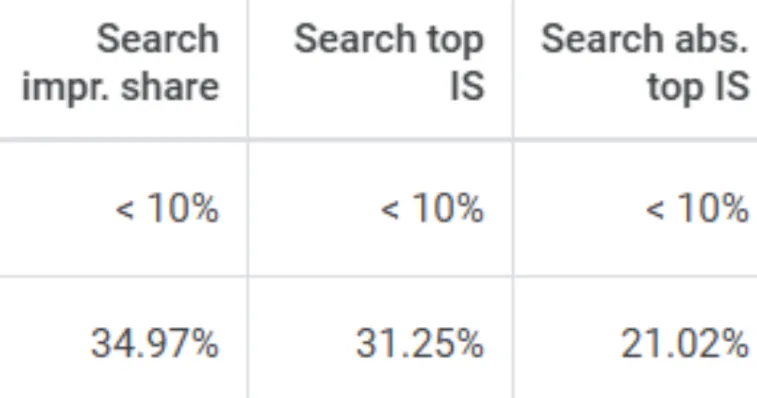
The three metrics Search Impression Share, Search Top Impression Share and Search Absolute Top Impression Share as seen on a Google Ads account.
Tools to Find Competitor Keywords
There are several tools you can use to uncover the keywords your competitors are bidding on. Here are some of the most popular:
1. Google Ads Keyword Planner
This is a free tool that helps advertisers discover new keywords, plan their keyword strategy, and estimate how their keywords will perform in terms of traffic and costs. It’s especially useful for creating efficient paid search campaigns, as it helps identify relevant keywords that are likely to drive traffic to your site or product.
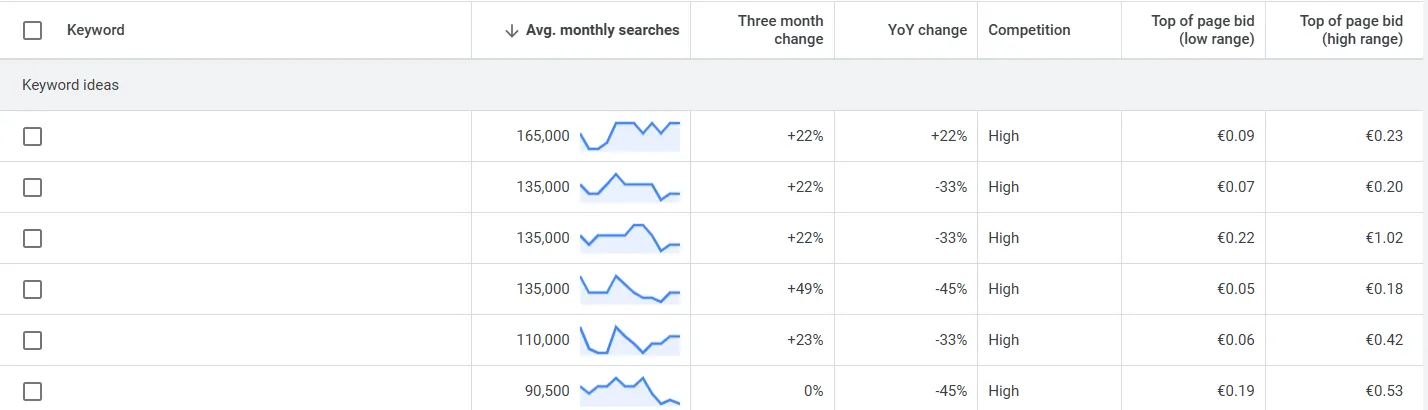
A look at the Google Ads Keyword Planner Interface.
I’ve always used (and preferred) this handy tool and I mainly look at what keywords are driving traffic, the avg. monthly search volume and the competition.
One of our clients, a business offering online courses in the UK, wanted to increase sign-ups for their certification programs. Using Google Ads Keyword Planner, we identified both branded keywords and generic ones like “asbestos online courses”.
By evaluating search volumes, we found that targeting specific (and sometimes even long-tail keywords) related to the courses led to higher engagement and a better ROAS.
We also tested the performance of keywords like “best asbestos online courses” versus “certified asbestos courses,” which allowed us to fine-tune the client’s budget allocation and optimize for higher-conversion searches.
2. SEMrush
SEMrush is a comprehensive tool that allows you to spy on your competitors’ PPC campaigns. You can view the exact keywords they’re targeting, their ad copy, and the landing pages they’re using. SEMrush also provides detailed insights on how much competitors are spending on ads, what their ad positioning is like, and the estimated traffic they are driving.
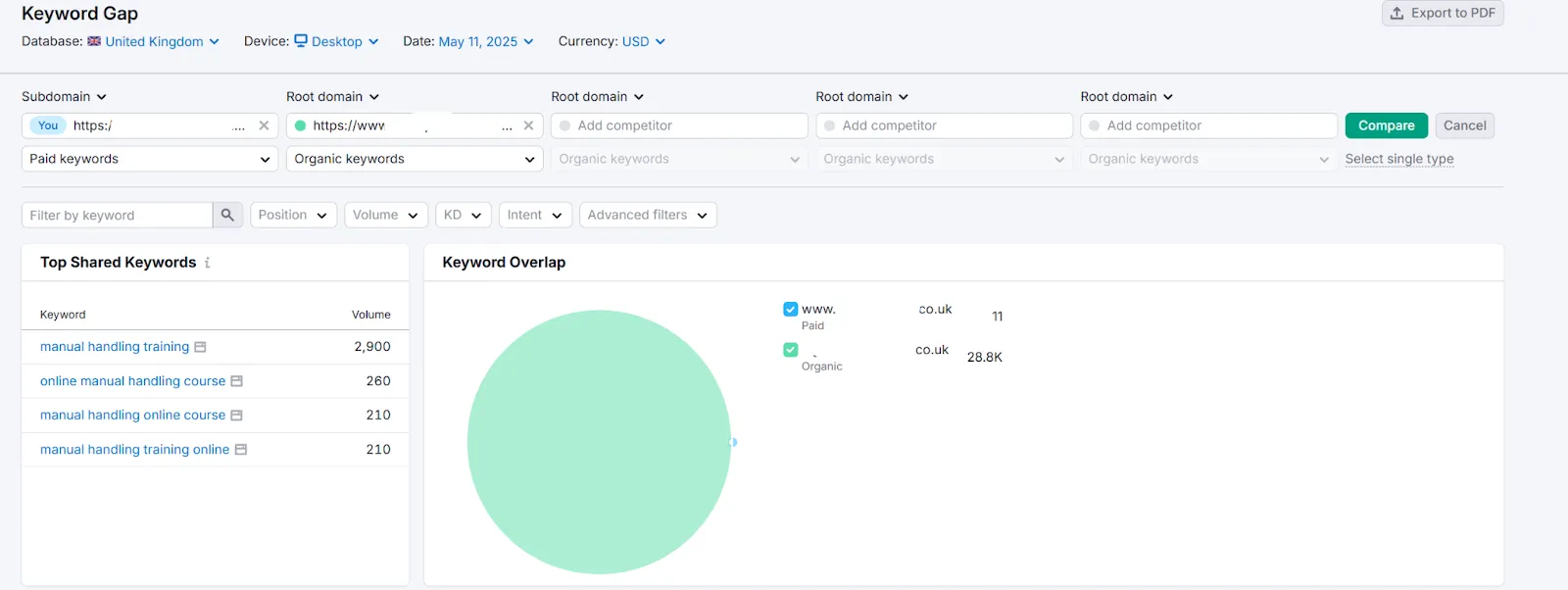
The Keyword Gap tool inside SEMrush helps identify and compare keyword opportunities by analyzing the differences and overlaps in keywords between your website and competitors’.
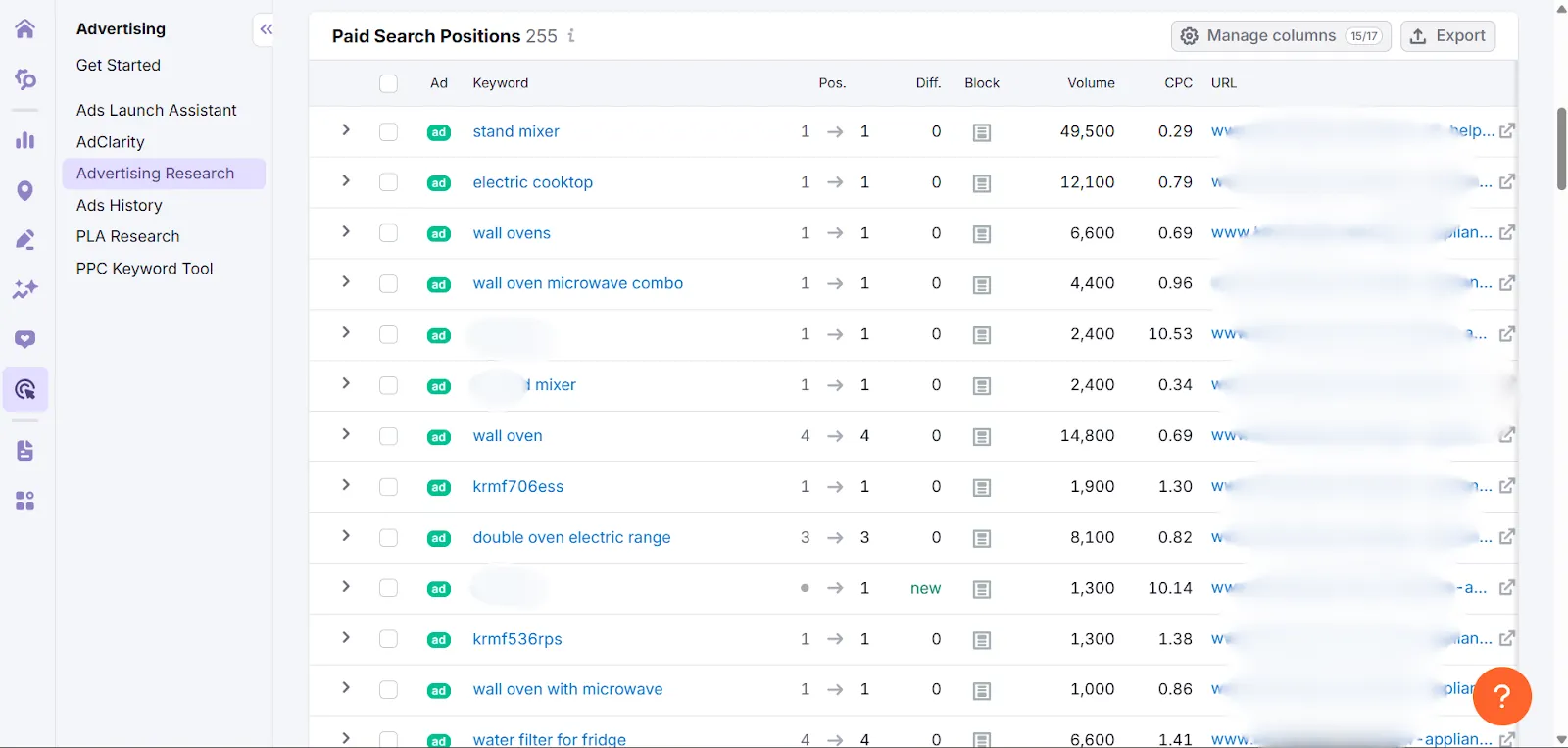
In SEMrush, you can see the keywords competitors are targeting, including trademark terms, generic terms and specific product models. Each keyword shows its CPC and search volume, helping you gauge competitiveness and budget allocation.
Some keywords have a high search volume with a low CPC, while some others have a high CPC but lower volume. SEMrush allows you to analyze competitor performance, identify gaps, and optimize your own PPC strategies.
The Advertising Research tool inside SEMrush analyzes competitors’ paid search campaigns to uncover their ad strategies, keywords, budgets, and performance insights.
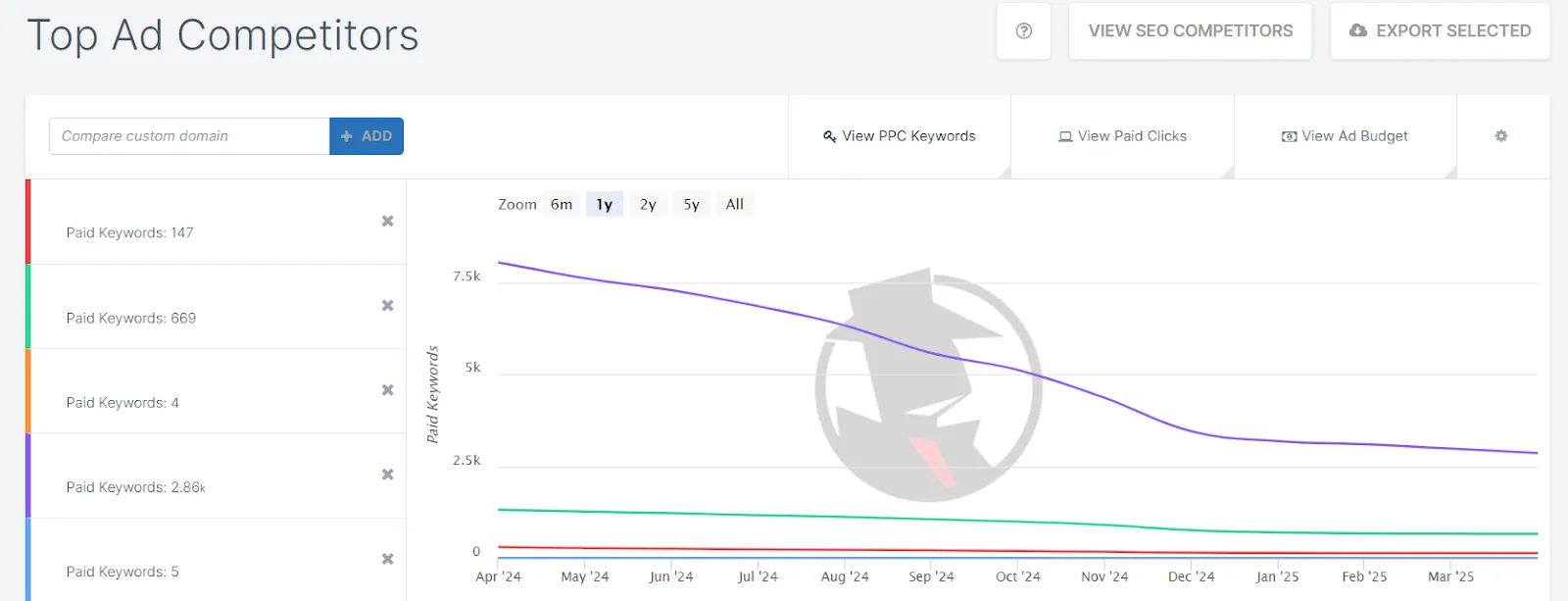
3. SpyFu
SpyFu offers an in-depth analysis of both organic and paid keywords. You can see the keywords that competitors are targeting in their PPC campaigns, how long they’ve been using them, and how much traffic those keywords are driving. SpyFu also provides insights into ad variations, so you can see which messaging is generating the most clicks.
The SpyFu tool interface.
4. Google Ads Auction Insights
Google Ads provides a native tool called Auction Insights that gives you information on how your ads perform relative to competitors. While it doesn’t provide an exact list of competitor keywords, it can show you who is competing in the same auction, which can help you narrow down competitor keywords by comparing their performance metrics (impressions, average position, etc.).
The Auction Insights tool provides detailed data on how your ads perform compared to competitors’ ads participating in the same auctions, helping you understand your relative visibility and market share.
As mentioned above, one of our clients specialized in online courses improved their income, also thanks to our efforts towards competition.
When we first started managing the client’s Google Ads campaigns, we focused on their branded and generic keywords, such as “online asbestos courses UK”. To ensure that the client was competitive in these auctions, we used Google Ads Auction Insights to benchmark the performance against competitors in the same space.
Impression share was one of the metrics we looked at; in fact, the Auction Insights report showed that our client had a relatively low impression share compared to their competitors. For keywords like “online asbestos courses”, competitors were capturing a larger share of impressions, even though our client’s ad was relevant to the target audience.
What we did to improve this was work on several optimizations (on both the website and Google Ads), and after a couple of weeks, we noticed a huge improvement.
Tips for Effective Competitor PPC Analysis
Once you have the right tools in place, follow these tips to make your competitor PPC analysis even more effective:
1. Identify Direct Competitors
Start by identifying direct competitors in your niche. Look for companies that offer similar products or services and target the same audience. Understanding the competitive landscape is essential for meaningful PPC analysis.
How? Other simple and direct ways you can use (apart from the ones I’ve mentioned previously), consist of searching for the keywords related to your business, product, or industry.
The businesses that show up in the search results (especially on the first page) are often your direct competitors. These competitors are showing for the same or similar terms and are targeting the same audience.
Example: Searching “online food awareness course” will show you companies offering the same type of training.
You can also search for reliable sources and market research reports: industry reports from Statista and IBISWorld, for example, often provide lists of key competitors in various industries. These reports highlight companies that have market share, customer base, and products/services similar to yours.
2. Focus on High-Intent Keywords
Don’t just focus on broad keywords. Pay special attention to high-intent keywords that indicate a potential customer is ready to convert. These include phrases like “buy,” “purchase,” “best,” and “discount.”
Take a look at your competitors’ ad copy. What messaging are they using? Do they highlight discounts, features, or benefits? This can provide inspiration for your own ads and help you stand out with better offers or more engaging copy.
Ad copy also helps to identify Unique Selling Propositions and gaps in their messaging or opportunities to position your brand more effectively. You can differentiate your offerings based on what’s missing in their approach or emphasize unique features they might not be highlighting.
4. Monitor Landing Pages
It’s not just about the keywords!
Check out the landing pages your competitors are sending traffic to and ask yourself some questions like:
Are they optimized for conversions?
Because if your competitor’s landing page is coherent and optimised, well, they’re likely capturing more leads or sales, which impacts their success. Studying their optimization can reveal tactics you might use to improve your own pages.
Are there strong calls-to-action (CTAs)?
Strong CTAs guide visitors to take action (buy, sign up, request info), which is fundamental for turning traffic into customers. Remember that unclear CTAs can lead to lost opportunities.
Are they mobile-friendly?
As most users browse on mobile devices, a mobile-friendly page ensures a smooth experience, reducing bounce rates and improving conversions.
What offers are they promoting?
Knowing your competitors’ offers helps you understand how they attract and incentivize customers, so you can create better offers yourself.
Are they user-friendly?
This is often underestimated, but an easy navigation and a clear layout reduce friction for visitors, helping them find what they want quickly and increasing the likelihood of conversion.
Are there any specific features you can implement within your website that they already have?
Adopting some features (e.g., chatbots, testimonials, interactive tools) can enhance your site’s performance and user experience.
Is the page speed fast when you click on their website?
Fast-loading pages improve user experience, and on the other hand, slow pages frustrate visitors and cause higher bounce rates, negatively affecting conversions.
5. Regularly Monitor Your Competitors
Competitor analysis isn’t a one-time task. The PPC landscape changes constantly, with competitors tweaking their strategies, updating their ads, and shifting focus. Set up a regular schedule for competitor research to stay updated.
Conclusion
Competitor PPC analysis is an invaluable tool for improving your advertising strategy. By leveraging the right tools, tracking competitor keywords, and analyzing key metrics like CPC, Search Impression Share, Search Top Impression Share, and Search Absolute Top Impression Share, you can uncover opportunities for growth and optimization.
The competitive intelligence you gain will allow you to refine your campaigns, increase your ROI, and stay ahead in the ever-changing PPC landscape.