Key Performance Indicators for Video Marketing Success
Video marketing has become a game-changer for brands aiming to boost engagement and connect with their audience. This is thanks to Google Ads. But how do…
Video marketing has become a game-changer for brands aiming to boost engagement and connect with their audience. This is thanks to Google Ads.
But how do you know if your video campaigns are working? That’s where KPIs (Key Performance Indicators) for video marketing come in!
These metrics will help you track how well your videos perform. They will also measure ROI (return of investment) and show how your audience interacts with your content.
What Are Video Campaigns?
Video campaigns are a great way to display your ads on YouTube. They also appear on other websites and apps in Google’s video network. If you want to raise brand awareness, attract traffic, or increase sales, video ads are a great way to connect with your audience.
Let’s explore how to make the most of them!
When to Use Video Campaigns?
If you want to show your video ads on YouTube and other websites, video campaigns are the way to go.
These campaigns are great for all Google advertisers. They work well for beginners and those with some experience, but you need to know your KPIs and targets before diving in!
Setting up video ads might sound tricky, but they’re easy to manage. You can use videos from your YouTube account. Like other Google Ads campaigns, you can track how your video ads perform. You can also adjust your targeting as needed.
Example: let’s say you just opened a pizzeria.
It’s very Italian, right? You want to tell potential customers about it.
A video campaign lets you reach people browsing food-related websites, like blogs or pizzerias reviews. You can also target folks watching YouTube videos about the type of food your business serves. It’s a great way to get your message in front of the right audience!
Types of Video Ads
There are different types of video ads to connect with your audience on YouTube and Google video partners:
Skippable In-stream Ads
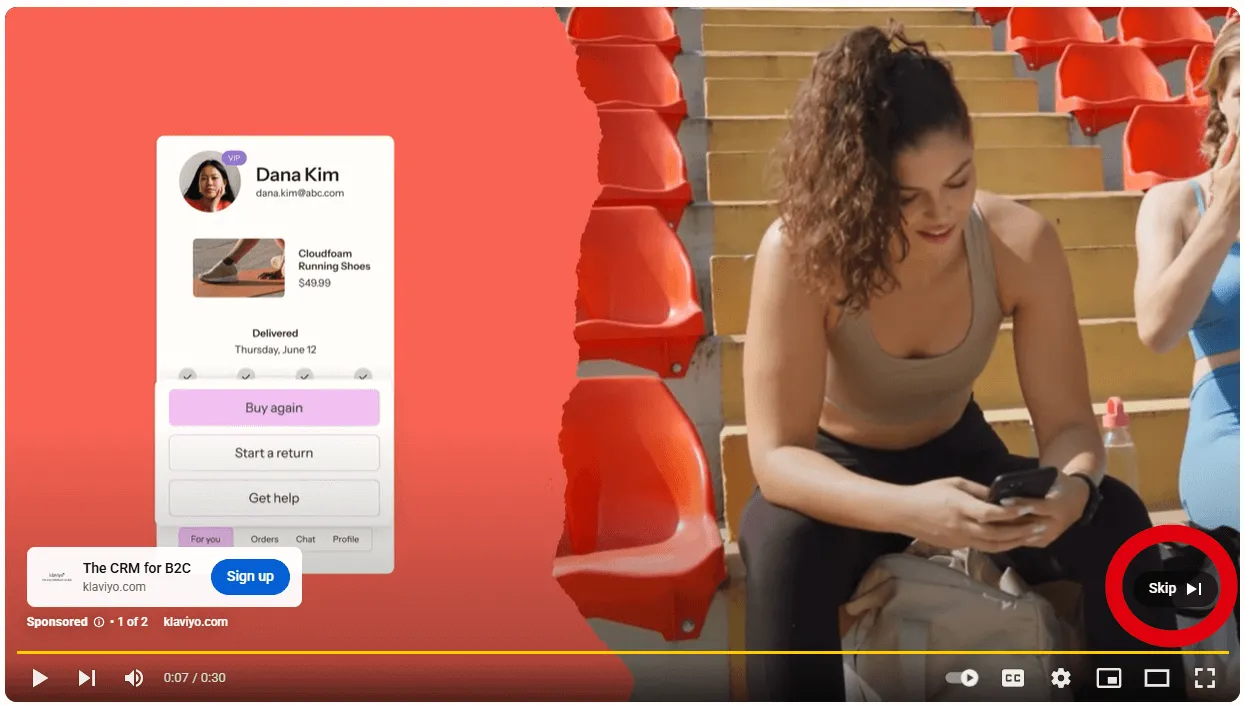
Play before, during, or after videos. After 5 seconds, viewers can skip the ad if they want.
An example of Skippable In-stream Ads. They are easily recognizable, as a “Skip” button appears on the bottom right corner a few seconds after the ad starts.
I’d recommend this type of ad for reaching a broad audience and driving action.
Remember that viewers can skip the ad after 5 seconds. This works well for both brand awareness and conversion goals.
Non-skippable In-stream Ads
These ads let you share your full message without interruptions. These are 15 seconds or less and can’t be skipped (annoying, right?! Well, yes if you are listening to your favorite song!).
You can also find these types of ads on CTV (Connected TV), and they typically last 30 seconds. You know those ads that pop up while you’re watching Netflix, YouTube on your TV, or streaming a movie on your favorite app? That’s CTV.
It’s video advertising delivered right to your television while you’re watching content through a smart TV, a Fire Stick, a Roku, a gaming console, or any other connected device.
Yep, even YouTube on your TV counts.
I’d recommend using these types of non-skippable ads if you want to ensure your full message gets across, especially when you need to make sure viewers watch your entire ad. I believe it is a great method for delivering a focused, impactful message without interruptions.
Bumper Ads
These are super short (6 seconds or less) and can’t be skipped. They’re great for building brand awareness with a quick, memorable message.
I would recommend using these ads for quick and memorable brand awareness.
In my opinion, you can use them when you want a super-short, 6-second ad that can’t be skipped. These are ideal for you if you are building brand recognition in a short time frame. Think of for example when you are running a TV campaign contemporarily – you can strengthen your TV efforts with these Bumper Ads, other YouTube type ads, or for example Spotify Ads.
In-feed Video Ads
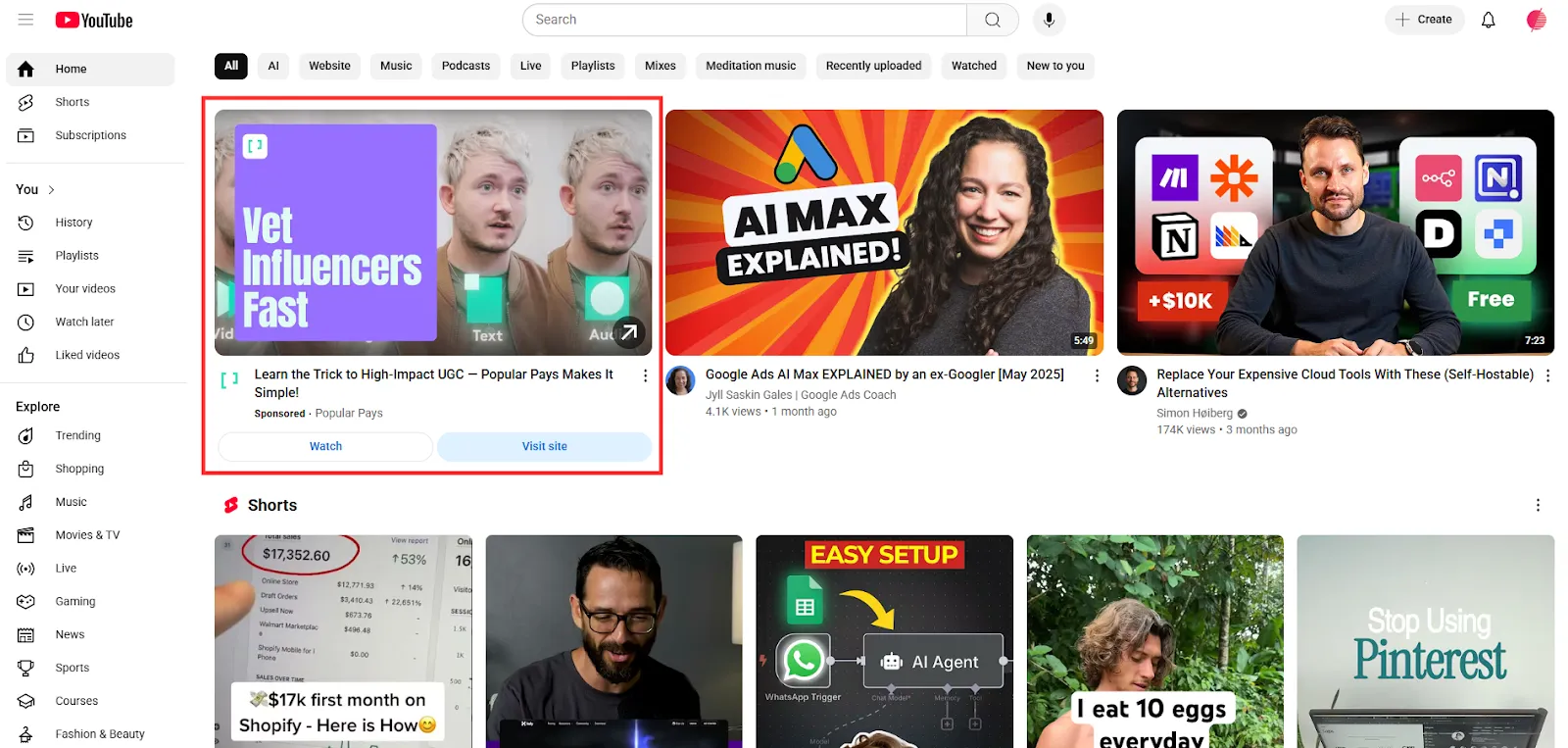
Show up on YouTube, reaching viewers when they’re discovering new content. When someone clicks on your ad thumbnail, it’ll play on their YouTube page.
In-feed video ads appear on your Youtube Home alongside organic videos.
I’d suggest you use it when you want your ad to appear alongside YouTube content, allowing viewers to click and watch more, but only if they’re interested. It is also great for engagement and driving more views.
Masthead Ads
Appear in the YouTube Home feed on all devices, giving you a big chance to showcase your brand. You can plan these ahead of time to get extra visibility and reach.
The only catch? Masthead Ads are reserved inventory, so you can’t just activate them through Google Ads’ self-service platform unfortunately. You need to contact a Google Rep to get more information, as well as a quote.
Costs depend on country/region, device, seasonality, length of reservation, and impression volume. And yes, they can easily cost in the tens and hundreds of thousands of euros.
I would recommend it for maximum visibility and reach. I’d suggest this to clients when they want to showcase their brand on YouTube’s homepage and gain massive exposure when you’re having a big product launch, or massive TV campaign, for example.
In summary: each format helps you connect with your audience in different ways, so you can choose the one that works best for your campaign goals!
Video Action Adsto Demand Gen
You know what video action ads are about, right? The video ads known for their great conversion rates? Did you know that these video ads will be automatically upgraded to Demand Gen starting in July 2025? Yes, that’s right, but it’s not necessarily a bad thing.
In case you were wondering what these are, here a brief description:
Instead of just showing a video ad and hoping someone remembers your brand later, video action ads add clickable elements like a headline, a CTA (call-to-action) button, and even a link to your website (under the video, of course).
They’re designed to encourage people to take action while they’re still watching or immediately after. These ads can show up in places like YouTube’s home feed, watch pages, and even across Google video partners.
The cool part? They’re skippable after 5 seconds, but that doesn’t mean they’re ineffective. In fact, you only pay when someone watches 30 seconds, the full video, or interacts with your ad (whichever comes first).
That means you’re not wasting money on people who aren’t interested. And because Google uses its powerful targeting tools, your ads are more likely to be shown to people who are already searching or watching content related to your offer.
What Are the Main KPIs to Look At?
On Skippable In-stream, you are charged in different ways:
CPV
With CPV (cost-per-view) bidding, you pay when a viewer watches your video for at least 30 seconds. If your video is shorter than 30 seconds, you pay when they watch the whole video. You also pay if they interact with the video.
The metric itself helps you find the average cost of each view. This lets you see how well your ads are doing, especially when views are the main goal.
CPV is most helpful when you compare it across different ads, ad groups, or campaigns. This way, you can see which ones work best with your budget. How do you calculate the average cost per view?
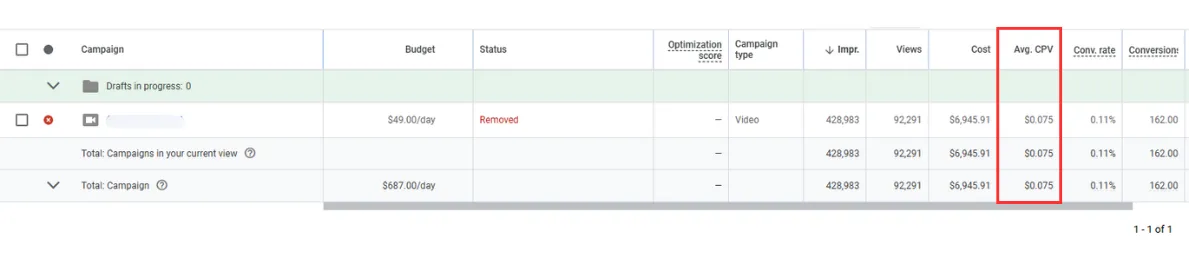
Average cost per view = cost/views
You can find Avg CPV of your campaign from the Google Ads interface at campaign-level.
You may ask yourself, “what’s a good CPV?”
In my opinion, a “good” CPV depends on things like your ad format, industry, and season. The best way to measure it is by comparing it to your past campaigns. If you have none, well, you need to test!
CPV shows you how much you’re paying for each view of your video ad. A low CPV means you’re getting more views for less money! It is great for maximizing reach without breaking the bank. If your CPV is high, you might need to refine your targeting or check if your video quality and content are up to par.
Impressions
With Target CPM, Target CPA, and Maximize conversions bidding, you pay based on impressions. These show how many people have seen your ad and how often they’re exposed to it. This can include views of your in-feed thumbnail, the start of your in-stream video, or the playback of your Shorts ad.
In-stream ad impressions are counted when your video plays. This can happen before, during, or after another video that a viewer is watching.
The main metric to consider is CPM, which stands for cost per thousand impressions. This is the amount you pay for 1,000 views of your ad. It’s a good way to see how many times your ad has been shown to potential viewers!
Jumping on Non-skippable in-stream ads and bumper ads: these use Target CPM bidding, so you pay based on impressions too.
CPM
The main metric to consider is CPM, which stands for cost per thousand impressions. This is the amount you pay for 1,000 views of your ad. An “impression” happens whenever your ad is shown to a viewer, even if they don’t interact with it.
When you set up a CPM bid, you’re paying for exposure, not for specific actions like clicks or views. It’s all about getting your ad in front of as many eyes as possible. If you’re focused on raising awareness and reaching a broad audience, CPM is a great option.
CPM = (Cost / Impressions) * 1000
Example: if you spend $100 and get 50,000 impressions, your CPM would be $2.
VTR
Another fundamental metric to look at is the VTR: this one’s a biggie! The View-Through Rate tells you how often viewers watch your video in its entirety.
I believe this is a good way to see how engaging your video is. If people watch all the way through, it means your content is connecting with them.
In my experience, a high VTR suggests that your video is engaging enough to hold attention. If your VTR is low, it may be time to rethink your video content or make it shorter and more direct.
Views
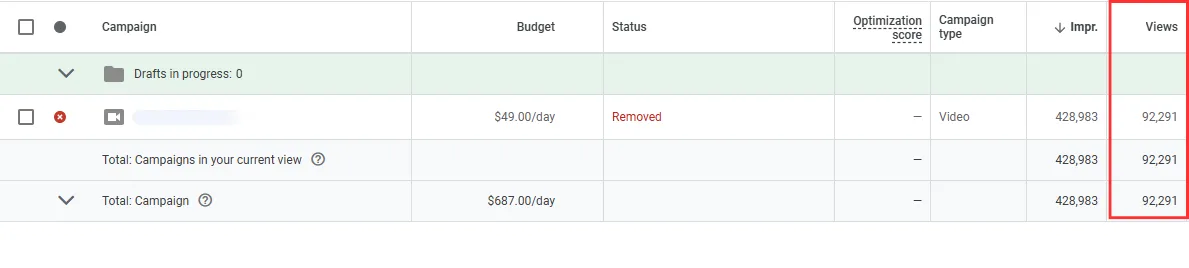
What about views? They indicate the number of times users watched. This helps you get a clearer sense of how interested viewers are. However, remember that Google Ads measures views differently depending on how long your ad is.
You can find the number of Views of your campaign from the Google Ads interface at campaign-level.
Reach
Reach means the total number of unique people who see your video ad at least once. It is important for brand exposure and brand awareness. The higher your reach, the more people know about your brand or message.
Frequency
Frequency refers to how many times the same person sees your video ad over a specific period. It helps you understand how often your ad is being shown to individual viewers.
According to my experience:
If this is too high, your audience may get annoyed or tired of the ad. This means they might stop paying attention or even ignore it.
If this is too low, your ad might not make enough impact, and people might not remember your brand or message.
CTR
CTR (click-through rate) measures how many people click on your ad after viewing it. If you’re running a video ad with a call-to-action (CTA) like “Shop Now” or “Learn More,” the CTR will tell you how effective that CTA is.
CTR helps you understand whether viewers are interested enough to take the next step after watching your video. If you’re not getting clicks, maybe your CTA needs a little more oomph or the video’s message isn’t clear enough.
Video Played To
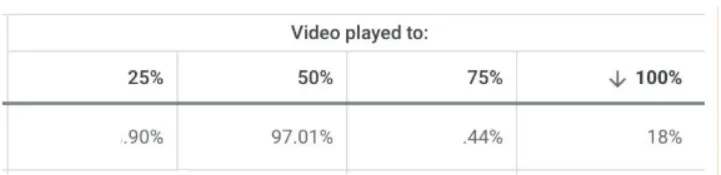
Another important metric is the Video Played To, which shows you how much of your video viewers are watching (25%, 50%, 75%, or 100%). By tracking these percentages, you can pinpoint where people lose interest and tweak your ads accordingly.
If you notice that many viewers drop off when the “Skip Ad” button appears, it’s a good idea to rethink your ad structure. Try testing stronger hooks or adding key information in the first 5 seconds to make sure your message is clear and catches attention early.
Video played to KPI as it appears on Google Ads. It is a percentage of how much of your video has been viewed by users.
Midsummer Case Study
At Midsummer, we’ve had the pleasure of working with several clients who are eager to raise their brand awareness.
One of our standout partnerships was with a U.S.-based e-commerce client in the haircare industry for which we created the video strategy. This brand focuses on hair biology and biotechnology. It has a fresh and youthful way of educating consumers, especially on TikTok. They’ve earned quite a following, educating consumers on the science behind healthy hair.
The challenge was to boost brand consideration in the US market during Q4. After looking at the client’s needs and the best platforms for the campaign, we chose YouTube.
YouTube is the second-largest search engine in the world, right after Google. It provides a great platform to connect with potential customers.
Before diving into the campaign, we conducted a thorough analysis to ensure we were targeting the right audience. Here’s how we approached it:
Google Ads History Analysis: We examined non-brand keywords, demographic data like age and gender, and audience segments.
GA4 History Analysis: We used Google Analytics 4 to look at all traffic sources. This gave us a complete view of our audience across different channels.
Collaboration with Google Rep: We worked closely with the Google representative to get additional insights and refine our strategy.
After looking at the audience and setting clear goals, we worked with the client. We estimated results and decided on a suitable budget for the campaign.
The campaign has delivered fantastic results, far exceeding expectations!
Here’s a quick snapshot of what we achieved:
→ 11 M+ Views: The campaign was seen by millions, helping to significantly raise brand awareness in the US.
→ 0.15% CTR: Our click-through rate showed strong engagement and attracted potential customers interested in the brand.
→ $4.88 CPM: With an impressive cost per thousand impressions (CPM), we were able to reach a wide audience efficiently.
→ 23.4 K+ Clicks: Over 23,000 clicks show that our audience was highly interested in what the brand had to offer.
→ 76.58% Video Plays at 75%: This high percentage shows how strong our content was.
→ 72.69% Engagement Rate: High engagement signals that our audience was not only watching but also interacting with the content.
→ $74.6K Invested: The campaign had strong support and a good budget. This helped us reach the right people at the right time.
In the end, the campaign was a resounding success. We focused on haircare science and used YouTube’s wide reach.
This helped us make the brand a top choice in the US market during an important time. The great results we achieved include millions of views, high engagement, and a strong CTR. This shows the power of using data-driven strategies with the right platform.
We love seeing our clients succeed. We look forward to helping brands grow in new and exciting ways.
Wrapping It Up: Tracking for Success
To truly maximize your video marketing ROI and audience engagement, it’s all about the right KPIs. Keep an eye on metrics to understand the effectiveness of your campaign(s).
Using these KPIs for video marketing helps you make decisions based on data. This can improve your video campaigns, target better, and increase performance.
Now go ahead, take these insights, and make your video marketing campaigns more effective than ever!
And don’t forget, Midsummer Agency is here to help. Do you need more information? Check out our PPC services or contact us directly!