Checkout is where the most revenue quietly disappears. Most stores lose more customers between “Add to Cart” and “Order Confirmed” than at any other stage of the funnel, and most of that loss is fixable without a redesign. You just need to find the exact step where people bail before you start changing things at random.
If you’re paying more for traffic every quarter and your conversion rate hasn’t moved, checkout is the cheapest place to look. This piece walks you through how to locate the specific step that’s leaking, which fixes to ship first, which ones to ignore, and what to measure once you’ve patched it. It is the diagnostic I actually run on Shopify stores, not a generic best-practices roundup.
The checkout funnel has four steps, and each one leaks differently
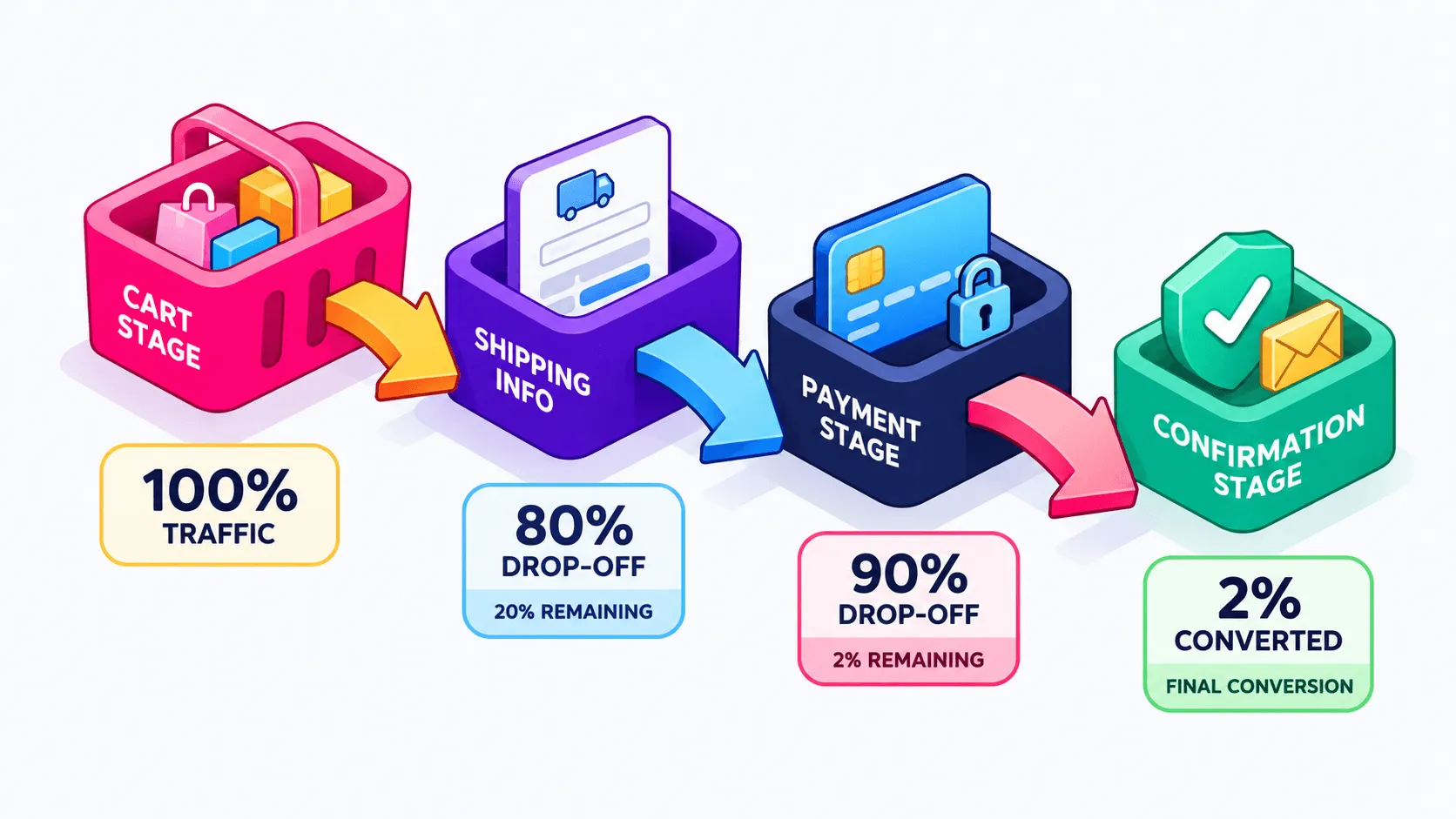
The most common mistake I see in client audits is treating checkout as a single number. Someone pulls “checkout conversion rate”, sees 45%, decides it’s bad, and starts redesigning the cart page. But checkout is four distinct stages: Cart, Shipping and Info, Payment, Confirmation. Each one has a different job, and each one fails in a different way.
A good checkout works like a current. It should pull the shopper from cart to confirmation without them noticing they’re moving. Friction at any stage is a rock just under the surface, invisible until someone hits it. When that happens, people don’t slow down; they get pushed sideways and out of the funnel entirely. Your job is to find the rock, not to repaint the boat.
Cart, info, payment, confirmation: what typically breaks at each stage
Cart: shipping cost anxiety (people can’t tell what the total will be), unclear return policy, no reason to keep going.
Shipping and info: too many required fields, forced account creation, no address autocomplete, mobile keyboards that fight the user.
Payment: their preferred method isn’t there, the discount code field misbehaves, or the page just doesn’t feel safe enough to hand over a card.
Confirmation: technical errors on submit, duplicate charges, or a thank you page that leaves people wondering if the order actually went through.
According to Baymard Institute, the average documented cart abandonment rate sits around 70%, and the abandonment concentrates in the middle of the flow rather than at the cart itself. That matches what I see in accounts: teams polish the cart page relentlessly while the actual leak is two steps later, sitting in a form nobody has opened in Clarity for six months.
How to actually find your leak
Guessing is expensive. I’ve seen teams ship a new checkout button color while a $12 shipping surprise was quietly killing 30% of their sessions at the payment step. Diagnosis before prescription, always. Before I touch a single element on a new client store, I open the funnel report.
What’s the biggest cause of checkout abandonment?
Unexpected extra costs, shipping, taxes and fees revealed too late in the process. Baymard’s own research puts this at the top of documented reasons for abandonment, with forced account creation close behind. If you fix nothing else this month, fix when and where your costs appear.
Building a checkout funnel exploration in GA4
Open GA4, go to Explore, and create a Funnel exploration. Add your four stages as steps using the checkout events Shopify sends: begin_checkout, add_shipping_info, add_payment_info, purchase. If GA4’s event structure and reporting interface still feel unfamiliar, our guide to web analytics covers the platform fundamentals before you dive into funnel exploration. Make it open (not closed) so you can see people who skip steps, set the breakdown to device category, and look at the completion rate between each step rather than the total.
You’re hunting for one number: the single worst step-to-step drop. Mobile almost always looks worse than desktop, so check that split before you conclude anything. If 70% of your sessions are mobile and your add_shipping_info to add_payment_info drop is 40 points, you’ve found your priority for the quarter.
Watching session recordings in Microsoft Clarity to see the “why” behind the drop
GA4 tells you where. It will never tell you why. That’s what Microsoft Clarity is for, and it’s free, so there’s no excuse. Filter recordings to sessions that hit your worst step and didn’t purchase, then watch ten of them back to back.
You’re looking for specific behaviors: rage clicks on a shipping field that won’t accept a postcode format, three failed attempts to apply a discount code, dead clicks on text that looks like a link but isn’t, or the cleanest signal of all, a user scrolling down, seeing the shipping total, and closing the tab. Ten recordings usually settle the argument faster than a month of internal debate.
The leaks worth fixing first (high-impact, low-effort)
Once you know where the drop is, here’s the stuff that moves the needle fast. These are the fixes I ship in the first two weeks of a CRO engagement, because they remove friction rather than decorate it.
Surprise costs shown too late
Put a shipping and tax estimate on the cart page, not on the payment page. Shopify gives you a shipping calculator on the cart, and most themes have it switched off or buried. If you offer free shipping above a threshold, show the gap in money (“You’re $18 away from free shipping”), not as a banner nobody reads. This is the fastest win on the list and I’ve implemented it more times than any other single change.
Forced account creation vs. guest checkout
Guest checkout should be the default. Offer account creation on the thank you page, after you have the money, framed around order tracking and faster reorders.
Element
Forced account creation
Guest checkout as default
Steps before payment
One extra screen plus email verification
Straight to shipping details
First-time buyer friction
High: commitment before trust exists
Low: transactional, no strings
Account data captured
Upfront, on fewer completed orders
Post-purchase, on more completed orders
Best fit
Wholesale, B2B, gated pricing
DTC fashion, beauty, lifestyle
Long forms, missing autofill and address validation
Count your required fields right now. Company name, second address line, phone number: half of them are optional in practice and required in your settings. Turn on address autocomplete, use the correct mobile input types so the numeric keyboard appears for postcodes and card numbers, and validate addresses inline instead of throwing an error after submit. The same friction principles that wreck a category page apply here, which is why our eCommerce navigation best practices read like a checkout audit with a different subject.
Limited payment options
Match payment methods to your AOV and your audience. Shop Pay is non-negotiable on Shopify because of the speed advantage for returning shoppers. PayPal still carries trust weight for older demographics. Buy now, pay later matters most on higher AOV fashion and beauty carts, where a $180 order feels different split into four payments. And check the order they appear in: the method your customers actually use should not be third in the list.
The leaks you can probably ignore (for now)
Button color. Micro-animations. Swapping “Complete order” for “Place order”. I’ve watched teams spend three sprints on this kind of thing while a broken discount code field sat untouched, which is peak “this is fine” energy while the room is on fire.
Here’s my rule of thumb: if a change doesn’t remove a step, remove a cost surprise, or remove a required field, it goes to the bottom of the list. Cosmetic tweaks aren’t wrong, they’re just low priority, and on a store doing $3M a year you have a finite number of things you can ship this quarter. Spend them on structure.
Shopify-specific fixes: what checkout extensibility actually lets you change
Generic checkout advice tends to ignore that you’re on a platform with rules. Shopify’s checkout is largely locked by design, and that’s mostly good news: it’s fast, it’s tested against enormous volume, and you can’t break it. What you can change now runs through checkout extensibility, which replaced the old checkout.liquid customizations and works through app blocks and UI extensions rather than raw code edits.
One-page checkout, Shop Pay, upsell slots
Shopify’s one-page checkout collapses information, shipping and payment into a single view, which removes exactly the step-to-step drops we were hunting in GA4. Shop Pay layers on top of that with saved details for returning shoppers, turning a two minute form into a couple of taps.
For upsells, extensibility gives you defined slots in checkout and on the post-purchase page. My honest take after doing this on a lot of stores: post-purchase offers are safer than in-checkout offers, because they can’t distract someone who has already decided to pay. Keep it to one relevant product, ideally a replenishable item or a small add-on to a seasonal drop, and resist installing four apps that each want their own slot. If you’re building out that side of things, our roundup of AI tools to increase average order value covers the options that don’t add bloat.
Heuristic audit vs. A/B testing: how to know which one you need
Here’s the part most CRO content skips. Running a proper A/B test on checkout requires conversions, not sessions, and a store doing 400 orders a month will spend six weeks producing a result that’s indistinguishable from noise. Testing without volume isn’t rigor, it’s theatre.
When you don’t have the traffic for testing
Do a heuristic audit and ship. That means the GA4 funnel for the where, Clarity recordings for the why, known best practices for the fix, then a clean before-and-after comparison over a stable period (same traffic mix, no big promo distorting the data). One change at a time so you can attribute the movement. It’s less elegant than a test, and for most $1M to $5M stores it’s the only honest option.
When you do have volume, what to test first
If you’re clearing enough monthly checkouts for VWO to reach significance in two to three weeks, test the structural things first: guest checkout as the default entry, payment method order, and where the shipping estimate appears. Don’t test six things simultaneously because you finally have traffic. CRO is a mindset, not a mandate to test everything with a pulse.
What to measure, and your checklist for this week
“Abandonment rate dropped” is not proof of anything. Abandonment moves with traffic quality, with promo periods, with how many people use the cart as a wishlist. Track checkout conversion rate (sessions that reach checkout and complete) and cart-to-purchase rate (add to cart sessions that end in an order) weekly, segmented by device, because that’s where your fix either worked or didn’t.
Then zoom out. A checkout fix should show up in blended efficiency, not only in funnel reports: same ad spend, more revenue, better MER. That’s the number your CFO and your media buyer both care about, and you can run it in a minute with our MER calculator. Vanity metrics don’t pay the bills.
Your checkout audit for this week
You don’t need a redesign. You need 90 minutes and the right reports open. If you want the wider context on how this fits into a proper optimization program, our guide to conversion rate optimization covers the full framework, and it’s worth pairing this with product page optimization since the two feed each other.
Run this, in order:
Build the GA4 funnel exploration with your four checkout steps and find the single worst drop, split by device.
Watch ten Clarity recordings of non-purchasing sessions that reached that step.
Check exactly where shipping cost first becomes visible, on mobile, as a first-time visitor.
Confirm guest checkout is the default and not hidden behind a link.
Count your required form fields and delete the ones you don’t act on.
Compare your payment methods against your AOV and your top two customer age brackets.
Fix one thing, log the date, and compare two clean weeks before and after.
Most of the time the leak is one specific step, not a broader problem with your whole checkout. Find that step before you touch anything else.
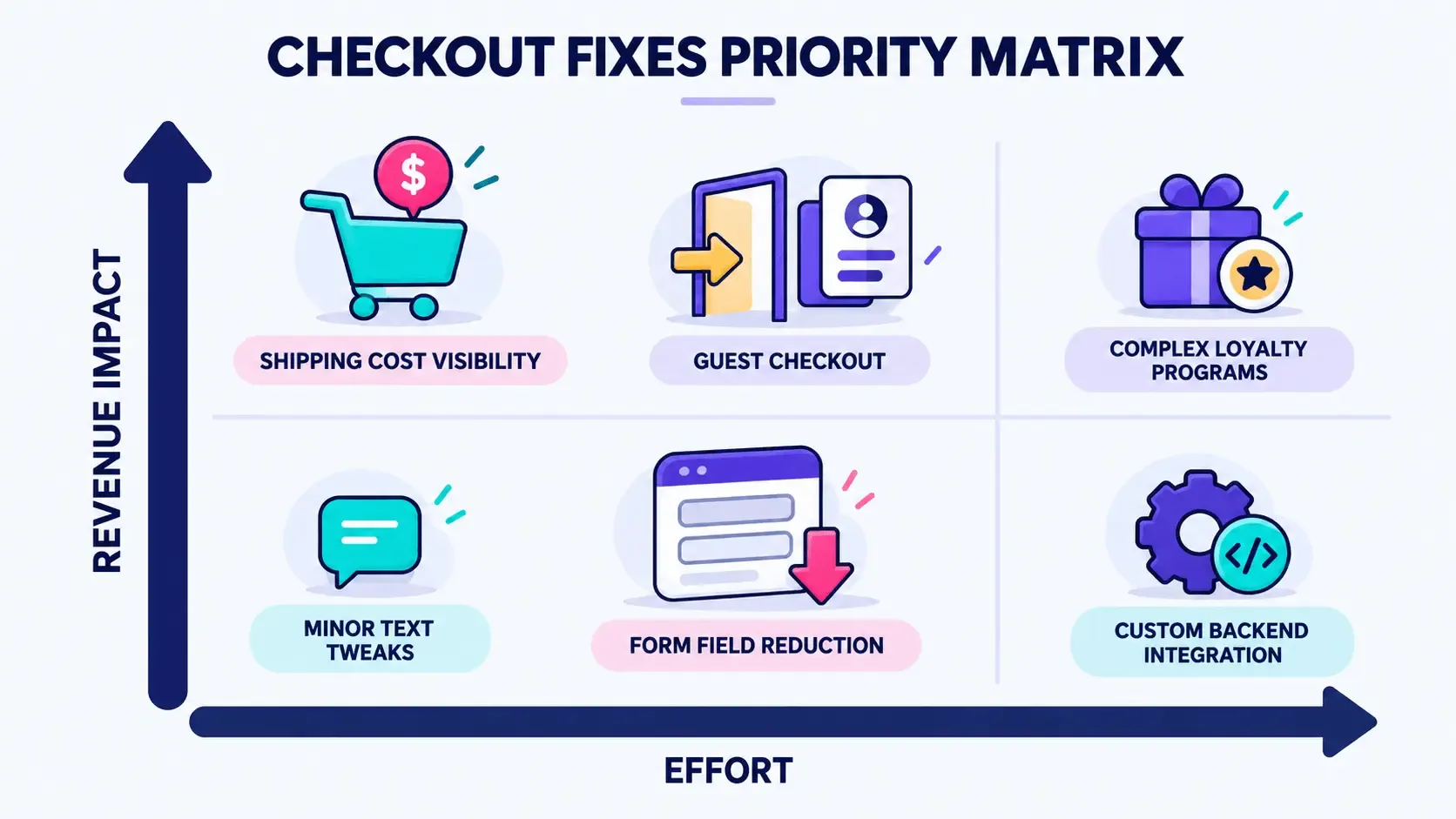
Want someone to run this audit for you instead? Take a look at our CRO services or ask for a checkout teardown. We’ll dig through your funnel data, watch the recordings you don’t have time to watch, and hand you a prioritized list of fixes ranked by effort and revenue impact.