

If you’re running an eCommerce business, you already know that – today more than ever – visibility is everything. The more people who find you when they search, the more traffic you get. The more traffic you get, the more you sell. It’s a simple equation, but getting it right is anything but simple.
Search engine visibility refers to how often and prominently your website appears in search results for relevant queries. It’s not just about ranking for one or two keywords, it’s about showing up wherever your audience is looking: traditional search results, featured snippets, “People Also Ask” boxes, and even new AI-powered results like Google’s AI Overviews.
So, how do you boost your visibility and stay ahead of the curve?
Here’s what I’ve seen work across eCommerce brands that scale – and keep scaling.
1. Perform a Technical Site Audit before anything else
Well.. the truth is you’ll likely want to run your technical site audit contemporarily with your keyword research. These two steps work hand in hand to give you a complete picture – helping you prioritize where to begin your SEO efforts.
A technical SEO audit is a structured evaluation of the behind-the-scenes elements that influence how well your site can be crawled, indexed, and understood by search engines. It ensures that your website meets modern SEO standards, is free of technical errors, and delivers a smooth experience for both users and search engines.
For ecommerce and content-heavy sites in particular, it’s crucial for identifying roadblocks that could prevent your pages from ranking – like;
- crawl errors
- slow load speeds
- poor mobile usability
- broken internal linking
When paired with keyword research, a technical audit helps you prioritize SEO activities based on the areas that most urgently need attention or have the biggest opportunity for growth.
These are some of the key activities you can consider when performing your technical site audit:
- Begin by verifying that Google Analytics and Google Search Console are correctly installed – these are your eyes into performance and indexing.
- Analyze your meta titles and meta descriptions – how are the click-through rates performing? If CTRs are below average, it likely means they aren’t aligning well with user intent or standing out in search results. Additionally, review bounce rates on those pages: a high bounce rate may indicate that even if users click, the content doesn’t meet their expectations. Both metrics offer valuable insight into how effectively you’re capturing and satisfying user intent.
- Use a crawler like Screaming Frog to scan the entire site for broken links, 4xx/5xx errors, missing metadata, and redirect chains. Screaming Frog is free but has a crawl limit of 500 pages + limited features. The paid version costs £199 per year and, in my opinion, is absolutely worth it.
- Check if your key pages are being indexed and aren’t blocked by robots.txt or noindex tags. I once audited a website after a migration and the full blog was, mistakenly, put to no-index!
- Confirm your sitemap is clean, complete, and submitted.
- Analyze Core Web Vitals and Time to First Byte in PageSpeed Insights to find load-time issues (more on this later).
- Manually review mobile usability, structured data, and image alt attributes.
- If you’re targeting multiple languages, test hreflang tags and confirm proper language-specific URLs are in place.
Once issues are identified, assign clear action items to your dev, content, and SEO teams to resolve them – from fixing crawl errors to improving site speed or implementing schema markup.
2. Start with keyword research (yes, still important)
Let’s get the basics out of the way: keyword research still matters – a lot.
Keyword research for low traffic ecommerce sites
If your site has low traffic and hasn’t yet had strong SEO investment, it’s smarter to focus on long-tail keywords like “leather boots for men winter 2025” rather than broad, competitive terms like “leather boots men.” Why?
Because long-tail keywords:
- Match high-intent searches;
- Are less competitive;
- Bring in more qualified traffic.
When someone searches a long-tail keyword, they know what they want. And if you’re the one offering it, you’ve got a much better chance of converting.
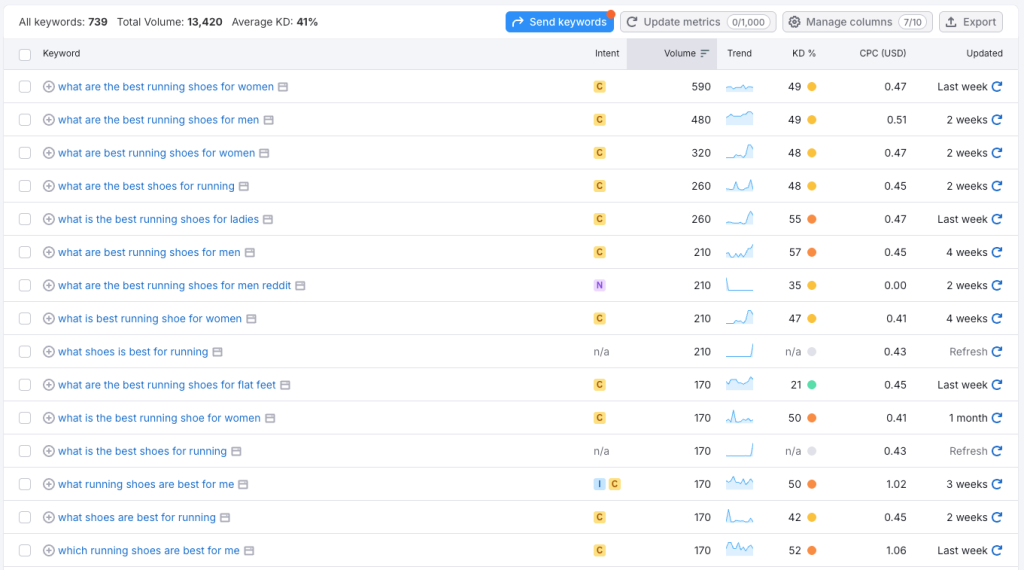
SemRush is a great tool to discover long-tail keywords
Keyword research for high traffic and complex ecommerce sites
Do you, on the other hand, already have strong traffic, quality backlinks, and a high authority score? Great – that means you’re in a good position to also target shorter, more competitive “main” keywords. For example, if you sell bread knives, you might go after terms like “bread knives” or “memory mattress” if that’s your product.
Start by identifying which product or category pages matter most to your business – based on revenue, traffic, or strategic importance. Then, research those keywords directly on Google:
- How are your competitors optimizing their pages?
- What can you do better?
Don’t stop at content. Improving your UX is just as important. That’s where SXO (Search Experience Optimization) comes in blending SEO with user experience for maximum visibility and engagement in search engine
Pro tip: don’t just stuff keywords into pages. Use tools like Search Console, Ahrefs, or Semrush to find what people actually search for – and map that to your product pages, category pages, and blog content. Also AnswerThePublic is great to get a feel of what users are searching for.
Reading it like this, keyword research might seem straightforward – and sure, it’s no rocket science – but there’s much more to it. I recommend checking out my full guide on building an SEO content strategy, where I not only go deeper into keyword research but also explore the broader strategic framework, complete with practical tips and actionable insights.
3. Fix what Google cares about: Core Web Vitals & Mobile Responsiveness
Google doesn’t just rank based on content – it ranks based on experience.
Your website can have amazing products and beautifully written content, but if it’s slow or clunky, Google won’t prioritize it. That’s where Core Web Vitals and mobile responsiveness come in. These aren’t just technical checkboxes, they directly impact how visible your website is in search.
What are Core Web Vitals?
Core Web Vitals are a set of performance metrics that measure real-world user experience on your website. As of now, Google focuses on 3:
- Largest Contentful Paint (LCP): Measures loading speed. LCP should happen within 2.5 seconds of when the page starts loading.
- First Input Delay (FID) (being replaced by INP – Interaction to Next Paint): Measures interactivity. Users should be able to click, tap, or scroll quickly—Google expects an input delay of less than 200ms.
- Cumulative Layout Shift (CLS): Measures visual stability. Pages shouldn’t jump around while loading. Your CLS score should stay under 0.1.
If your website fails in any of these areas, especially on mobile, Google will throttle your rankings – period.

In Google’s Dev Tools in Chrome you can check how responsive your site truly is.
This is the Google’s Pagespeed test, providing you detailed information about what you need to improve, and what is already working.
Why mobile responsiveness is non-negotiable
Over 60% of Google searches happen on mobile. That means your website must work flawlessly across screen sizes.
What does that look like?
- Fluid design: Your layout should automatically adapt to different devices.
- Tap targets: Buttons and links should be easy to press without zooming in.
- Font size: Text must be legible on smaller screens without needing to pinch or scroll sideways.
- No horizontal scrolling: Ever.
- Touch-friendly navigation: Menus, filters, and product selectors should be intuitive for fingers, not just mice.
If your website frustrates users on mobile, they’ll bounce – and so will your rankings.
In Google’s Dev Tools in Chrome you can check how responsive your site truly is.
How to diagnose & fix it
You don’t need to guess where you stand. Use these tools to assess and improve performance:
- Google PageSpeed Insights: Gives you Core Web Vitals scores and specific suggestions by page (mobile and desktop).
- Google Search Console > Core Web Vitals report: Shows how your entire site performs in the real world.
- Web.dev or Lighthouse: In-browser tools for performance audits.
- Chrome DevTools: Great for testing responsiveness and seeing how your site renders on different devices.
Once you’ve run the tests, prioritize the fixes. Some of the most common issues to fix are:
- Optimize images: Compress and serve them in next-gen formats (e.g., WebP). Compress and serve images in next-gen formats like WebP. Did you know that Shopify’s CDN automatically converts images to WebP or AVIF when supported, while falling back to PNG or JPEG for older browsers.
- Implement lazy loading: Only load images or sections when they come into view. In Shopify, many themes already support lazy loading. Look for existing loading=”lazy” attributes in your theme files to doublecheck if you’re doing this already.
- Minify and defer scripts: Don’t let JavaScript block rendering.
- Use a fast, reliable hosting provider: Especially one with CDN capabilities.Spending a little more often pays off.
- Upgrade your theme: If you’re using Shopify or WooCommerce and your theme is outdated or bloated, consider a leaner, SEO-optimized alternative.
Don’t treat this like a one-time project. Performance and mobile UX should be monitored regularly, especially after adding new apps, plugins, or third-party scripts.
4. Structure your website to make sense (for humans and bots)
Great websites are easy to navigate. Google thinks so, too.
That’s where Information Architecture (IA) and internal linking come in. Your category pages, product pages, and blog content should follow a clear, logical structure that helps both users and search engines move through your website.
A few things that make a difference:
- Keep your page depth shallow (ideally < 3 clicks from homepage);
- Use breadcrumb navigation;
- Internally link to high-value and related pages to guide authority flow;
- Avoid orphan pages (pages with no internal links).
Think of internal links like street signs. They help both users and Google figure out where to go next.

5. Get the right backlinks (quality > quantity)
If content is king, backlinks are the king’s PR team.
Google still uses backlinks to measure authority, but not all backlinks are created equal. A single link from a high-authority domain (like a respected publication or niche blog) can outweigh dozens from sketchy directories.
To build the right kind of links:
- Create shareable content: unique data, research, case studies;
- Pitch journalists, news and editorial websites;
- Build partnerships with influencers or vendors for link mentions;
- Get listed in niche directories or marketplaces (but stay away from low-quality ones).
What you don’t want: paid spammy links, irrelevant guest posts, or automated link-building schemes. These can hurt more than help. Be careful.

6. Optimize for humans (not just algorithms)
It’s tempting to write content with rankings in mind. After all, that’s the goal, right? But the truth is that Google rewards content that genuinely helps people, not content that simply checks SEO boxes.
So instead of cramming keywords or generating generic blog posts that “sound like SEO,” start by asking: what does my customer actually want to know? What would make their life easier, their search shorter, or their decision to buy a little quicker?
When your content answers real questions in a clear, structured, and engaging way, it doesn’t just perform better with users, it performs better in search. Google’s algorithm is smart enough to recognize value. And it’s even smarter about detecting fluff.
But here’s where things get more interesting: your content can (and should) do more than aim for the #1 result on a traditional SERP. Today’s search experience includes Featured Snippets, People Also Ask, AI Overviews, Image packs, and other evolving features that give users faster, richer answers.

To earn these placements, focus on:
- Answering common questions clearly and directly;
- Structuring content using headers, bullet points, and short paragraphs when needed;
- Including visuals that enhance understanding;
- Using natural language that aligns with how people actually search.
In other words, write like a human talking to another human. Organize like a librarian. And always keep in mind: you’re not just trying to rank, you’re trying to solve a problem faster and better than anyone else.
7. Monitor Search Engine Visibility like it’s a business metric (because it is)
If you’re only tracking rankings, you’re missing the bigger picture.
Search engine visibility isn’t just about being #1 for a few keywords. It’s about how often your brand appears in front of your target audience across all search experiences, and how that visibility translates into traffic, engagement, and ultimately revenue.
The good news? You don’t need fancy tools to start. Google Search Console is one of the most underused (and underrated) visibility tools out there. It tells you:
- Which queries bring impressions and clicks;
- Where your pages appear in the SERPs;
- How often you’re showing up in search features (like snippets or PAA);
- How your visibility is trending over time.
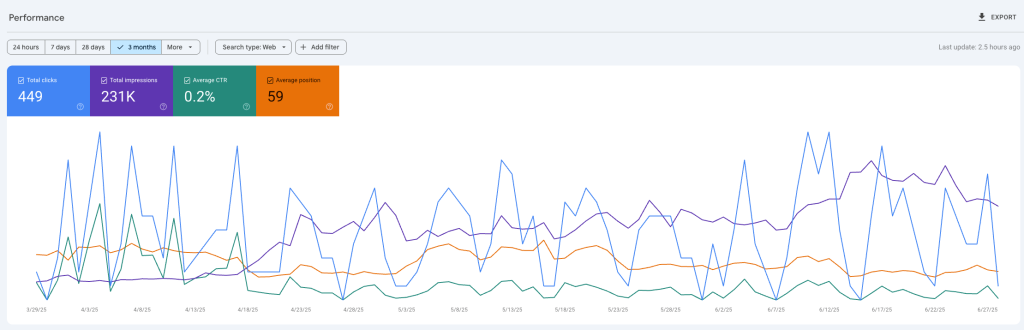
Search Console doesn’t just provide shiny graphs, it also gives insights on keywords, pages, countries, and much more.
From there, platforms like Semrush can add another layer, especially if you want to benchmark against competitors or monitor visibility across entire keyword clusters.
But the key here is: don’t just look at the data. Use it.
Think of visibility like your digital shelf space. The more you own, the easier it is for people to find you, trust you, and buy from you.
And like shelf space, it’s something you have to defend and grow consistently.
Final thoughts: visibility isn’t vanity
Search engine visibility isn’t about ego or “being first on Google.” It’s about getting in front of the right people at the right time.
If your content is useful, your site is fast, your structure is clean, and your links are solid, you will show up more. And showing up more means selling more.
This isn’t about quick wins or hacks. It’s about playing the long game and playing it well.
Want to go deeper? Let’s chat. Midsummer Agency helps eCommerce brands like yours grow visibility, traffic, and revenue, with a seo strategy that’s actually built to scale.