Alright, let’s talk marketing automation! It’s not just a buzzword – it’s your key to staying efficient, scaling fast, and ensuring your brand keeps ahead of…
Alright, let’s talk marketing automation! It’s not just a buzzword – it’s your key to staying efficient, scaling fast, and ensuring your brand keeps ahead of the competition. If you’re running a direct-to-consumer brand, you’re likely juggling a lot of tasks: managing ads, responding to customer inquiries, and constantly keeping track of your inventory.
But what if I told you that you could automate some of these tedious tasks and free up your time to focus on what matters?
I’ve seen firsthand how powerful marketing automation platforms can be, especially when talking about Make and Zapier. These two tools help you automate everything from lead management to social media content creation. And trust me, once you start using them, you’ll wonder how you ever got by without them. In this post, I’ll walk you through 5(+1) marketing automation ideas you can implement today to optimize business operations.
⚠️ This is our first post on the topic!If you find it useful, let us know on LinkedIn! We’ve got plenty more ideas in the pipeline, but couldn’t squeeze everything into one single blog post.
Why Marketing Automation Ideas Can Save You Time, Money, and Headaches
If you’re in the lead generation business, you know that every minute counts. But you also know that some tasks, like sending follow-up emails, managing leads, and creating social media posts, are necessary but time-consuming. Without automation, these tasks can easily become overwhelming, especially when you’re scaling your business.
What I’ve learned over the years is that automation is not just a luxury; it’s essential for growing. With the right tools, like Make and Zapier, you can streamline your marketing workflows, reduce human error, and increase efficiency. And the best part? Once you set it up, these systems practically run themselves, allowing you to focus on strategy and creative growth (the funniest part, I’d say!).
What is Make/Zapier? And How They Can Supercharge Your Marketing Efforts
Before we dive into the automation ideas, let’s quickly break down what Make and Zapier are, and why they’re essential for marketing automation.
Zapier: This tool is simple and user-friendly, designed to help you connect apps and automate workflows. It’s perfect if you’re looking for straightforward integrations that don’t require a ton of setup.
Make (formerly Integromat): Make offers complex workflows and great flexibility. It’s ideal for businesses that want to automate more intricate processes, like advanced data handling or multi-step workflows.
These marketing automation tools allow you to link different apps together, like your e-commerce platform (Shopify, WooCommerce) with your email marketing tool (Klaviyo, Mailchimp), or your social media scheduler (Hootsuite, Buffer). This means no more manual copying and pasting – your apps work together automatically.
If you’re wondering what the Midsummer Agency team is using, it’s Make, but since day one in the company I’ve always said that Zapier is my number one choice.
That said, Make is doing a great job, and we’re automating pretty much everything. Now, it’s more a matter of what really needs to be automated and what doesn’t.
(I love creating images like this with ChatGPT)
What Can You Automate with these Tools?
I wouldn’t say “everything”, but most of the tools are already integrated. So it’s more something related to your creativity, rather than the tool’s limit.
But let’s spark your creativity with some out-of-the-box ideas!
Marketing Automation Idea #1: Import Third-Party Conversions into Google Ads
Tracking conversions across platforms is critical, but it often becomes a real headache when tools don’t integrate smoothly. Setting up native conversion tracking for platforms like Google Ads is usually straightforward, but things get trickier when conversions happen offline or through tools that don’t speak directly to each other – like your CRM.
For example, if a deal is closed in HubSpot or Salesforce, and you want to send that value back to Google Ads for better attribution, you’re often forced to rely on manual uploads or workarounds. That’s where automation makes a huge difference: using tools like Make or Zapier, you can automatically trigger a conversion upload when the lead actually converts, feeding Google Ads with real business outcomes instead of just form submissions.
Here’s a simple solution:
Set up Zapier or Make to import third-party conversions (like from affiliate platforms) into Google Ads.
Make sure the GCLID (Google Click Identifier) is passed along with the data.
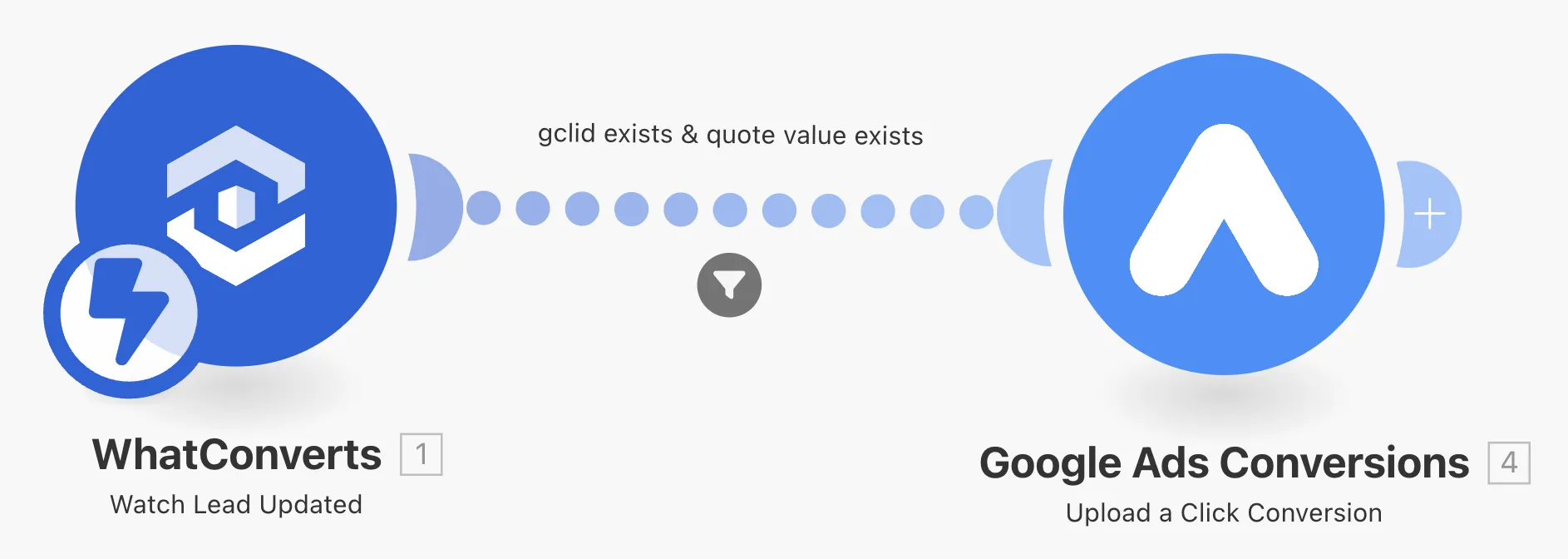
Yep, it’s as easy as that. For a recent campaign, we integrated WhatConverts (which tracks call leads and works as a CRM too) with Google Ads using Make. This automation allowed us to send quote_sent conversions along with the GCLID and enhanced conversion parameters, ensuring accurate tracking and performance insights.
Marketing Automation Idea #2: Use a Chatbot to Send Conversions to HubSpot and Update Deals Automatically
Manually updating deals and sales pipelines in your CRM system can be slow and error-prone. Moreover, human work usually doesn’t provide more value than automation. In that case, why not automate it?
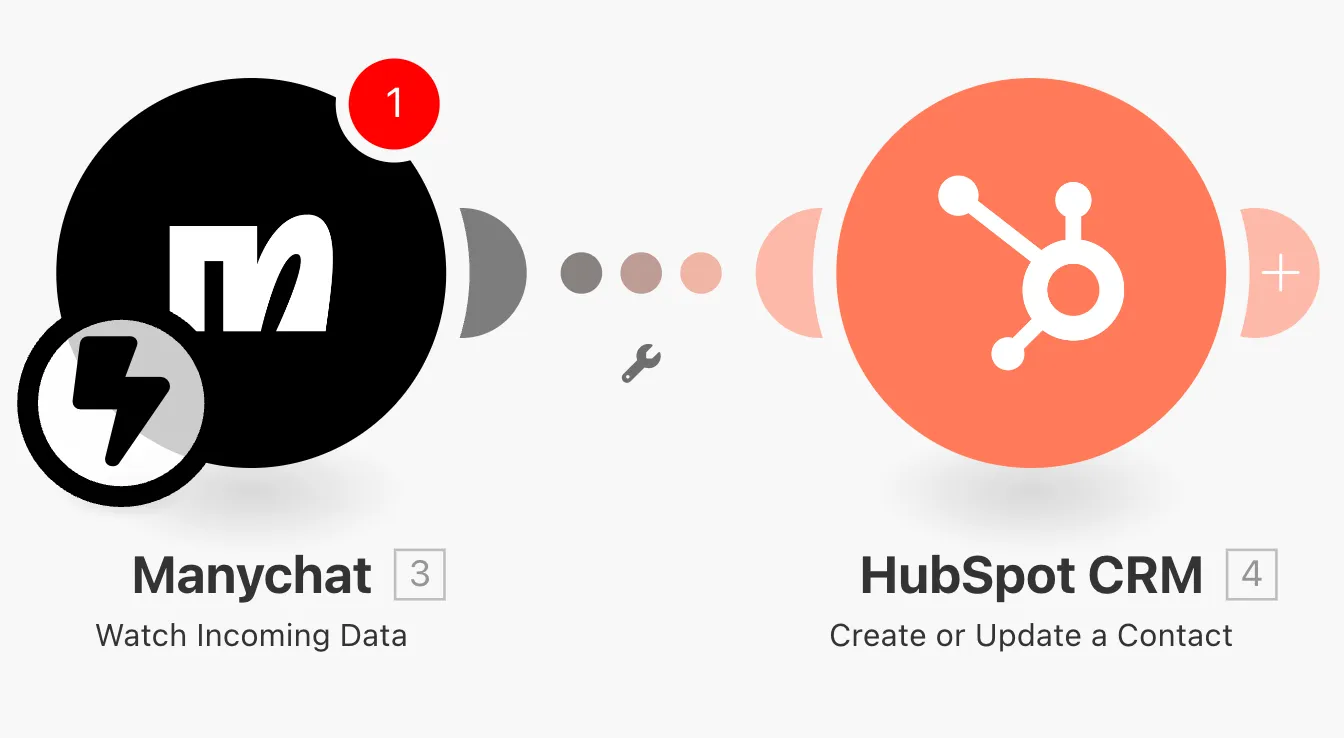
Imagine this: you have a chatbot on your website that captures leads in real-time. Instead of sending the information via email and manually entering the data, you can use Make or Zapier to automatically send the chatbot’s data to HubSpot, updating deals and relevant fields in real-time. This is as easy as valuable. Even if you gain 1 minute per lead, it means 200 minutes per month, if you get 200 leads.
How to Set It Up:
Set up a chatbot (e.g., WhatsApp or Facebook Messenger) to capture lead data.
If you use tools like Chatfuel or Manychat, they integrate with Make and Zapier. In this case, you just need to select the specific block to send the user’s data to the CRM.
If you’re not using a tool that integrates with those platforms, you can send an API request to send the data to them. It’s just more technical, but not that much difficult with GPT’s help.
You can also set up follow-ups and automatic emails in the CRM, based on the lead status, to automate it even further.
This kind of automation means no more double work or data entry – the moment someone interacts with your chatbot, all relevant details are sent straight to your CRM and your sales pipeline is updated instantly. You can also set up steps to track how many interactions the user had – for example, by creating a label in HubSpot called “Chatbot Step” and sending a value based on the user’s progress through the chatbot, such as “Quote requested”, “Chat started but stopped”, and so on.
This can help you set up automated follow-ups or notify the sales team when action is needed.
Marketing Automation Idea #3: Activate Email Marketing or Chatbot Sequences After Lead Capture
Once you capture a lead, timing is everything. You need to engage them quickly and make the customer journey as fast as you can, but manually triggering email campaigns or chatbot messages can lead to delays and missed opportunities. That’s where automation saves the day.
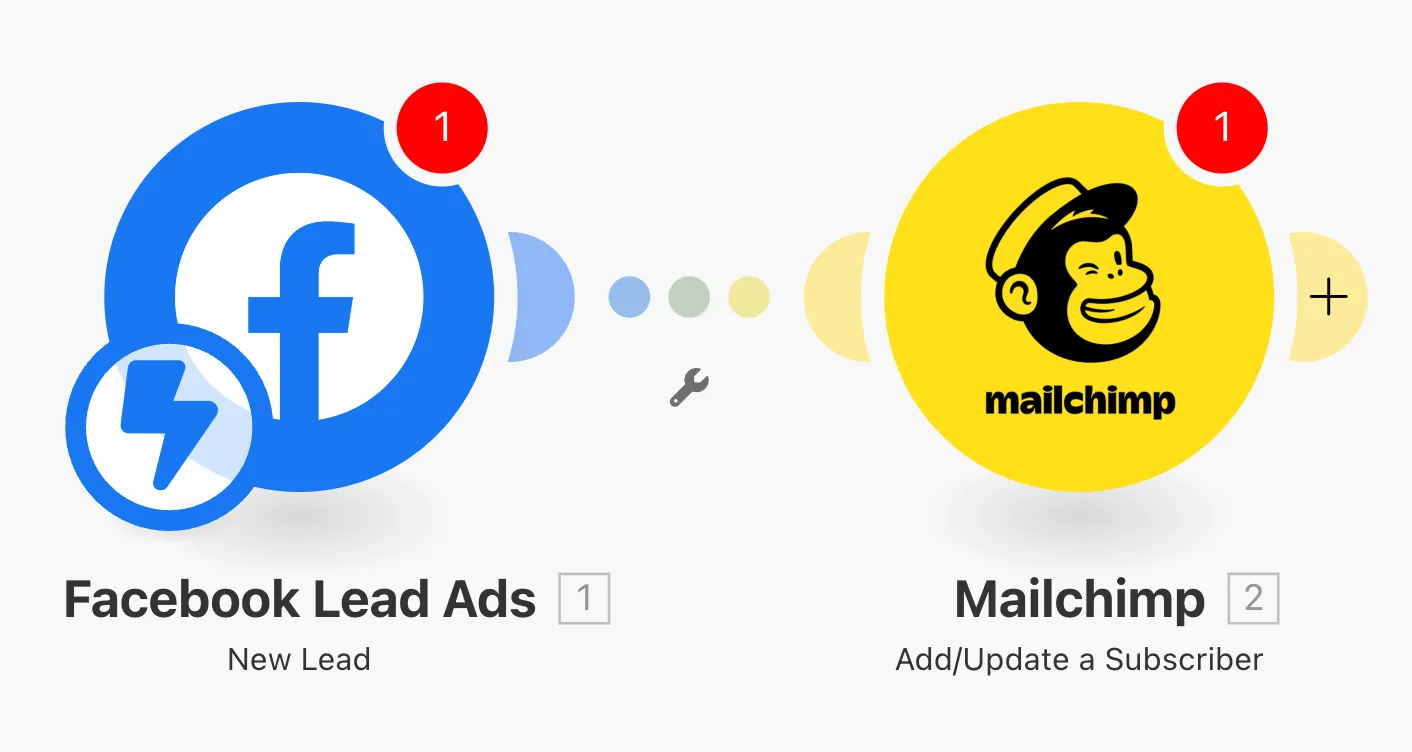
Most of the tools, like Mailchimp, already provide native forms that let you automate this easily, no need for Zapier or Make. That should always be your first choice, unless you need to process or enrich user info before sending it to the platform.
Once a lead fills out the form, use Zapier or Make to trigger an email marketing sequence (via Klaviyo, Mailchimp, etc.) or a chatbot sequence.
Whether it’s an automated welcome email or a product recommendation sequence, this ensures your leads are nurtured without you lifting a finger.
**How we did that:**We set up a lead generation campaign on Meta with a lead form and used Zapier to send a WhatsApp chatbot message to the user. We asked for more information to qualify the lead, and only those who responded with the requested data were passed along to the sales team. The responses were automatically logged into HubSpot, making it easy for the team to prioritize high-quality leads without manually checking the chatbot.
The sales team’s conversion rate skyrocketed, while the costs were pretty much the same, compared to the classic Lead Form + Sales call!
Marketing Automation Idea #4: Automatically Create Social Media Carousels
Uh, this is a nice one from my colleague Andrea! Creating engaging social media content doesn’t have to take up all your time. With automation, you can generate dynamic content that engages your audience with minimal effort.
Here’s how:
Use Make or Zapier to pull content (like product images or blog posts) from your e-commerce platform or content management system.
Leverage tools like GPT to generate content from them.
Automatically format this content into a carousel using a design tool like Canva or directly within a social media management platform.
Schedule it to post across your social media platforms.
**How we did that:
**We created a form where users submit their post ideas. Using Make, we sent the idea to GPT, which generated 7-12 carousel page contents. The post content was automatically transferred to Google Slides, formatted using a template, and then sent to Canva for the final touches. This streamlined the content creation process and ensured posts were ready for publishing very quickly.
Marketing Automation Idea #5: Notify Suppliers for Product Replenishment When Inventory is Low
Managing stock levels is a vital part of e-commerce, and nothing can hurt your brand more than running out of popular items. I’ve seen how automating inventory alerts can make a huge difference.
Set up an inventory threshold within your e-commerce platform (Shopify or WooCommerce).
Integrate your e-commerce platform with Slack or email tools via Make or Zapier.
Set up triggers to notify your suppliers automatically when stock levels are low.
**Note:**Supplier integrations may vary, and not all suppliers may be able to support such automation, so it’s important to verify compatibility.
Marketing Automation Idea #6 (Bonus): Automate Lead Analysis PDF (Free and No Make/Zapier Required)
What if you have a quiz or form on your website designed to qualify leads? Instead of manually reviewing each lead and generating custom reports, you can automate the entire process. Here’s how:
Set up a Google Form to capture lead information (e.g., questions about their business, challenges, and goals).
Send the form responses directly to Google Sheets so that you can track and analyze the data automatically.
Assign in Google Sheet a value to each answer based on a predefined scoring system (1-10). This way, you can rank leads automatically based on their responses.
Automatically generate personalized reports using Google Data Studio. With the data in Google Sheets, Google Data Studio will update in real-time, giving you an analysis of each lead and turning that data into actionable insights. You can send these as PDFs to each lead instantly.
I’ve used this process in the past for a lead generation client who wanted to send personalized marketing analyses to new leads.
Here’s what I did: after the leads submitted their responses, the answers were automatically assigned a score based on their relevance and potential. I then used Google Data Studio to generate an in-depth marketing analysis that evaluated their brand’s strengths and weaknesses. The best part? I was able to send this personalized report directly to each lead within minutes, without any manual work.
This kind of automation not only streamlined the internal workflow, but also improved the lead experience.
Tips to Get the Most Out of Make and Zapier
When you’re first starting with marketing automation, the idea of setting up complex workflows can be overwhelming. But trust me, with a bit of patience and the right approach, you’ll be automating like a pro in no time. Here are some tips to get the most out of Make and Zapier.
1. Start Small and Scale Gradually
Tip: Master one task before moving to the next, and if a flow becomes too long or complicated, split it into smaller, easier-to-manage workflows for easier debugging.
When you’re getting started with automation, the key is to build incrementally. Start with one simple step – something you can easily set up and test. For example, begin by automating your lead capture: set up a Zap to send form submissions directly to your CRM or email marketing tool.
Once that’s up and running smoothly, you can gradually add more steps to the flow. But instead of trying to create a long, complex workflow right away, focus on adding one step at a time and ensuring each one works perfectly before expanding further. If the workflow starts to get too complicated, break it down into smaller, more manageable flows. This approach makes debugging much easier and ensures that everything runs smoothly without overloading the system.
2. Use Pre-Built Templates to Save Time
Tip: Browse the template library before creating your own workflow. It can save you hours of setup time.
Both Make and Zapier offer pre-built templates that you can customize for your needs. These templates are a great starting point if you’re new to the tools, as they give you an idea of how common workflows are set up. You can then tweak the templates to suit your specific business processes.
3. Focus on Integrating Core Apps First
Tip: Connect the most used apps (e.g., Shopify, Mailchimp, HubSpot) first, and prioritize automation between them. Once you’ve mastered these, you can add more integrations.
To get started, focus on integrating the apps you use the most – such as your e-commerce platform, email marketing tool, CRM, and analytics platforms. This way, you can ensure that the most important systems are connected, which allows for smoother data flow across platforms.
4. Monitor and Optimize Your Automations Regularly
Tip: Set a reminder to check your automations weekly or monthly, so you can catch and fix any issues before they become problems.
Trust me, even though automation can run on autopilot, it’s essential to monitor your workflows regularly. Check the logs to ensure everything is running smoothly, especially as you add new steps or apps. Zapier and Make both have monitoring tools that show you exactly what’s happening in real-time.
5. Test Before You Go Live
Tip: Before making an automation live, run it in test mode and review the results. Catching issues early can save you hours of troubleshooting later.
Always test your automations before going live with them. Both Make and Zapier allow you to test your workflows to ensure everything runs as expected. This is especially important for complex automations that involve multiple steps, as even a small error can cause your process to fail.
Sometimes you’ll think, _“I’ve done this automation hundreds of times, I don’t need to test it again.”_And that’s exactly when a tiny piece of the puzzle suddenly breaks.
Lesson learned: test even when you think you don’t need to.
6. Don’t Be Afraid to Experiment
Tip: Start with a small experiment that automates a single task, then build on that success. Don’t be afraid to play around and test new ideas.
Automation tools like Make and Zapier are incredibly flexible, so don’t be afraid to experiment. Try different workflows, test different apps, and see what works best for your specific needs. You can always tweak and optimize automations as you go. The more you experiment, the more you’ll learn about how to streamline your processes.
FAQs about Marketing Automation with Make/Zapier
What Are the Pricing Models and Limitations of Zapier and Make?
Both Zapier and Make are powerful, but they come with different pricing models and limitations based on your usage:
Zapier: Pricing is task-based. The free plan offers 100 tasks/month, and paid plans start at $19.99/month for 750 tasks. You may also face limits on multi-step workflows or premium apps depending on your plan.
Make: Operations-based pricing. The free plan offers 1,000 operations/month. Paid plans start at $9/month for 10,000 operations. While cheaper than Zapier, costs can increase quickly if your workflows involve multiple actions (each action counts as an operation). It’s best suited for users who need more flexibility but are comfortable managing operations.
How Do I Choose Between Make and Zapier?
Zapier is ideal if you’re looking for simplicity and don’t need complex workflows. It’s perfect for smaller automations but can get expensive with growth.
Make offers greater flexibility and customization, especially for multi-step processes. It’s more affordable for smaller tasks but can get costly if your scenarios involve numerous operations.
Can I Use Make and Zapier Together?
Yes, you can use both platforms in tandem. For instance, you might use Zapier to handle simple tasks like adding new leads to your CRM and Make to manage more complex workflows, such as sending personalized follow-up emails based on user behavior.
If you’re a beginner, I suggest you choose one platform and go for it, most of the time it will be enough.
Final Thoughts
I hope these 6 automation ideas gave you a good starting point to streamline your marketing efforts. Whether you’re saving time with automated lead capture or making your follow-ups smarter, these tools can really help you work more efficiently.
If you’ve got other automation ideas that have worked well for you, feel free to reach out to me on LinkedIn! I’d love to chat, share feedback, and learn from each other.